Content Updates for WordPress—fast, on‑brand, and safe
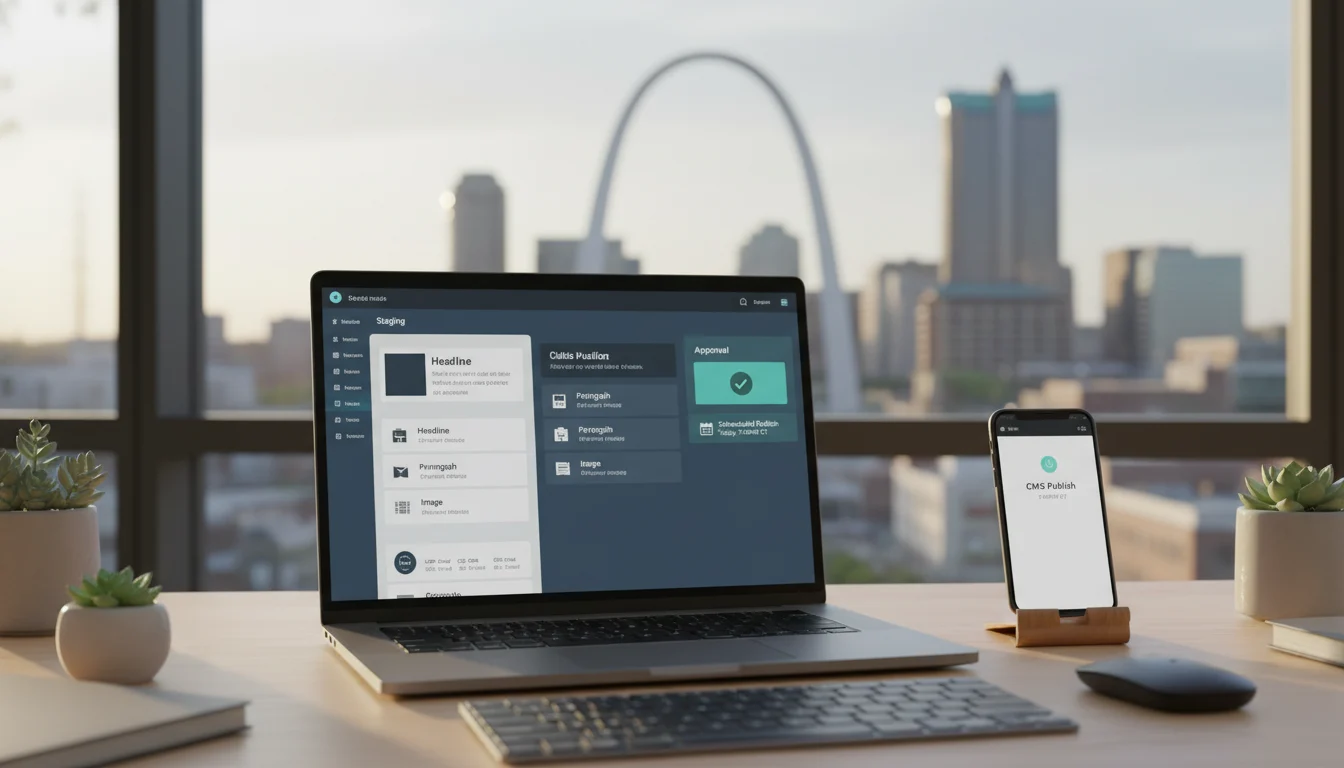
Need WordPress updates done right and done fast? With STL CodeScape, you’ll get accurate, on‑brand changes without the stress. Send us your update list, a Figma/file link, or even rough notes—we’ll turn it into polished, production‑ready work. Everything’s backed by a clear staging, approval, and scheduled‑release workflow, so you always know what’s happening and when. Ready to move? Request a quick estimate and we’ll get your first batch in motion.
Whether you’re a business owner or marketer who needs reliable help, or a branding/creative agency looking for a flexible development partner, we’re ready. Our St. Louis–based team plugs into your process and keeps your site moving—one‑off updates or ongoing support. Prefer to meet first? Book a quick 15‑minute intro to confirm fit and timelines.
Expect predictable timing: same day for micro edits when possible, usually 1–2 business days for multi‑page changes. If it’s urgent, let us know and we’ll prioritize. You’ll get a private staging link for review, clear approvals, timed publishing to match your campaign, and post‑publish checks across devices. We document every change, run quick performance and accessibility checks, and keep a clean rollback path so updates are safe and measurable.
Next, here’s exactly what we can update.
What we update
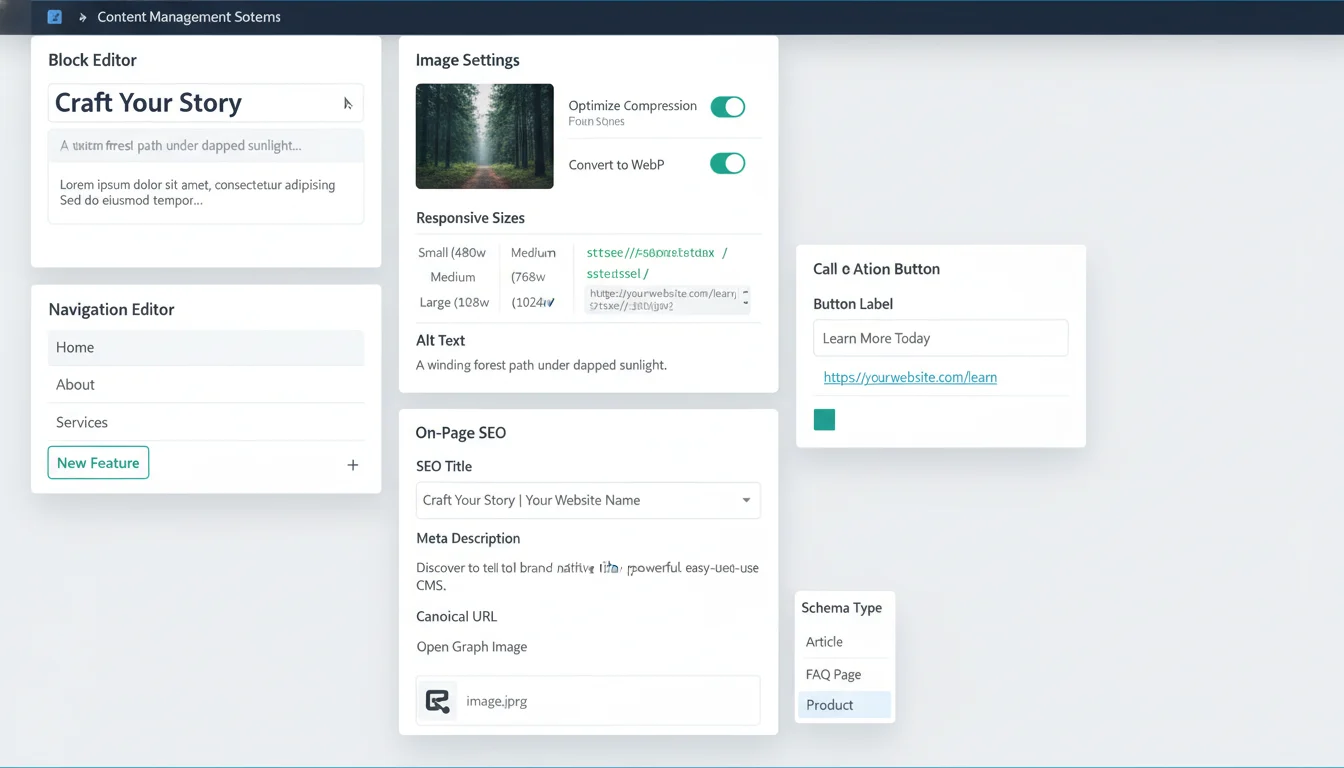
We handle everyday edits that keep your WordPress site accurate, fast, and on brand—using your existing blocks and templates without adding bloat. Send us the to‑do list you’ve been sitting on; we’ll make clean, reliable updates and keep your design system intact. Not sure if something fits? Ask—if it’s within your current components, it’s likely included.
- Text edits and on‑brand copy placement (headlines, body, FAQs, microcopy). We place approved content in the right fields (Gutenberg, ACF, custom fields) and keep spacing, hierarchy, and tone consistent across pages, popups, and system messages—just send the copy and we’ll handle the rest.
- Images and media: swaps, compression, responsive sizes, and alt text. We convert and optimize (WebP/AVIF where supported), set correct srcset sizes, enable lazy loading, add meaningful alt text and captions, and tidy media library usage so pages stay snappy and accessible.
- New pages or sections from existing components (no new templates). We assemble new layouts, clone patterns, and keep typography and spacing consistent using your established blocks/components—perfect for quick campaigns or landing pages without new dev. Need a new block or template later? See our Custom WordPress Theme Development.
- Navigation, internal links, CTAs, buttons, and footers. We update menus and mega menus, fix or add links, refine CTA copy/placement, maintain button states, and keep footers accurate (locations, hours, policies) to reduce friction and boost conversions. Curious about our conversion lens? Here’s our take on UX and conversion‑focused design.
- Downloadable files and light form tweaks. We replace or add PDFs/specs and handle non‑structural form changes (labels, field order, options, confirmation/notification copy). Complex workflows or new integrations are scoped separately—share your goals and we’ll advise the best path.
- Blog/news posts. We format posts, apply categories/tags, set featured images/excerpts, add internal links, and schedule publishing. Drop your draft (Doc/Google link) and we’ll prep, stage, and queue it for approval.
- Product/service details (non‑ecommerce structural changes). We refresh feature lists, pricing, tables, images, and specs using existing components. For WooCommerce, we handle copy/media/attributes—not new product types or custom checkout flows—so your catalog stays accurate without surprises.
- On‑page SEO touches. We adjust titles/meta, fine‑tune headings, add or update schema where applicable (Article, FAQ, Organization, Product), set canonical/robots directives, update Open Graph/Twitter cards, and manage slugs/redirects to protect rankings—and can coordinate with your SEO team. Running a local business? See our note on local SEO optimization.
- Small UI elements using your theme components. We add or edit accordions, tabs, cards, badges, and notices while preserving accessibility (ARIA, focus states) and performance.
All updates happen inside your custom WordPress setup (Gutenberg, ACF, custom post types) and existing design system, so performance, accessibility, and brand consistency stay intact. Have a backlog or a one‑off task? Send it over for a quick estimate—or book a short call and we’ll map the fastest path to done. Next: why timely, precise updates improve SEO, conversions, and trust, and how we make that reliable.
Why frequent updates matter
Purposeful edits do more than keep things current. They build visibility, conversions, trust, and team efficiency. If you’d rather not babysit the site, we can plan, write, and ship those updates for you—on a simple monthly cadence or as‑needed tune‑ups.
- Freshness for search and stronger topical coverage: Search engines revisit and reward sites that change with intent. Updating copy, adding internal links, publishing FAQs and case notes, and tightening schema/meta send clear freshness signals and broaden topical coverage. That helps capture long‑tail queries, earn richer snippets, and hold rankings as your offerings evolve. Want quick, targeted wins? Ask us for a lightweight “freshness snapshot” and priority update list—or pair updates with our AI Content Creation for net‑new posts that ship fast.
- Conversion and UX gains from clearer offers and CTAs: Small tweaks add up. Sharper headlines, clarified pricing or inclusions, tighter CTAs, refined form labels, and visible trust elements reduce friction and raise conversions, especially when aligned with current campaigns or seasonal promos using your existing components. Ready for fast improvements? We’ll review your top pages and recommend three testable changes you can launch this week. Learn more about our conversion‑focused approach.
- Accuracy and compliance (hours, pricing, policies, accessibility text): Out‑of‑date hours, pricing, service areas, or policies erode trust and can create risk. We keep legal pages current, sync seasonal hours, and maintain accessibility text (alt text, captions, link labels) so your site stays accurate, WCAG‑aware, and consistent. Need peace of mind? Book a quick policy and accessibility sweep.
- Lower support load via better FAQs and resources: Clear FAQs, help articles, troubleshooting steps, and downloadable guides cut repeat tickets and calls. These pages often rank for high‑intent searches and can feed AI/chatbot answers if you use them. Considering automation for common questions? Explore our Custom AI Chatbot Setup.
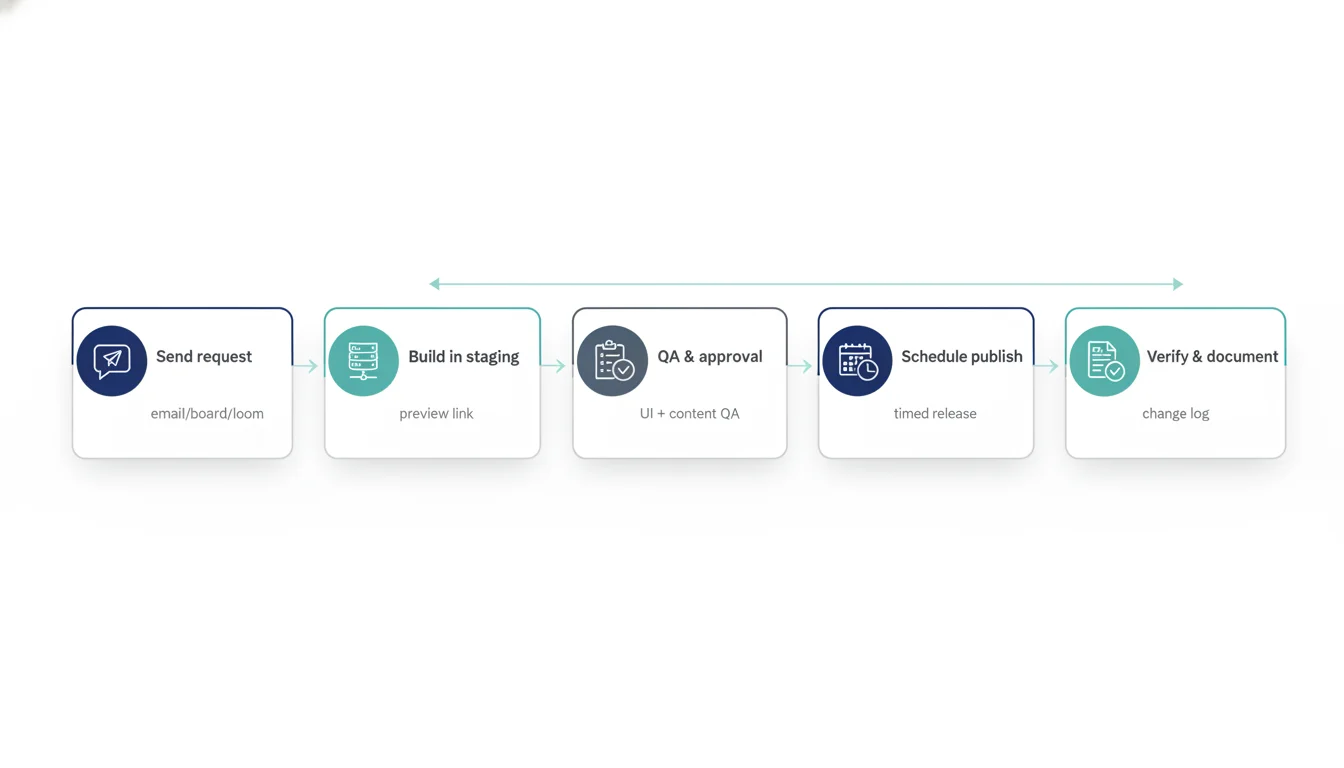
Here’s the simple process that makes updates fast and accurate. Prefer we run it for you? Schedule a 15‑minute consult or send your update list—most small changes ship within a few business days.
How it works
-
Send your request
- Use what’s easiest: email, a shared task board (Asana, Trello, ClickUp), or a quick Loom/video brief.
- Not sure how to frame it? Share the goal and any assets; we’ll turn it into a clear, actionable ticket.
- We triage, confirm scope and intent, and reply with an ETA. If it’s beyond a standard content update, we flag it before work begins.
- New to STL CodeScape? We’ll help you get set up quickly with secure access and a simple request workflow.
- Ready to move? Send your first request and we’ll confirm scope and ETA quickly.
-
Build in staging, not live
- We make edits on a secure WordPress staging site and provide preview links.
- No live edits without your approval unless you’ve pre‑authorized micro fixes.
- Want faster cycles on small items? Pre‑authorize micro fixes so we can ship them immediately.
Need reliable staging and backups? Our managed Web Hosting can help.
-
QA and client approval
- We run a content and UI QA checklist, then send the preview for review.
- You approve or request tweaks. We iterate quickly until it’s ready.
- Need help with copy or images? We can draft options for your approval to keep things moving.
-
Schedule the publish
- We agree on a publishing window that fits your audience, including after‑hours or low‑traffic slots.
- Updates are scheduled to auto‑publish for precise timing.
- Coordinating with PR, social, or email? We’ll align timing so everything lands together. Want help generating campaign content quickly? See our AI Social Media Content.
-
Verify and document
- After publishing, we verify on production, clear caches as needed, check links, and confirm layout on key devices.
- You receive a concise change log covering what changed, where, and when.
- Prefer added peace of mind? We can keep an eye on the update post‑launch and suggest quick follow‑ups.
Typical turnaround
- Same day for micro edits (copy swaps, image updates, a single CTA change), often within business hours if received before noon Central.
- 2–3 business days for multi‑page batches or coordinated updates.
- Rush options available when timelines are tight.
Have an update ready? Send it over or book a quick kickoff, and we’ll take it from there.
Speed is only half the story. Here are the safeguards that protect quality and performance.
Quality and performance safeguards
- Accessibility checks: Heading hierarchy, meaningful alt text on new or changed images, descriptive link text, and color contrast where relevant. We spot‑check forms, buttons, and focus states on affected templates to keep the experience inclusive and consistent.
- Link integrity: Automated link scans on impacted pages and manual checks on critical paths to catch typos, mixed content, and bad anchors. We confirm 404s are handled well and that intended 301/302 redirects are in place—so users and search engines never hit a dead end. Curious what that looks like? See our notes on custom 404s and error handling.
- Performance mindset: Optimize and properly size images (WebP/AVIF where supported), enforce lazy loading and srcset, and review script/style impact before adding anything new. For material changes, we record Core Web Vitals deltas (LCP, CLS, INP) against the page baseline to prove we’re protecting speed. More on our approach to performance optimization and caching.
- Cross‑device/browser checks: Test key templates on current Chrome, Safari, Firefox, and Edge, plus responsive checks at common mobile, tablet, and desktop breakpoints to confirm layout, tap targets, and forms behave as expected.
- Rollback ready: Create a fresh backup before significant edits and version code changes. If something isn’t right post‑publish, we can revert quickly without downtime.
- Structured data and code quality: Validate or update JSON‑LD where used and lint edited HTML/CSS to avoid regressions in markup quality or Rich Results eligibility.
- Documented change log: After each batch, you get a summary of what changed, where, when, and why, plus any relevant metrics (performance deltas, link fixes) and recommended next steps—so you always have a clear record.
Want your next update handled with this level of care? Pick a plan that matches your pace and SLAs, or book a quick 15‑minute call to confirm fit. We’ll review your current workflow and recommend the right tier to keep your site fast, accessible, and worry‑free.
Plans and response SLAs
Choose the plan that matches your pace and monthly volume. Every tier includes staging previews, QA, scheduled publishing, and a post‑publish change log. Month to month—start small, scale up as you go.
Essential
- Response time: 1–2 business days
- Monthly update block: 12 task credits (about 3 hours of production time)
- For steady, low‑volume edits and routine housekeeping
- Great starter plan—prove the process for a month, then upgrade if you need more
Growth (most popular)
- Response time: next business day
- Monthly update block: 28 task credits (about 7 hours)
- For ongoing content cadence (blog posts, product/service updates, image refreshes)
- Ideal if you want predictable turnaround and room for a weekly publish rhythm
Priority
- Response time: same day during business hours (requests received by 2:00 p.m. CT)
- Monthly update block: 48 task credits (about 12 hours) with reserved capacity
- For teams with frequent, time‑sensitive updates and quick approvals
- Best when launches, campaigns, and stakeholder reviews can’t wait
How credits work and fair use
- One task credit is about 15 minutes of production time. Complexity (pages, media prep, QA) can move a task slightly. We’ll confirm scope and credits before we start—no surprises.
- Examples:
- Micro task (1 credit): swap up to 150 words on one page; replace up to two images; fix broken links; update a phone number in header/footer; upload a PDF and link it on one page; add a single FAQ.
- Small task (2–4 credits): publish a blog post with client‑supplied copy/media and on‑page SEO fields; add a new section using existing components; update primary navigation labels across desktop/mobile; create 3–5 internal links; add a simple location/service card.
- Multi‑page batch (6–12+ credits): roll out the same copy/image change across 5–10 pages; build 1–3 new pages using an existing template; bulk‑update product data via CSV with QA.
- Not covered by update credits: new templates, new features/integrations, redesign work, or full copywriting. Those are estimated as mini‑projects (see next section). For new blocks/templates, see our Custom WordPress Theme Development.
Rollover, overages, and cancellation
- Up to 50% of unused monthly credits roll over for one additional month while your plan stays active. We’ll always apply the oldest credits first (and remind you before they expire).
- Need more in a busy month? Add a Flex Block at your plan rate with your current SLA. We’ll confirm scope and ETA before proceeding so your timeline is predictable.
- Plans are month to month. Upgrade or downgrade for the next cycle. Cancel anytime; remaining credits expire at the end of the current term.
Rush options for off‑cycle or urgent drops
- Same‑day outside your plan’s SLA, after‑hours, or weekend publishing is available on request. Rush work uses credits at 1.5x or a dedicated Rush Block. We’ll quote and get approval first. After‑hours/weekend work may carry a 2x multiplier due to team availability.
- Launch coming up? Give us a heads‑up and we’ll pre‑book capacity so your timing’s locked.
Not sure which tier fits? Share a sample month of requests and we’ll map it to the right block size with expected turnaround—often the same day. Prefer to talk it through? Book a quick 15‑minute fit call and get a clear recommendation. Next: what counts as an “update” vs. a mini‑project.
What’s included vs. a separate mini‑project
To keep work fast and predictable (and your budget happy), here’s what falls under “content updates” vs. what becomes a scoped mini‑project. If you’re not sure where your request lands, send it over—we’ll point you in the right direction and keep things moving.
Included in your content updates
- Edits using existing components: update copy, swap images, rearrange blocks, and create new sections built from modules already in your theme. Just send the content; we’ll implement and QA.
- On‑page SEO/meta: titles, metas, headings, internal links, alt text, basic schema adjustments, and URL slugs with safe redirects if needed—so you can publish confidently without hurting rankings.
- Media optimization: compress/convert images (for example, WebP), replace oversized assets, update transcripts/captions, and clean up file names to keep pages fast and searchable.
- Link and navigation tweaks: fix broken links, add/remove menu items, adjust footer links, and refresh CTAs to keep user journeys clear and conversion‑focused.
- Blog/news publishing: format posts, set categories/tags, add featured images/excerpts, schedule publish times, and push to your sitemap/RSS. Email us the draft; we’ll handle the rest.
Handled as a separate mini‑project
- New templates or components: designing/building custom blocks, page templates, or layout systems not already in your theme. Great when you’re expanding capabilities or launching a new section—ask us for a quick scope and estimate. Start here: Custom WordPress Theme Development.
- Complex form logic or integrations: multi‑step/conditional forms, CRM/marketing automation hookups (HubSpot, Salesforce, Marketo), webhooks, or custom validations. We’ll map the flow, document the data, and price it clearly before we start. See our AI Integrations.
- Ecommerce feature changes: checkout/cart customizations, subscription logic, product type/attribute architecture, payment/shipping/tax rules, or ERP/POS sync. We’ll outline risks, testing needs, and a rollout plan. Our WordPress Specialists can guide the best approach.
- Multi‑language setup: WPML/Polylang, translation architecture, language switchers, and hreflang/site structure decisions. We’ll recommend the right approach and scope implementation.
- Redesigns and rebrands: new visual direction, information architecture overhauls, or broad component restyling. Let’s align on goals and timeline, then build a phased plan.
Content strategy and copywriting
Light copy edits are included. Need net‑new messaging, page builds at scale, or a full content refresh? We can lead it—ask about content packages and a quick discovery call. Explore our AI Content Creation options.
Clear escalation path
If a request becomes a mini‑project, we flag it early, share an estimate and timeline, and get written approval before proceeding. Routine updates continue in parallel so your site keeps momentum.
Not sure if your request is an update or a mini‑project? Send it our way and we’ll sort it out together. Ready to move? Contact us to get a quick scope and next steps. Next up: how we collaborate smoothly with agencies and in‑house teams.
Collaboration for agencies and in‑house teams
For creative teams that need a dependable development arm, we fit into your workflow, protect your reputation, and ship on time—so you can say yes to more projects without adding headcount.
- White‑label partnership: We can be invisible or client‑facing under your brand. Need us on a client call, in your deck, or inside your shared inbox? We’re there—on‑message, easy to brief, and deadline‑driven.
- Design‑system fidelity: We follow your brand system and component library closely, including tokens, type scales, spacing, grids, and interaction states, so every change feels native and consistent—even under tight timelines.
- Pixel‑perfect from Figma/Sketch: We implement from your files with careful attention to responsive behavior and accessibility, using existing theme components and patterns to keep code lean, maintainable, and fast. See our Theme Development capabilities.
- Work in your tools: We manage tickets and updates in Asana, Trello, Jira, or ClickUp, and coordinate in Slack or Teams. Prefer Loom for context? Send it. We mirror your workflow to minimize PM overhead.
- Predictable approvals and drops: You get staging links for review, agreed approval windows, and scheduled publishes (same day for micro edits, 1–2 business days for multi‑page updates, and timed releases for campaigns).
- NDA‑friendly and clear ownership: We’ll sign your NDA. You own the code and content. We contribute via pull requests or documented change logs so everything stays auditable and under your control.
Have a project in flight or overflow this week? Send your brief and Figma link, or book a 15‑minute fit check. We’ll respond within one business day with scope options, timing, and a straightforward estimate. Start with a low‑risk, one‑sprint pilot—no long‑term contract required.
We’re WordPress‑first and strongest in custom themes, and we can also help with content edits in Webflow or Shopify when you need an extra hand. More on platforms next.
Platforms we support
WordPress is our home field. We build and maintain custom themes with Advanced Custom Fields (including Options, Repeaters, and Flexible Content), native Gutenberg blocks and block patterns, custom post types/taxonomies, and tailored custom fields. Updates stay fast, consistent, and editor‑friendly. If you’re looking to streamline your backend or expand your block library, send us your wishlist and site URL—we’ll scope the work and get it on the calendar quickly. Learn more about our Custom WordPress specialization.
Have an existing theme or page builder? We support many third‑party WordPress setups and will review builder‑based sites (Elementor, Divi, Beaver Builder) case by case. Our goal is to keep your design intact, minimize bloat, and protect performance. Share what you want changed and we’ll confirm compatibility and provide a clear path forward before we start.
By request, we also handle non‑structural content edits in Webflow or Shopify: copy and image updates, CMS/Collection items, product data, menus, alt text, and basic metafields. We don’t take on theme/template development in those platforms under this service. If your team manages the theme, we’ll plug in as your content crew—send the changes, we’ll handle the load‑in and QA.
Coming to us with a site we didn’t build? No problem. We start with a quick technical audit to map hosting, versions, plugins/apps, user roles, backups, and performance baselines. You’ll get a clear plan before we touch production. Ready to move? Request an audit and we’ll outline scope, timing, and access needs. If you also need faster, safer infrastructure, see our managed Hosting Solutions.
Next, see how we back this up with reporting and real outcomes—or tell us what you need updated and we’ll take it from there.
Proof, reporting, and outcomes
You shouldn’t have to guess what changed or what it did. We make results visible and verifiable. Want to see exactly what this looks like in practice? Ask for a sample monthly report or a 15‑minute walkthrough.
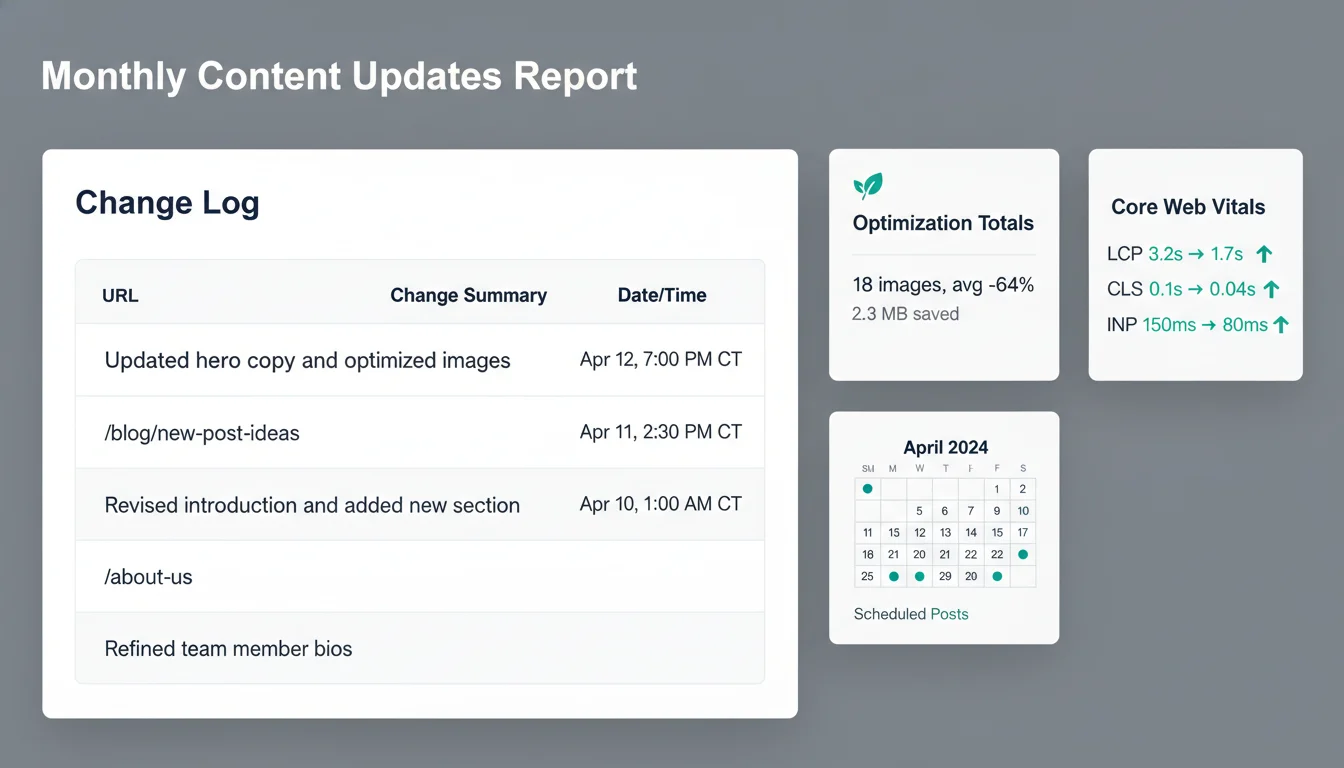
What you’ll see each month
- Change log: a concise list of updated pages and posts (with URLs you can click to verify), a one‑line summary of each change, internal links added or adjusted, and media optimized (file count plus average and total size savings)—so you know what moved and why.
- Optimization totals: images and videos compressed/converted (for example, to WebP/MP4), average percent reduction, and any layout shifts eliminated—tied back to Core Web Vitals when applicable.
- Scheduled publish calendar: what’s queued next with exact dates/times so your team can plan promotions and emails. Prefer a quick view? We include a one‑page executive summary for leadership.
Optional visibility add‑ons
- Index coverage snapshot: Search Console status for updated URLs (indexed, discovered, excluded) and any coverage issues we addressed.
- On‑page SEO deltas for updated pages: title/meta refinements, H1 alignment, schema added/updated, internal link counts, alt‑text coverage, and early trend lines for impressions/clicks where data allows.
Before/after clarity, not just claims
- Media optimization example: reduced a 1.8 MB JPG hero to a 180 KB WebP with no visible quality loss, improved mobile LCP from 3.2s to 1.7s, and cut total page weight by 64% (with side‑by‑side screenshots in your report).
- Layout polish example: converting a long FAQ into accessible accordions reduced scroll depth by 22% and increased CTA click‑through by 11% on that page.
A quick vignette from recent work
A regional home‑services brand needed accurate updates ahead of their busy season: revised service‑area content, a new financing banner, and refreshed gallery images across 12 pages. We shipped everything within three business days of approval, kept Core Web Vitals in the “good” range despite added media, and saw a 19% lift in quote requests month over month. Support tickets asking “Do you service my neighborhood?” dropped 27% after we added a targeted location FAQ and internal links from service pages.
Service‑level metrics we track and share
- Average time to first response during business hours
- Average time to publish after client approval (same day for micro edits, typically 1–3 business days for multi‑page updates)
- QA error rate (issues caught pre‑publish vs. found post‑publish)
- Scheduled publish success rate and any rollbacks (with reasons)
- Media optimization impact (per‑page Core Web Vitals deltas when applicable)
- Change approval cycles (average revisions to sign‑off)
Note: Results vary by site and season, but your monthly report shows clear progress, request by request.
Ready to make your updates measurable? Request a sample report or book a quick call, and we’ll show you what your first month with STL CodeScape would look like. Have a specific change in mind? Send it over and we’ll scope it with timelines before you commit. Need analytics set up or verified? We also handle Google Analytics and tracking tool setup.
FAQs
Can you update sites you didn’t build?
Yes, after a quick compatibility audit. We spend about 1–2 hours reviewing your theme structure, field/page builder setup, plugins, hosting/backups, and staging access. If everything looks good, we proceed and document any risks. If we find blockers, we’ll quote a small remediation step before starting regular updates. Want us to take a look? Include admin/staging access with your first request and we’ll confirm a start date.
How fast can you publish?
Turnaround depends on task size and your plan’s SLA. Typical ranges:
- Micro edits (copy tweaks, image swaps, link/CTA fixes): same business day on Priority, next business day on Growth, 2–3 business days on Essential.
- Multi‑page edits or a new section using existing components: 1–2 business days (Priority), 2–4 business days (Growth), up to 5 business days (Essential).
- Blog posts with provided assets: within 1 business day (Priority), 2 business days (Growth), 3 business days (Essential).
We confirm an ETA when we triage your request—no surprises. Need it faster? Ask for Rush publishing or upgrade to Priority for guaranteed same‑day windows.
Do you draft copy or just implement?
Both, with clear boundaries. We implement client‑provided copy and make light, on‑brand edits for clarity, grammar, accessibility, and basic SEO (titles, meta, alt text). For new copy or SEO‑focused refreshes, we offer a separate Content Refresh service with human‑edited drafts routed for approval, then published with internal links and schema updates. Want us to own the words? Mention “Content Refresh” in your request—or explore our AI Content Creation.
Do you work with ACF, Gutenberg, and custom fields?
Yes. We regularly work with ACF/ACF Pro (Repeaters, Flexible Content, Options Pages), Gutenberg blocks and block patterns, Custom Post Types/Taxonomies, WooCommerce product fields, Yoast/Rank Math, and bespoke field frameworks. We respect your content model. If a new block or field group is required, we’ll scope it as a mini‑project with a clear estimate so you can approve quickly. Feeling boxed in by your page builder? We can create flexible components that match your design system—our WordPress Specialists can help.
How do scheduled publishes and after‑hours windows work?
We stage changes and send a preview link for approval. After sign‑off, we schedule the publish in WordPress or deploy at a set time. Common windows include early morning (6–8 a.m. CT), evening (7–9 p.m. CT), or weekends. We monitor for 15–30 minutes post‑publish, verify caches/CDN, run link checks, and can roll back if needed. After‑hours releases are included in higher tiers and available as an add‑on for other plans. Coordinating a campaign or press release? Share the date/time and we’ll align the publish and QA.
What if an update request is actually a new feature?
If it needs new templates, complex forms/filters, third‑party integrations, or database changes, we’ll flag it and propose a mini‑project with scope, a fixed estimate, and a timeline. Routine content updates can continue in parallel. You’ll get everything in writing before work begins.
Do you pair content updates with core/plugin updates and backups?
Content Updates‑only includes a pre‑update backup or restore point (where hosting permits) and a staging/approval workflow. Full platform care—core/plugin/theme updates, security monitoring, uptime/performance checks—is part of our Ongoing Website Management plans. Not on a plan? We’ll confirm your backup strategy before publishing or provide a one‑time backup as an add‑on so you’re always covered. If you also need faster, safer infrastructure, explore our managed Website Hosting.
Ready to send your first request? Email updates@stlcodescape.com with your edits (Google Doc or Loom welcome). Prefer a quick chat? Book a 15‑minute call or choose a plan and SLA at stlcodescape.com/contact. Want us to review access and your current setup first? Include WordPress/staging credentials and we’ll kick off the audit.
Ready for fast, safe updates?
Want to keep your site current without the headaches? Let’s make your next update the easiest one you’ve had. Book a quick call to confirm fit—or send your first request and see how smooth, fast, and safe updates can be with staging, QA, and approvals before anything goes live.
Quick start
- Share site access: add us as a temporary WordPress user (Editor or Admin) or send credentials securely. NDAs available on request.
- Pick a plan: choose the monthly plan with the response SLA you need. Same day for micro edits, 1–2 business days for typical updates, and scheduled windows for multi‑page batches.
- Confirm your first batch: send page links, copy/media files, and timing notes. We stage and QA, you approve, we schedule/publish, and you receive a change log with any performance notes.
Built for WordPress, start to finish
- Native expertise: custom themes, Gutenberg, ACF, custom post types, and WooCommerce.
- Predictable and safe: clear SLAs, staging previews, accessibility and link checks, and an easy rollback plan if needed.
- Transparent results: approvals before publish plus a detailed change log and performance insights after.
Ready to go?
Questions before you start? Our St. Louis‑based team is here to help. Reach out using the form or calendar on this page, or just head to stlcodescape.com to connect. We work with clients nationwide and can meet virtually—or in person around St. Louis. No pressure—just straight answers and next steps.