Hosting Solutions
High‑performance WordPress hosting, managed by the team that built your site
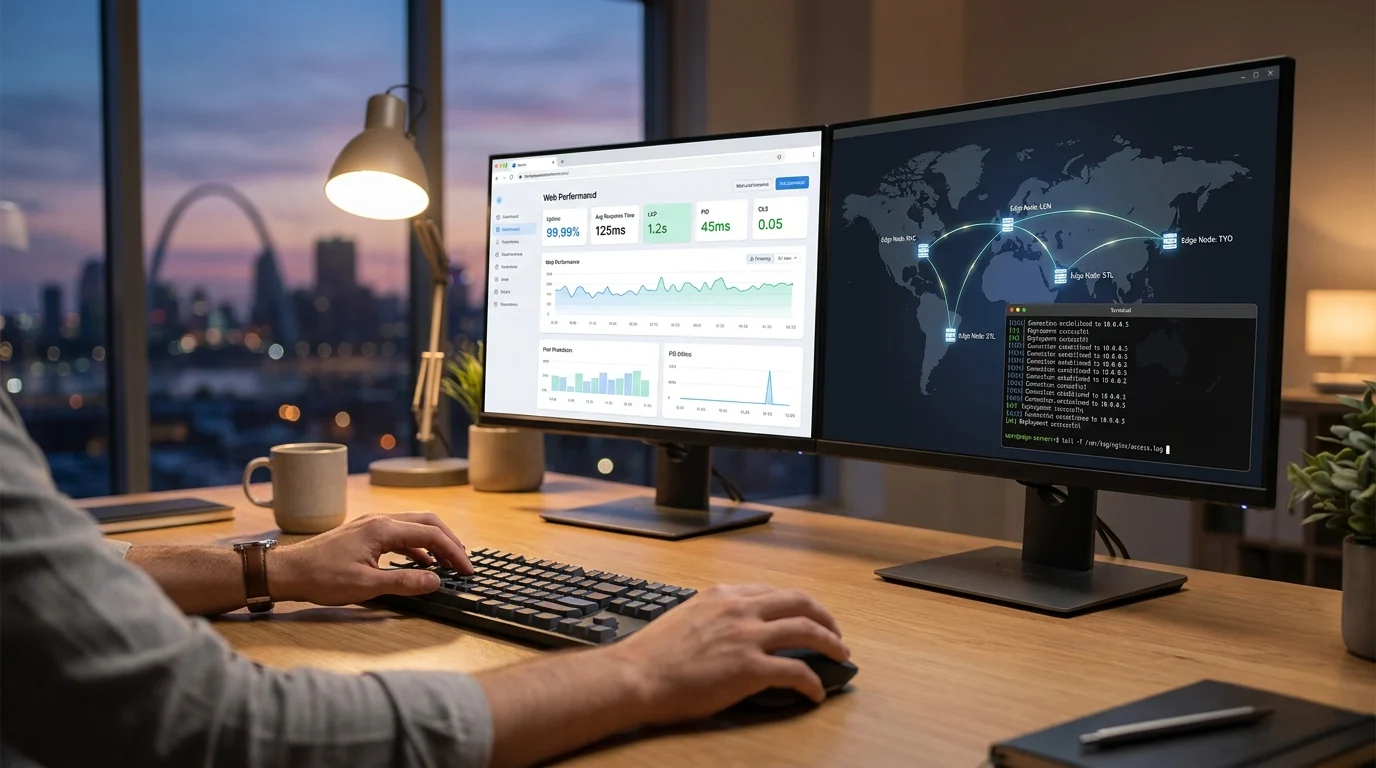
Your WordPress site was built to do real work—so it deserves hosting built around its code, not a one‑size‑fits‑all box. When we manage your hosting, the same engineers who wrote your theme tune the stack to your plugins, traffic patterns, and caching strategy. We handle performance, security hardening, updates, and monitoring—so you don’t have to. Pages load fast. Spikes don’t knock it offline. We spot and fix issues before you notice. And because we built (or actively maintain) your theme, we can right‑size resources, refine caching, and keep Core Web Vitals on target.
Not on our servers yet? We’ll plan a low‑risk migration, coordinate DNS, and verify forms, logins, and analytics after cutover.
Talk to an engineer Compare hosting options
St. Louis‑based, human support. Real engineers, not a ticket black hole. Concierge, low‑risk migration available.
Proof at a glance
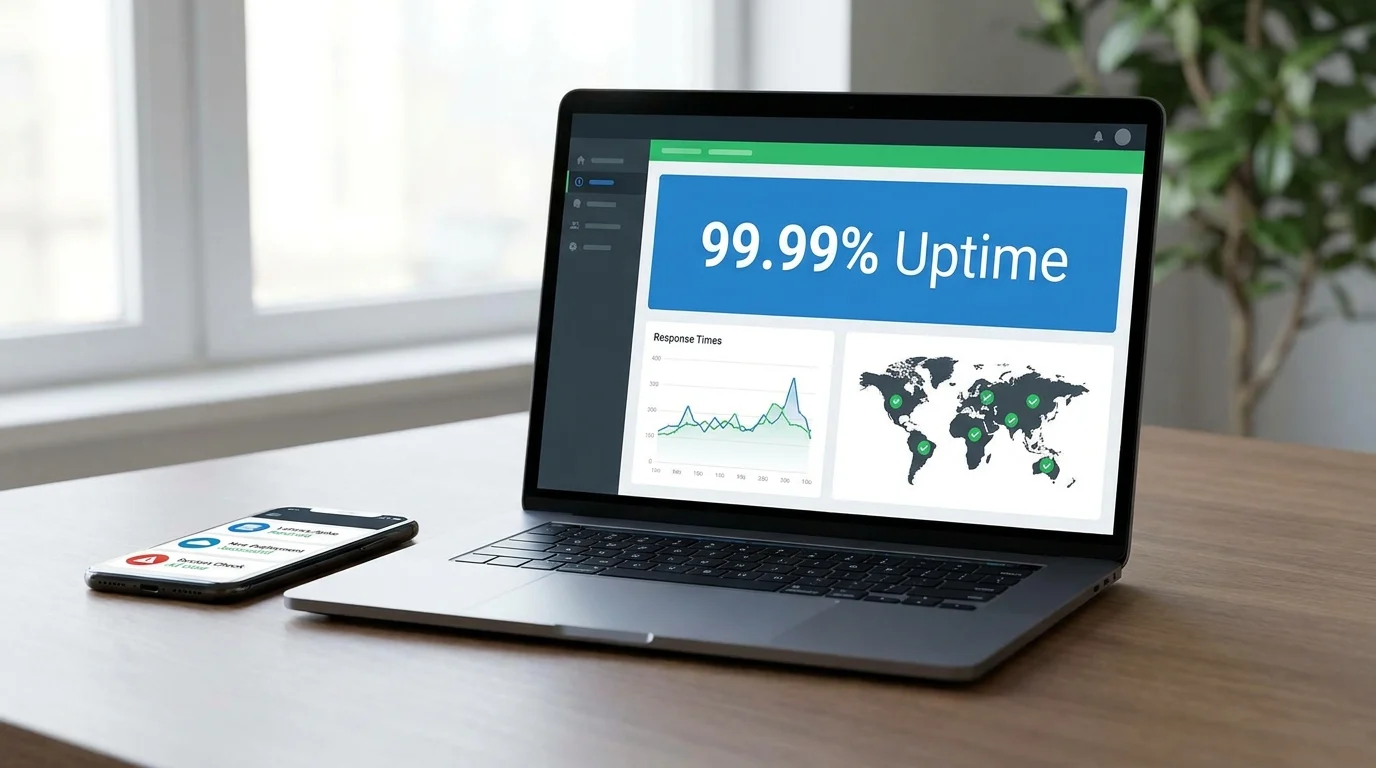
- 99.99% uptime target with real‑time monitoring
- Typical first response under 1 hour
See who trusts us and what’s included in every plan. Need help now? Call 314-657-7421 or email jc@stlcodescape.com.
Trusted by teams that can’t afford surprises
Across St. Louis and the Midwest, manufacturers, healthcare clinics, nonprofits, hospitality groups, and professional services teams trust STL CodeScape to keep WordPress sites fast, secure, and online when it counts. The same engineers who build your site manage it day to day—so there’s no finger‑pointing between host and developer, just clear ownership and quick fixes. If uptime is non‑negotiable for you, let’s talk about a hosting plan that fits your risk profile and budget. Call 314-657-7421 or email jc@stlcodescape.com for a quick, no‑pressure consult.
By the numbers
- Critical incident response target: under 15 minutes, with 24/7 monitoring and alerting
- Backup protection: automated daily snapshots with multi‑point storage and rapid restore targets measured in minutes
Infrastructure you can trust
We deploy on leading managed WordPress platforms backed by independently audited data centers and networks (SOC 2 Type II, ISO 27001) via our hosting partners. STL CodeScape manages application hardening, performance tuning, and ongoing updates—so you get enterprise‑grade reliability without enterprise‑grade hassle. Want to see how your current stack compares? Ask for a complimentary hosting assessment.
Here’s what’s included in every STL CodeScape hosting engagement, so you can compare options with confidence. Prefer to talk it through live? Schedule a 15‑minute call and we’ll map out the best fit.
What’s included in every managed hosting plan
Every plan includes a modern WordPress setup built for speed, safety, and day‑to‑day control, without vague promises or hidden limits. Clear and ready to go. Want to see how your current host stacks up? Ask us for a quick, no‑obligation performance snapshot.
Performance, from day one
- Global delivery via Cloudflare CDN for fast, consistent loads worldwide (HTTP/2 and HTTP/3, TLS 1.3, Brotli compression)
- Multi‑layer caching tuned for WordPress: edge caching at the CDN, server‑level page caching (FastCGI/Nginx), and browser cache directives
- Redis object cache to speed database‑heavy features (WooCommerce, search, membership)
- PHP‑FPM tuning with OPcache, version management, and worker concurrency sized to your traffic
- Front‑end care: optimized asset delivery and image formats (WebP) supported across the stack
- Want proof, not promises? We’ll share before/after load tests post‑launch.
Reliability you can count on
- Backups: automatic nightly backups with 30‑day retention, plus on‑demand snapshots before updates
- RPO (max data at risk): 24 hours
- Typical restore time (RTO): 30–60 minutes for a single site
- 24/7 monitoring and alerting: 60‑second uptime checks, error log and performance watch, instant alerts to our team
- 99.95% uptime target backed by SLA credits from our hosting partners
- 1‑click staging for safe testing, with selective database/table merges to production
- Need stricter RPO/RTO for mission‑critical sites? We’ll tailor a backup plan to fit.
Security, layered and proactive
- Web Application Firewall and DDoS protection at the edge (Cloudflare WAF/L3‑L7 mitigation)
- Daily malware scanning and included remediation if an incident occurs
- Free SSL certificates (Let’s Encrypt) or your own custom certs, auto‑renewals, forced HTTPS; HSTS available on request
- Least‑privilege access: separate SFTP/SSH accounts per user, role‑based permissions, IP allowlisting
- Two‑factor authentication enforced for hosting dashboards and available for WordPress admins we manage; SSO supported where applicable
- Prefer a security review first? We’ll audit your current setup and prioritize fixes.
Workflow that fits real teams
- Developer‑grade access: Git, SSH, WP‑CLI, SFTP, phpMyAdmin/DB access, and real‑time logs
- Launch and change checklists: DNS cutover, SSL, redirects, caching rules, schema/SEO, and CWV verification
- Ongoing care: monthly site health and performance reports, planned core/plugin/theme updates, and a prioritized improvement backlog
- Optional staging → review → deploy flows tailored to your release cadence
- Want a peek at our reports or process? Request a sample monthly report.
Clear, plain‑English resource limits
- We specify tangible resources, not fuzzy “visits”: CPU/vCPU, RAM, PHP worker concurrency, NVMe storage (GB), database size, and CDN egress bandwidth (GB/TB)
- Simple scaling up or down with headroom for campaigns and seasonal spikes
- Full data portability: you always have access to backups and exports
- No surprises: we alert you well before thresholds and help plan temporary scale‑ups.
When the same WordPress engineers who built your theme run your hosting, everything is tuned to your code and goals, not generic defaults. That’s how speed, security, and peace of mind add up. Ready to see if this is a fit? Email jc@stlcodescape.com or call 314-657-7421 for a quick plan recommendation and pricing.
Why host with the same team that built your WordPress site
- Quicker fixes and safer updates: Deep knowledge of your templates, custom fields, and plugins means issues are diagnosed at the source. Updates move through staging with automated checks, visual diffs, and a documented rollback path. Database changes and cache rules follow the same process every time, so updates feel routine, not risky. Want updates without the heartburn? Let’s put your workflow on rails.
- Better Core Web Vitals by design: Theme code, caching, and assets are tuned as a single system. Critical CSS and hero image preloads help LCP, stable media and font loading protect CLS, and lean, deferred scripts improve INP. Edge caching and WebP/AVIF delivery fit your site’s patterns (for example, cart and account pages bypass caching) so speed gains don’t break functionality. Ask us to review your current vitals and highlight the fastest wins.
- Fewer incidents through shared standards: A vetted plugin set, reproducible environments, and runbooks for deployments, cache purges, and restores reduce surprises. Monitoring, alerts, and log access are consistent across all sites we manage, so anomalies get caught early and fixed fast. If reliability matters to your revenue, this is how you get it.
- One accountable partner: No finger pointing between host and developer. Strategy, hosting, maintenance, and the feature plan live with one team that understands your goals and your codebase. One partner, one plan, one invoice.
Ready to see what this looks like for your site? Schedule a quick consult at 314-657-7421 or jc@stlcodescape.com and we’ll outline a clear path—migration, staging, and performance targets included.
Next: a plain‑English look at our performance setup—how CDN, caching layers, PHP tuning, and database/object caching work together to deliver consistent speed under real traffic. If you want to skip ahead and talk specifics for your stack, reach out and we’ll walk you through it.
Performance architecture, explained in plain English
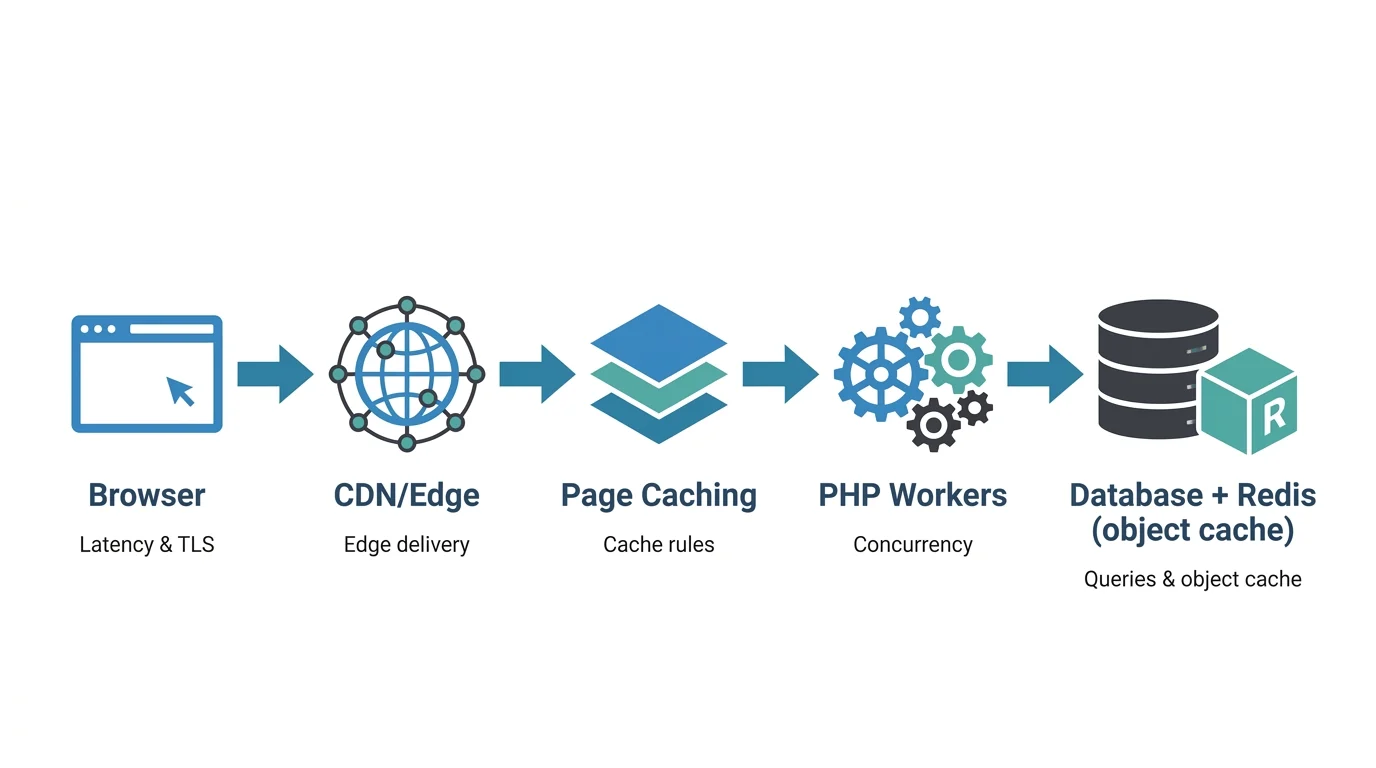
Fast websites aren’t magic; they’re good architecture. Here’s the path every request takes and how we tune each layer for your site—so you get speed you can feel and numbers you can trust. If you want us to sanity‑check your setup, we can review it with you in 15 minutes.
Simple map of the stack
Browser → CDN/edge → caching → PHP workers → database/object cache
We manage the plumbing; you get faster loads, better SEO, and fewer abandoned checkouts.
Edge/CDN (what it does for you)
- Provider: By default we use Cloudflare’s global CDN to put your content close to visitors worldwide. If your compliance or platform needs something else, we can configure alternatives like AWS CloudFront. Result: lower latency without changing your site.
- Protocols and optimization: HTTP/3 and TLS 1.3, Brotli compression, and automatic minification for CSS/JS/HTML. When it makes sense, we enable on‑the‑fly image optimization (WebP/AVIF) and responsive resizing to cut payloads without hurting quality—typically shaving seconds off mobile loads.
- Caching rules at the edge: Long‑TTL caching for static assets. For anonymous pages, we can enable full‑page edge caching to reduce origin load and improve TTFB. UTM/query‑string normalization prevents cache fragmentation. We’ll show you hit rates and before/after metrics so you can see the impact.
Application/page caching (what stays dynamic vs. cached)
- We combine server‑level page caching with edge caching to maximize hit rates for anonymous traffic, translating into faster first visits and repeat views.
- Cache bypass rules keep dynamic areas fresh: shopping carts, checkout, account pages, dashboards, site search, and any page that sets auth or cart cookies. No stale carts. No weird logged‑in states.
- We use “stale while revalidate” where possible so users get instant responses while the cache refreshes in the background—especially helpful during traffic spikes.
PHP workers and concurrency (what handles uncached work)
- Every uncached request (logged‑in pages, cart/checkout, wp‑admin, AJAX, API) uses a PHP worker. WooCommerce, LMS, membership, and other login‑heavy flows need more workers to avoid queues. No more checkout slowdowns at peak times.
- We size plans based on real usage: percent of logged‑in sessions, average and p95 concurrent requests, and peak windows during campaigns or seasonality. You get headroom for spikes and can scale up for launches and events. Tell us your promo calendar—we’ll prep capacity so it just works.
Database and object cache (what keeps queries fast)
- We tune MySQL/MariaDB for your workload (connection limits, InnoDB buffer pool, thread/cache settings) and monitor slow queries to spot N+1 patterns and missing indexes. You’ll get a plain‑English summary of the top offenders and fixes.
- A persistent object cache (Redis) cuts duplicate queries and speeds up dynamic views (product/category pages, account areas, complex menus).
- We review plugin‑generated queries and WP_Query usage for hotspots, then optimize or refactor as needed—improving both front‑end speed and wp‑admin responsiveness.
Where your origin lives (latency matters)
- We place your origin server near your primary audience, such as US‑Central/US‑East for North America, Frankfurt/London for EU, or Singapore/Tokyo for APAC.
- We verify with real user metrics (TTFB by top cities) and adjust if your audience shifts. The CDN handles global reach; the origin location keeps dynamic requests quick. Expanding into a new region? We’ll plan the move with zero downtime.
How we right‑size you on day one
- We audit analytics (traffic, geo, login ratio), review site complexity (ecommerce, LMS, search), and run load tests to set targets for edge cache hit rate, PHP worker pool size, DB/Redis resources, and CDN bandwidth. Then we monitor and adjust. You get a one‑page performance plan and clear next steps.
Want a quick, no‑pressure performance review of your current hosting? Email jc@stlcodescape.com or call 314-657-7421. We’ll tell you what’s great, what’s risky, and what’s worth fixing first.
Next, how we keep your site safe and who owns what across security and compliance.
Security and compliance you can verify
Security isn’t a checkbox. It’s tools, process, and clear ownership. We document the controls in your proposal and in your site runbook so you can verify what’s in place and who owns it. Nothing vague, nothing assumed. Want to see it before you decide? Ask for a sample runbook or a 15‑minute security walkthrough of your current setup.
Network and application security
- Managed web application firewall (WAF) enforcing OWASP Top 10 rules with virtual patching for known WordPress/plugin CVEs
- Multi‑layer DDoS mitigation (network L3/L4 and application L7) with automatic rate limiting at the edge; optional higher‑tier protection for high‑risk or seasonal sites
- Bot management: bad‑bot blocklists, fingerprinting, and throttling; reCAPTCHA/honeypot options on forms to cut spam without hurting conversions
Hardening and safe updates
- Core hardening: disabled file editor, minimized XML‑RPC, least‑privilege file permissions, strict headers (HSTS; optional CSP), and tuned PHP/MySQL
- Update policy: security releases tested in staging and deployed in the next maintenance window; routine plugin/theme updates weekly; major version upgrades scheduled with regression testing and a rollback plan
Malware scanning and remediation
- Continuous file integrity and malware scanning with daily signatures
- If suspicious activity is detected, we isolate the site, block malicious traffic, run a forensic scan, remove or replace infected files, rotate credentials, patch the root cause, and restore from a clean snapshot if needed. You get a post‑incident summary and prevention steps
Access control
- Least‑privilege WordPress roles and separate staging/production access
- Enforced 2FA for admin and hosting dashboards
- IP allowlisting for wp‑admin, SFTP/SSH, and database access on request
- Per‑user, short‑lived credentials with documented offboarding; audit logs for logins, deployments, and privilege changes (retained at least 90 days)
Backups and restores
- Automated nightly backups (30‑day retention standard) with on‑demand pre‑deploy snapshots; hourly or 6‑hour options for commerce or content‑heavy sites
- Off‑site, geo‑redundant storage with encryption at rest
- Documented restore runbook; typical targets: RPO 24 hours (1–6 hours with short‑interval snapshots) and RTO 1–4 hours depending on site size. We test restores quarterly
Compliance and data handling
- We use providers with third‑party audits such as SOC 2 Type II and ISO 27001. Your agreement lists the exact platform and certifications with links to their trust centers
- TLS 1.2+ everywhere with managed SSL
- PCI: we design ecommerce for SAQ A where feasible (no cardholder data on your server; hosted fields or redirects). For broader scope, we coordinate with your QSA
- PII: guidance on data minimization, DPAs with upstream providers, and regional hosting when required. We do not host ePHI/HIPAA workloads unless separately contracted with a BAA
Prefer proof over promises? Request a recent backup restore report, WAF/rate‑limit activity summary, or a control matrix mapped to your security questionnaire. If you’re mid‑incident, call 314-657-7421. Otherwise, email jc@stlcodescape.com to schedule a quick security review.
Next: our migration, staging, and go‑live process.
Zero‑drama migrations, safe staging, and confident go‑lives
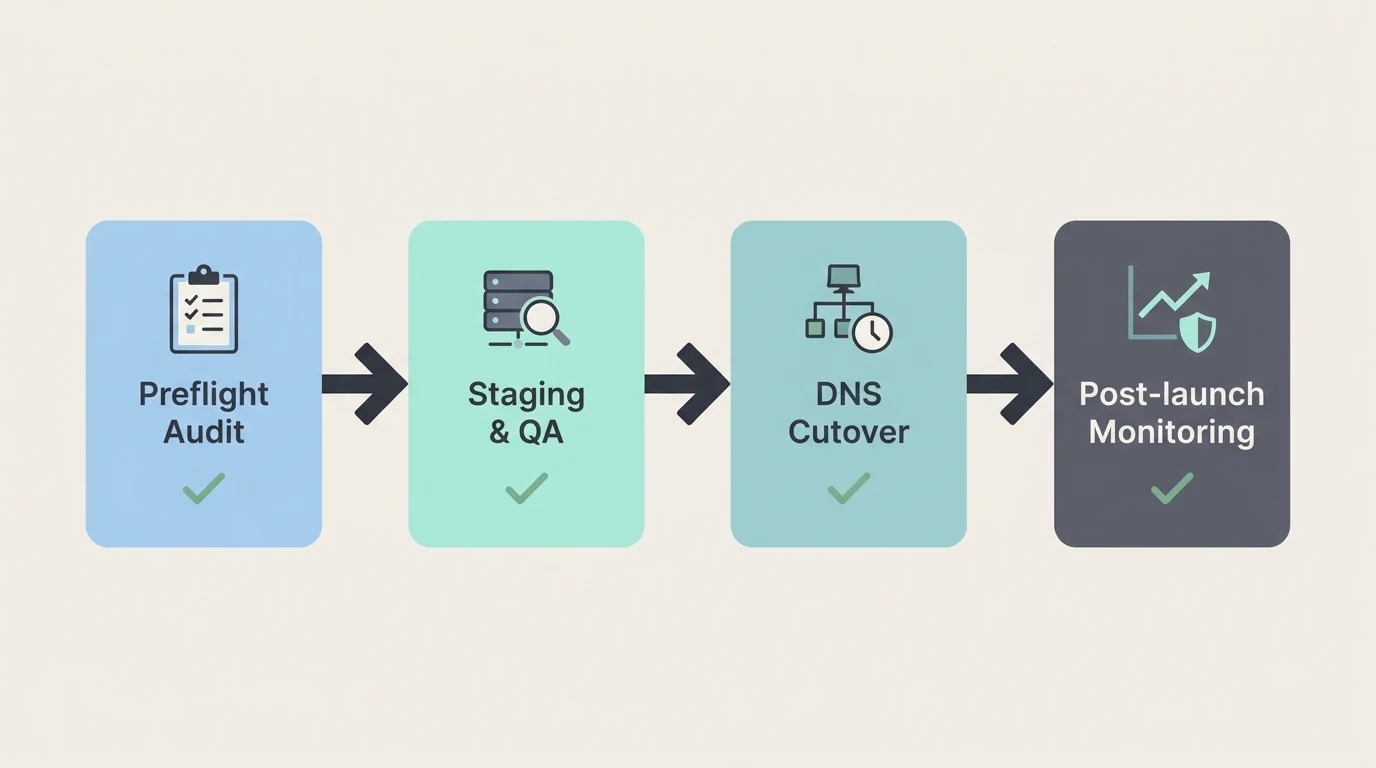
Move to STL CodeScape without surprises. We use a test‑first process that preserves SEO, data, and user sessions, so launch day feels routine. Calm, controlled, and reversible. You get a clear timeline, fixed scope, and a single point of contact. We coordinate with your current host, DNS, and IT so you don’t have to.
Concierge migration
- Preflight audit: Full plugin/theme inventory, PHP/MySQL version check, media library size, database health, hard‑coded URLs, cron jobs, redirects, caching conflicts, and a vulnerability scan. We also baseline performance (TTFB/LCP/CLS) to catch regressions later—so we can prove the move helped, not hurt
- Environment setup: We provision staging and production, tune PHP and the database, configure object caching and CDN, enforce HTTPS, set least‑privilege access with 2FA, and enable backups and monitoring. You get a private preview URL for sign‑off and a clear checklist of what’s changing
Staging and QA
- Content freeze: We schedule a short freeze (typically 30–60 minutes) for final delta copy. For ecommerce and membership sites, we enable read‑only or maintenance mode only during the last sync to avoid lost orders or signups
- Visual diffs: Pixel‑compare key templates at multiple breakpoints and do targeted device checks to confirm design fidelity—no “it looks different on my screen” surprises
- Functional tests: Forms, site search, logins, carts and checkout, payments, transactional emails, sitemaps, schema, redirects, 404s, analytics/Tag Manager events, pixels, and third‑party integrations (CRM, marketing automation, shipping)
- Performance checks: Compare staging vs. current host for TTFB, LCP, CLS; sample slow queries; verify cache headers
Go‑live plan
- DNS strategy: Reduce TTL to 300s 24–48 hours prior, pre‑validate A/AAAA/CNAME records, and coordinate with your DNS owner to avoid last‑minute changes
- Cutover window: Choose a low‑traffic window, preissue and validate SSL, prewarm caches, and keep the old host online briefly to let global DNS caches drain
- Rollback readiness: Verified backups right before cutover, a one‑click restore path, and a defined go/no‑go checklist so we can revert within minutes if needed
- 301/redirect mapping: Import legacy redirects, normalize canonical host (www or non‑www), enforce HTTPS, and map retired URLs to preserve rankings and referrals
Post‑launch assurance
- Real‑time monitoring: 60‑second uptime checks, error/log monitoring, resource alerts, and 404/500 anomaly alerts
- Regression watch: Compare traffic, conversions, and key events against baseline; crawl critical paths to catch broken links or tags
- Analytics validation: Confirm GA4/Tag Manager firing, pixels and conversions, Search Console verification, and sitemap/robots correctness
Downtime expectations
- Most brochure or lead‑gen sites launch with no noticeable downtime thanks to delta sync, short‑TTL DNS, prewarmed caches, and a brief parallel run during cutover
- High‑write sites (WooCommerce, memberships, LMS) may show a short maintenance screen, usually under two minutes, during the final database sync to prevent data loss
Want your cutover to be boring—in the best way? Ask for a Migration Readiness Check and a clear plan/quote: 314‑657‑7421 or jc@stlcodescape.com. Next, see how our managed support works day to day—what’s included, what’s billable, and our typical response and resolution times.
Support that actually solves WordPress problems
When you need help, you’ll reach the engineers who built and manage your site, not a generic queue. Here’s how support works and what to expect. No mystery, no ticket limbo. If you’re tired of bouncing between your host and a help desk, you’re in the right place.
How to reach us
- Ticket/email (best for non‑urgent): Email jc@stlcodescape.com and a ticket is created automatically
- Phone (quick triage): 314-657-7421, Mon–Fri, 9am–5pm CT
- Emergencies (P1): Call 314-657-7421 and say “P1 outage,” then email jc@stlcodescape.com with “P1” in the subject so our on‑call engineer is alerted 24/7
Pro tip: Add jc@stlcodescape.com and 314-657-7421 to your contacts so you’re never searching in a crisis. Want a quick “support readiness” check? Call us and we’ll confirm we have the right contacts, logins, and escalation path on file.
SLA response targets
- P1 Critical (site down, checkout/login broken, security incident)
- Acknowledgment: 15 minutes, 24/7
- Stabilization: target within 60 minutes
- Updates: every 30 minutes
- Host escalation (if infra related): initiated within 15 minutes
- P2 High (major degradation, broken template impacting key pages, scheduled content blocked)
- First response: within 1 business hour
- Action plan ETA: within 4 business hours
- Typical resolution: same business day (complex cases may take longer)
- P3 Standard (minor bugs, admin help, content adjustments)
- First response: within 1 business day
- Typical resolution: 2–5 business days
SLA-backed, engineer-led responses mean you get action, not auto-replies. If timelines change, we’ll tell you why and what’s next.
What we manage vs. what’s billable
Included in managed hosting
- 24/7 uptime monitoring and emergency remediation
- WordPress core/plugin updates with testing and rollback
- Security hardening, malware scanning/removal, SSL renewals
- Daily backups and on‑demand restores
- Performance monitoring and tuning (CDN, caching, PHP/DB optimization)
- Server/PHP upgrades coordination and DNS/CDN adjustments required to keep the site stable
Billable (scoped and approved before work)
- New features, templates, or integrations
- Design changes, UX improvements, and A/B tests
- Large content entry/migrations and data imports
- Third‑party system work beyond basic connection (CRM/ERP customizations, APIs)
- Strategic consulting, audits, and training beyond normal support
No surprises: we’ll estimate, confirm scope, and get your approval before any billable work begins.
Change windows and notifications
- Routine maintenance (updates, minor tuning) is done during off‑peak evening hours CT to reduce risk
- High‑risk or potentially disruptive changes are scheduled in a maintenance window with at least 48 hours’ notice
- Emergency security patches are applied immediately; we’ll notify you as we act
- Monthly reporting: the first week of each month you’ll receive a summary of uptime, performance trends (including Core Web Vitals), security events, backup/restore tests, completed tickets, and recommended next steps
Have a preferred maintenance window or blackout dates? Tell us and we’ll align to your calendar.
How we coordinate with the underlying host
- One point of contact: STL CodeScape is your front line. We diagnose at the application level (WordPress, theme, plugins) and engage the hosting provider for infrastructure issues (network, containers/VMs, WAF/DDoS, CDN, storage) on your behalf
- Parallel response: for P1 incidents, we work application and infrastructure tracks at the same time to shorten recovery
- Clear ownership: we own code‑level fixes and WordPress operations; the host owns data center, hardware, and platform reliability. We manage the handoff and escalation so you aren’t stuck in the middle
Already have a preferred host? We’ll integrate with them. Need a recommendation? We’ll match you with the right platform for your stack and traffic.
Next, find the right hosting fit. Compare options or use our quick intake to size a plan to your traffic, stack, and risk. Have 10 minutes right now? Call 314-657-7421 or email jc@stlcodescape.com with “Hosting Fit” and we’ll get you a recommendation and next steps.
Find your fit: resources tailored to your traffic and stack
Choose a plan based on what you need today, with room to grow. We size WordPress hosting around real usage—traffic patterns, logged‑in activity, and the complexity of your stack—and scale cleanly as your audience expands. No guesswork. Want a quick read on where you fit? Book a 15‑minute fit check at 314-657-7421 or jc@stlcodescape.com and we’ll point you to the right tier.
Our core tiers
- Essential: For fast brochure sites and content marketing
- Resources: 2 vCPU, 4 GB RAM, 15–25 GB NVMe storage, 200 GB CDN egress/month
- Concurrency: ~4 PHP workers
- Backups: Automatic daily, 14‑day retention
- Ideal if you need a lean, secure foundation with room to upgrade later
- Professional: For growing brands with dynamic content
- Resources: 4 vCPU, 8 GB RAM, 30–40 GB NVMe storage, 500 GB CDN egress/month
- Concurrency: ~6–8 PHP workers
- Backups: Automatic daily, 30‑day retention
- A common choice for active blogs, marketing sites, and light app‑style features
- Commerce: For WooCommerce, memberships, and LMS
- Resources: 8 vCPU, 16 GB RAM, 50–80 GB NVMe storage, 1 TB CDN egress/month
- Concurrency: ~10–16 PHP workers, Redis object caching included
- Backups: Automatic daily, 45‑day retention plus on‑demand snapshots
- Built for checkouts, logged‑in dashboards, and courseware performance
- Enterprise: For mission‑critical, high‑traffic, or multi‑site networks
- Resources: 16–32+ vCPU, 32–64+ GB RAM, 100–500+ GB NVMe storage, 2–5 TB+ CDN egress/month
- Concurrency: 20+ PHP workers, dedicated or clustered options
- Backups: Automatic daily, 60–90‑day retention plus point‑in‑time restores
- Get a tailored architecture plan and migration roadmap from our engineers
Not sure where you land? Start with these five questions
- Monthly sessions and logged‑in percentage: How many GA4 sessions in a typical month, and roughly what percent of visitors are logged in?
- Peak concurrency: During launches or promos, how many simultaneous visitors or checkouts do you expect?
- Ecommerce/LMS: Are you running WooCommerce, memberships, or courseware (LearnDash, LifterLMS)?
- Media library size: How large is your media library (GB), and do you self‑host video or offload to a platform?
- Compliance and data residency: Do you have PCI considerations, HIPAA/PHI concerns, or region preferences (for example, US‑only)?
Send your answers to jc@stlcodescape.com and we’ll recommend a tier and scaling approach—usually the same day.
How we measure and scale
- Sessions and bandwidth: We size environments using GA4 monthly sessions plus expected logged‑in activity. Bandwidth is total CDN egress (GB) over the billing period. Bot traffic is filtered from planning
- Concurrency limits: PHP workers define how many dynamic requests can run at once. More workers mean smoother checkouts, dashboards, and LMS use
- Overage handling: If you exceed included CDN egress or storage, we keep the site online, notify you, and review options. Short‑term bursts are absorbed; persistent overages trigger a right‑size recommendation. No surprise throttling
- Scaling options: Zero‑downtime upgrades, temporary bursts for campaigns, add‑on PHP workers, RAM/CPU bumps, advanced caching rules, and migration to dedicated or clustered resources when needed
Want us to run the numbers? Share GA4 access or a traffic snapshot and we’ll size your environment with headroom for growth.
Terms, migrations, and portability
- Contracts: Month‑to‑month or annual (discounted). Pause, upgrade, or downgrade at renewal. Monthly plans can be canceled anytime before the next billing cycle
- Migration credits: Concierge migration included for one site on Essential/Professional, up to two on Commerce, and portfolio migrations scoped and credited on Enterprise
- No lock‑in: You own your code, content, and data. Full backups, database exports, and media archives are available on request. We provide DNS guidance and offboarding help if you ever move
Ready to move? Email jc@stlcodescape.com to reserve a migration window and get a written checklist.
Planning for multiple client sites or a portfolio? Agencies are welcome—partner with STL CodeScape for dependable development plus managed hosting under one responsive team. Let’s talk about your roster and map the right tiers per site: 314-657-7421.
For branding and marketing agencies
Creative sets the story; we power the build and keep it fast—on secure, fully managed WordPress hosting. STL CodeScape plugs into your team as a senior development and hosting bench for custom WordPress—white‑label or co‑branded—so you keep the client relationship while we deliver speed, stability, and clear communication. Drop us into a pitch or an in‑flight project and expect calm handoffs, clean code, and zero‑drama launches. We routinely partner with branding and marketing agencies and support campaign creative with brand‑safe AI video.
Shared workflows that match your process
- Staging and approvals: Dedicated dev/staging/prod for each site with password‑protected previews, content/database syncs, and a documented approval checklist before deploys—so your PMs always know what’s shipping and when
- Git and branching: We work in your GitHub/GitLab/Bitbucket org with your preferred branching model (trunk‑based or GitFlow), pull‑request reviews, and changelogs for each release your clients can actually read
- Task boards: We adopt your Asana/Jira/Trello/ClickUp boards (or provide ours), using clear acceptance criteria, sprint cadences, and deployment windows planned around campaigns; fast response times during launch windows included
White‑label delivery and precise permissioning
- Branded touchpoints: Optional agency‑branded status updates, maintenance emails, and reports. Support can come from a shared inbox on your domain and a Slack Connect channel—plus an optional branded status page for uptime/incidents
- Client access controls: Least‑privilege roles across WordPress and hosting—editor vs. admin boundaries, restricted plugin installs, 2FA enforcement, per‑environment access rules, and audit trails to keep everyone protected
Managed hosting built for campaigns
- Performance and scale: Edge CDN, full‑page/object caching, image optimization, and cache pre‑warming for launches and spikes
- Security and resilience: Daily offsite backups, 1‑click restores, WAF, SSL/HTTPS everywhere, uptime monitoring, and proactive patching/PHP updates
- Developer‑friendly: SSH/SFTP, WP‑CLI, database access, and reproducible environments so fixes and features ship quickly
Flexible commercial models that work with you
- Resell or refer: Choose a reseller setup with portfolio‑level discounts and margin, or a referral path with revenue share
- Billing your way: We can invoice you (consolidated by client/project) or bill your client directly under co‑branded terms. Line‑item transparency keeps your markup simple
- Relationship protection: Engagements are scoped to you with non‑solicit language and NDA‑friendly terms. We support your client relationships, not compete with them
Joint launch playbooks and co‑branded reporting
- Launch with confidence: Pre‑launch QA (CWV, accessibility spot checks, schema, redirects, analytics/tagging), rollback points, DNS/SSL cutover windows, pre‑warmed caching, and on‑call coverage for go‑live and traffic spikes
- Insights you can present: Monthly co‑branded reporting with uptime, Core Web Vitals, page speed, security posture, backups/restores tested, key conversions, and prioritized next steps—delivered as a client‑ready deck and a live dashboard
Have a launch or migration in the next 30–60 days? Start with a low‑risk pilot or a time‑boxed discovery sprint and get a same‑day ballpark. Call 314-657-7421 or email jc@stlcodescape.com to book a 15‑minute fit check.
Next: a few quick results and partner quotes that show this in practice.
Results our clients can feel
The best hosting stories are about faster sites, steadier launches, and fewer fires to fight. Here’s what that looks like for clients we manage end to end (names withheld for confidentiality). Real wins, measured. Curious what this could look like for your site? Ask for a no‑pressure performance snapshot in 2 business days—Core Web Vitals, TTFB, uptime posture, and quick wins. Call 314-657-7421 or email jc@stlcodescape.com.
WooCommerce retailer: zero‑downtime migration and faster checkouts
- Core Web Vitals (mobile p75): LCP 3.9s → 1.8s, INP 420ms → 140ms, CLS 0.24 → 0.04
- Time to First Byte: 900ms → 160ms
- Launch: no downtime, no broken carts during switch‑over
“Launch night was a non‑event—in the best way. Pages are snappy and support hasn’t heard a peep.” — Director of E‑commerce, regional outdoor retailer
Planning a replatform? We’ll map a zero‑downtime migration plan tailored to your stack.
Healthcare network: campaign surge without a blip
- Traffic spike: 2.3× baseline over 10 days, 100% uptime during the campaign window
- p95 response time: 1.6s → 520ms under load; TTFB: 700ms → 150ms
“We didn’t have to wake anyone up at midnight this time. It just held.” — Communications Manager, multi‑location healthcare network
Launching a high‑stakes campaign? We’ll load‑test and give you a clear go/no‑go plan.
B2B manufacturer: fewer tickets, faster fixes
- Support tickets: down 58% after consolidating hosting and custom theme
- Restore time (RTO): ~3 hours → 12 minutes; nightly encrypted backups with 30‑day retention
- Editor workflow: staging plus one‑click deploys cut publish time from 12 steps to 5
“Issues that used to take half a day get closed before lunch. Our team finally focuses on content, not firefighting.” — VP of Marketing, industrial manufacturer
Want to ship faster with fewer tickets? Let’s streamline your workflow and support path.
We use proactive monitoring and focused alerts to catch regressions early, predict traffic stress, and suggest fixes before users feel them. Want a quick walkthrough of how we keep sites fast and reliable day after day? Schedule a 15‑minute call at 314-657-7421 or jc@stlcodescape.com.
Practical AI and automation (when it actually helps)
We’re pragmatic about AI. We use it where it clearly reduces risk and saves time—never as a black box, and always with your approval. Useful, visible, and optional. If it won’t measurably help uptime or workflow, we don’t use it. Want an honest take on what’s worth automating for your stack? Book a quick, no-pressure consult.
What we automate for site reliability
- Anomaly detection: We baseline traffic, PHP errors, TTFB, and Core Web Vitals, then alert your team (Slack or email) within minutes when metrics move past set thresholds—so you can fix small issues before users feel them
- Synthetic uptime and journey tests: 60‑second global uptime checks plus optional “user path” monitors (add to cart, form submit). We only escalate on multi‑location failures to avoid noise and alert fatigue
- Capacity forecasting: Rolling 30/60/90‑day trends of CPU, PHP workers, queries, and bandwidth to recommend scale‑up before campaigns or seasonal spikes
- Auto‑tagging performance regressions: On deploys or plugin updates, we run page‑level tests and flag LCP/CLS/JS error regressions in your changelog with suggested fixes and rollback notes
Prefer to see it first? Ask for a 30‑day monitoring pilot on your current host or ours—no code changes required.
Content workflows you can opt into
- Safe AI‑assisted drafts for meta tags, product blurbs, FAQs, and social snippets—never auto‑published. Drafts route through your editorial queue with your brand voice and compliance rules applied
- Bulk updates with human review (title standardization, alt‑text suggestions) to speed content hygiene without sacrificing quality
Curious how it sounds in your brand voice? We’ll produce a few sample drafts from your existing content before you decide.
Data handling and your controls
- Privacy first by default: your site data and prompts are not used to train third‑party models. We use vendors with no‑training policies and industry‑standard certifications (and we’ll sign your DPA)
- Feature‑level toggles, audit logs, and per‑role permissions let you enable or disable automation anytime. Prefer zero AI? We’ll run rule‑based monitoring instead
Whether you use these automations or not, you keep full control and portability. Every check, script, and dashboard can be documented, exported, and handed off without lock‑in.
Ready to try it? Get a 15‑minute walkthrough and a tailored pilot plan: jc@stlcodescape.com or 314-657-7421.
Ownership and portability
No lock‑in, ever. Your website is your asset—you’re in control from day one, and moving later is straightforward. Clear ownership, simple exits, zero surprises. Have questions as you read? Call 314-657-7421 or email jc@stlcodescape.com.
What you own and how access works
- You own 100% of your code (custom theme, child themes, custom plugins), content, media, and database records—always
- You’ll have at least one “Client Owner” with full WordPress Administrator access on each environment (staging and production), plus SFTP/SSH and database credentials on request. We’ll help you set up least‑privilege roles for the rest of your team in minutes
- We maintain a restricted, emergency admin account for incident response. All other access is time‑boxed and logged, so you always know who did what and when
- Your code lives in a private Git repository. We can host it under your organization’s Git account (GitHub/GitLab/Bitbucket) from day one or transfer it to you at any time—no friction, no fees
- Third‑party premium plugin/theme licenses: we’ll document what’s in use and either transfer keys (when vendor terms allow) or help you re‑license under your account so renewals stay in your control
- Want a quick ownership checkup? Ask for a 10‑minute review and we’ll confirm everything’s set up correctly
Backups and exports—what you get and how to request
- Managed plans include automated daily backups (30‑day retention). For ecommerce or high‑update sites, we can enable hourly backups (7‑day retention) plus on‑demand snapshots before major changes
- Need a copy? Request a full export and we’ll provide it within one business day (often same day) via a secure download link—or we can push it to a storage bucket you control
- Your export typically includes:
- Database SQL dump with search‑replace notes for domain changes
- wp‑content (uploads, themes, plugins, mu‑plugins)
- Custom code repositories (theme/plugins) and a sample wp‑config with environment values redacted
- Optional WordPress XML (WXR) export for posts/pages, plus CSV/JSON exports for orders, customers, or form entries when applicable
- Curious how portable your current site is? Ask us for a portability review and we’ll outline exactly what an export would include
Offboarding and transfer, step by step
- Email jc@stlcodescape.com (or call 314-657-7421) to start. Share your destination host details and a target timeline
- We generate and deliver your full export, credentials, and a plugin/theme inventory
- Optional: we coordinate with your new provider for a low‑risk migration window and DNS plan
- We perform a final delta sync to capture last‑minute content changes and schedule cutover
- DNS switches, we verify the site, and monitor for 24–48 hours
- After you confirm all is good, we deprovision access. We retain a fallback backup for 14 days
- Standard offboarding completes in 3–5 business days once we have the needed info; expedited 24–48 hour turnaround is available if timing is tight
- There are no proprietary builders or closed tools that would block a clean handoff
- Planning a change soon? Book a 15‑minute migration consult and get a clear plan before you move
DNS ownership—best practices
- Register domains under your company’s legal entity and keep the registrar account in your control with 2FA enabled
- Use a reputable managed DNS provider that supports role‑based access and activity logs. We can manage DNS via delegated access—no need to share master credentials
- Keep DNS and email independent of your web host. Maintain clear records for A/AAAA, CNAME, MX, TXT (SPF/DKIM/DMARC), and verification entries
- Before go‑live or a host change, lower TTLs to 300 seconds 24–48 hours in advance for faster propagation; raise them back after cutover
- We’ll provide a complete DNS change checklist and stay with you through the switch
- Not sure where your DNS currently lives? We’ll locate it, document it, and get you back in control during onboarding
Still have questions? Check the FAQ below for specifics on backups, plugin licensing, resource limits, and more—or reach out and we’ll walk you through it. Get a same‑day answer at jc@stlcodescape.com or 314-657-7421.
Hosting FAQs
Here are straight answers to common questions about hosting with STL CodeScape—plus how we make each step simple and low‑stress.
Do you provide email hosting?
- We don’t host email inboxes. We recommend Google Workspace or Microsoft 365
- We’ll set up DNS records (MX, SPF, DKIM, DMARC) and help migrate mailboxes if needed
- Your email accounts are always owned and billed directly to you
- Want us to handle the setup and migration so nothing gets missed? Say the word and we’ll take it off your plate
How are backups handled? What are your RPO/RTO targets?
- Standard: automatic nightly backups retained for 30 days, plus on‑demand snapshots before major updates or releases
- Enhanced (recommended for ecommerce/membership sites): hourly backups available
- Recovery Point Objective (RPO): the maximum data you could lose if we restore
- Standard RPO ≈ 24 hours; Enhanced RPO ≈ 1 hour
- Recovery Time Objective (RTO): the time to bring your site back online once a restore begins
- Typical RTO is 15–60 minutes for a single‑site restore; complex restores may take longer
- Restore process: request a restore and we can roll back the full site or specific components (files/database) to a chosen timestamp. We also test restores periodically to confirm integrity
- Not sure which tier you need? We’ll recommend the right plan—and can temporarily bump you to Enhanced for launches or high‑risk periods
Are there any plugin restrictions?
- Yes, to protect performance and security
- Front‑end caching plugins are disallowed because caching is handled at the server and edge
- Resource‑intensive backup/scanning plugins may be blocked to avoid conflicts with our backup and WAF stack
- Nulled/unlicensed, abandoned, or poorly maintained plugins are not permitted
- Review policy: new plugins are evaluated for security track record, update cadence, compatibility with your theme, and performance impact. Most reviews complete within 1–2 business days, with testing in staging before production
- Have a plugin in mind? Send us your shortlist—we’ll approve quickly or suggest a safe, high‑performance alternative
How do you handle performance optimization and caching?
- We right‑size your plan based on:
- Concurrency (PHP workers) and uncached request volume
- CPU/RAM and database/query load
- Storage (media/library size) and CDN offload
- “Visits” and “bandwidth” definitions vary by platform; we translate platform metrics into plain‑English monthly reports so you know what matters
- Spikes and campaigns: tell us in advance and we’ll pre‑scale. Short, unexpected bursts are usually absorbed by the CDN and burstable resources. If sustained growth exceeds the plan, we’ll recommend an upgrade before you hit hard limits
- Overage fees (if any) are pass‑through from the underlying platform, with thresholds documented in your runbook. No surprise throttling
- Planning a promo or press hit? Loop us in early and we’ll make sure you stay fast and online
Can we choose our data center? How does the CDN affect latency?
- Yes. We place your site in a primary region closest to your audience (common options include US, Canada, EU, UK, APAC). We can move regions during a maintenance window if your audience shifts
- A global CDN serves static assets from edge locations worldwide to reduce latency. For brochure sites, we can enable edge page caching. For ecommerce/memberships, logged‑in and cart/checkout pages are smartly bypassed
- Ask us about edge caching options—we’ll show you where it’s safe to squeeze out more speed
What are the contract and billing terms?
- Simple terms: month‑to‑month or annual (discounted). No long‑term lock‑in
- Cancel anytime before your next renewal, no penalties. If you prepaid annually and need to exit early, we’ll work with you on a fair pro‑rated credit or refund based on unused time
- Payment options: card or ACH. You’ll get a clear Statement of Work outlining what’s managed vs. what’s optional
- Start monthly to try us out—switch to annual later for savings when you’re ready
Can we bring our own host?
- Yes. We can build and manage your WordPress site on your chosen host
- What changes:
- We’ll adapt to your host’s stack and constraints, but can’t guarantee performance, uptime, or security beyond what that host provides
- Our SLAs apply to our work; infrastructure SLAs remain with your provider
- We’ll need proper access (SSH/SFTP, database, WP‑CLI, staging) and may bill for time spent coordinating with your host’s support
- Not sure if your current host is a fit? Ask for a quick compatibility check and best‑practice setup checklist
Who owns the site, and what happens if we leave?
- You own everything: code, content, database, media, and DNS/domain
- If you leave, we’ll package your site (theme/plugins, uploads, database export) or provide repo access, plus a migration checklist. We can assist with the move to another host if you’d like
- After service ends, we retain a secure backup for 30 days for safety, then purge it
- No lock‑in, no surprises—we’ll make your transition smooth if and when you’re ready
Still have questions or want to sanity‑check your current hosting? Email jc@stlcodescape.com, call 314-657-7421, or ask for a quick hosting fit review—no pressure, just clear next steps.
Ready to move? Get your migration plan or hosting fit in one call
Get a clear plan in one quick conversation with the engineers who’ll actually manage your site. We’ll right‑size resources to your traffic and goals, outline a low‑risk migration if needed, and give straight answers on performance, security, backups, and workflows. One call, real answers—no jargon.
What you’ll walk away with:
- A right‑sized hosting fit tailored to your current traffic, seasonal spikes, growth plans, and any ecommerce or membership needs—so you’re not overpaying or under‑provisioned
- A practical migration plan and timeline (staging, testing/QA, DNS cutover window, monitoring, and rollback steps)
- Clear next steps, who does what (us vs. you), and straightforward budget ranges you can take back to your team
Talk to an engineer Compare hosting options Start a fit assessment
Prefer to reach out directly? Call 314-657-7421 or email jc@stlcodescape.com
No pushy sales. You’ll get straight answers that map resources to your goals and traffic. And if we’re not the right fit, we’ll say so and point you in the right direction.