Launch a high‑accuracy AI chatbot built for WordPress
Add a smart, on‑brand chatbot to your WordPress site—trained on your content and tuned to your voice. It only answers from sources you approve, captures qualified leads 24/7, and feels native to your site. We handle design, training, and install so it fits your workflows and stays fast on every device.
- Accurate answers: retrieval‑augmented generation (RAG) tied to your pages, PDFs, help docs, and FAQs. No made‑up answers or off‑brand tone.
- Fast setup: done‑for‑you intake, training, and install so you can go live in days, not months.
- Safe by design: your data stays yours. Optional BYO API keys, role‑based access, PII redaction, and clear logging controls.
- WordPress‑first performance: lightweight widget that loads async/deferred, works with caching and CDNs, and keeps Core Web Vitals intact.
Book a 20‑min consult See live demo
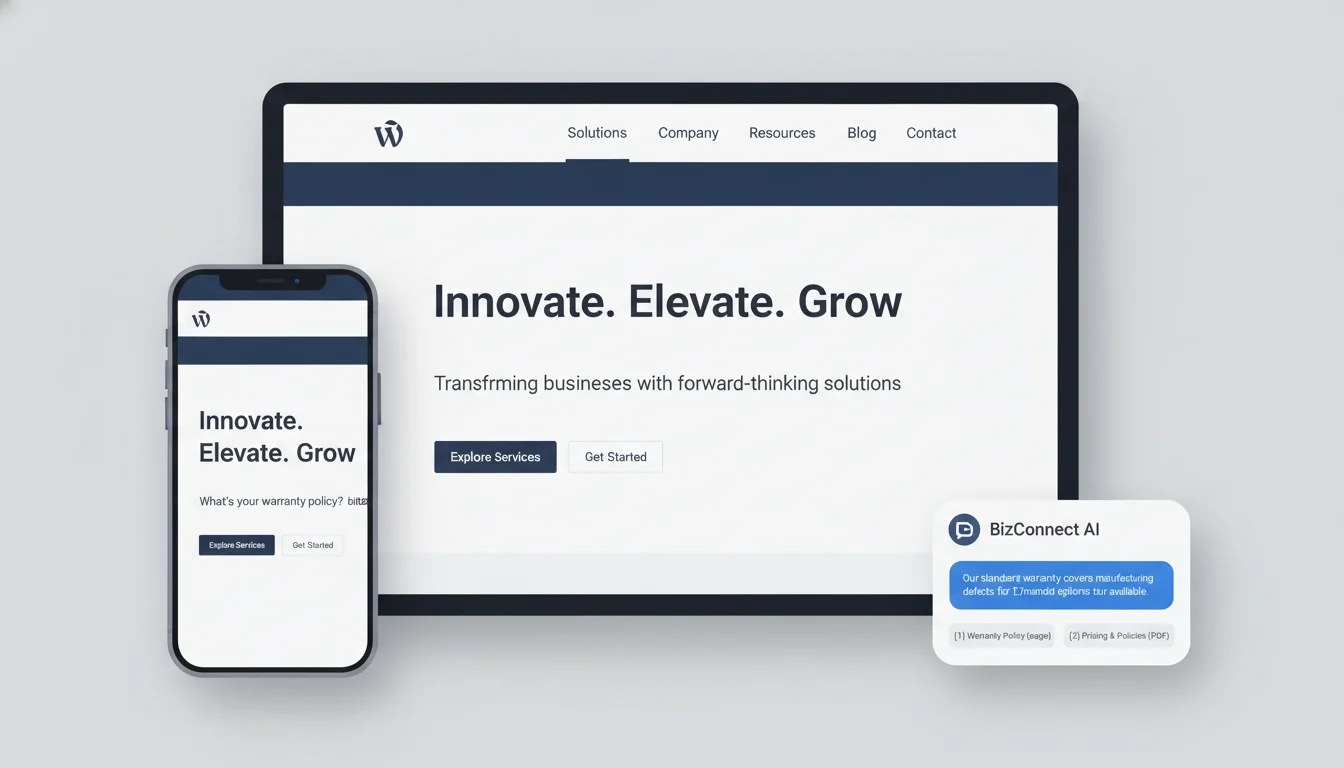
Trusted by St. Louis businesses and partner agencies. Up next: what’s included in our Custom AI Chatbot Setup.
Trusted by St. Louis teams who need speed, accuracy, and control
Manufacturers, clinics, nonprofits, and agencies in St. Louis choose us to launch on‑brand chatbots fast—and keep them accurate as they grow. We handle setup end‑to‑end, connect the bot only to your approved content, and provide ongoing monitoring and updates. Clear setup, no drift.
Want a quick, no‑pressure walkthrough of how this could look for your brand? Call 314‑657‑7421 or email jc@stlcodescape.com.
- Regional manufacturers
- Healthcare providers
- Nonprofits
- Professional services
- Branding agencies
“STL CodeScape took us from kickoff to a fully branded WordPress chatbot in days, not months. It’s fast, looks like us, and started deflecting routine questions immediately.”
— Marketing Director, St. Louis B2B manufacturer
“The bot answers from our approved policies without guessing, and their team is on it with updates and clear guidance. Support has been outstanding.”
— Operations Manager, regional nonprofit
View more client stories or book a 15‑minute consult at 314‑657‑7421.
What you get with our Custom AI Chatbot Setup
Here’s what we implement and hand over so your WordPress site gets a fast, on‑brand AI assistant you control—without slowing your site or adding bloat:
Content intake and indexing
We gather and clean your approved sources (website pages, posts, PDFs, knowledge base articles, FAQs) and index them with crawl rules, exclusions, and update schedules so the bot references only current, trusted content.
Result: a single source of truth that stays fresh automatically. Have unusual sources (SharePoint, Notion, Google Drive)? Ask us.
Retrieval‑Augmented Generation (RAG) pipeline
Answers are grounded in your indexed content to reduce hallucinations. We configure retrievers, confidence thresholds, and citations with links back to source pages, plus safe fallbacks when content isn’t found.
Result: accurate, traceable answers—and no awkward guesswork. Want separate knowledge sets for Sales vs. Support? We can segment them.
Brand voice tuning and guardrails
We capture tone of voice and do/don’t rules, add compliance boundaries (PII handling, HIPAA/GDPR‑aware patterns), set refusal behavior for risky topics, and define escalation triggers for sensitive queries.
Result: on‑message responses that protect your brand and reduce risk. In a regulated industry? Let’s align on requirements early.
WordPress‑first embed
A lightweight, asynchronous widget or custom UI component built as a block, shortcode, or theme component. It loads deferred, works with caching and CDNs, and preserves Core Web Vitals. Fully responsive, accessible, and styled to your brand.
Result: a seamless UX that looks native and won’t hurt performance. We’ll match your design system down to micro‑interactions. Have a complex build? Our WordPress Specialists align the embed to your theme and workflow.
Human handoff options
Route to email, help desk, or live chat when confidence is low or on specific intents. We can pass the full transcript, page URL, and user details to tools like Zendesk, Freshdesk, Help Scout, HubSpot, Intercom, or a shared inbox (see AI integrations).
Result: no dead ends—just faster resolutions with full context.
Analytics and training
A simple dashboard for conversations, top intents, unanswered questions, and deflection signals. We include an improvement plan and cadence so your team knows which articles to add, update, or refine each month. See how AI can spot trends in customer feedback.
Result: steady gains in self‑service and fewer repetitive tickets. We can run periodic reviews with you for continuous lift.
Clear ownership
You own your content index, prompts, and settings. You get admin access, export options, and the choice to bring your own API keys (OpenAI/Azure OpenAI, Anthropic, Google) for maximum control over cost and data retention.
Result: no lock‑in and the freedom to switch models or vendors as your needs change.
Documentation and handover
A concise admin guide (updating content, safety settings, analytics) plus a recorded handover session so your team can run it confidently.
Need ongoing help? We can manage updates and optimization month to month.
Want to see how it feels on a real site? Try the live demo below—or get a quick estimate in a 15‑minute call at 314‑657‑7421 or jc@stlcodescape.com.
Try it: live demo
Open the chat bubble in the lower right to try our embedded demo chatbot—no login required. It’s trained on anonymized content from a sample WordPress site: pages, blog posts, a small product and services list, policy pages, and a pricing PDF. Every answer cites its sources, so you’ll see it pull real site content instead of guessing. Ask it anything you’d expect a real visitor to ask.
Try prompts like:
- Product or service fit: “Do you serve ZIP 63010?” “Do you install tankless water heaters?”
- Policies: “What’s your return or warranty policy?” “How do cancellations work?”
- Scheduling: “Book a consultation for Friday at 2 pm.” (Calendar is simulated in this demo.)
- Lead capture: “I need a quote for website maintenance.” (It will collect name, email, and a short brief.)
- Support: “Reset my password” or “My order hasn’t arrived.” (See guidance and human handoff.)
- Content Q&A: “Summarize the Spring Maintenance Guide in 3 bullets.” “What’s on page 3 of the pricing PDF?”
- Multilingual: Ask “¿Cuáles son sus horarios?” to see language detection and a Spanish reply.
- Human handoff: Type “Talk to a human” to see routing to a form or email.
Notes and demo limits:
- Scope: the bot only knows the sample site’s content. It is not connected to live calendars, CRMs, inventories, or payments. Scheduling and ticketing are simulated. In production, we can integrate with your calendar, CRM, help desk, or booking tools.
- Accuracy: responses are limited to the demo dataset and may decline out‑of‑scope questions.
- Privacy: please don’t enter sensitive personal or payment information. Demo chats may be retained briefly for quality review and are purged periodically.
- Performance: the widget loads asynchronously and won’t delay page rendering. Your production embed uses the same lightweight, WordPress‑friendly approach.
Want this on your content? Email a few URLs or PDFs to jc@stlcodescape.com or call 314‑657‑7421 and ask for a private demo. Prefer to start in the chat? Tell the bot “Set up a private demo” and we’ll follow up.
Who this is for and common use cases
You’ll see the most value if you’re an SMB or mid‑market organization on WordPress and you want faster answers for customers without adding headcount. We also partner with branding and creative agencies that need a dependable dev team to implement and maintain chat experiences under their label. If you lead support, marketing, or operations—and you’re tired of repetitive questions clogging the queue—this is built for you. Not sure if it’s a fit? Send us your FAQ link and we’ll tell you what’s realistic for your stack.
Common use cases we implement
- Customer support deflection: train the bot on your FAQs, policies, and tutorials so it resolves repetitive tickets and routes edge cases to your help desk (Zendesk, Freshdesk) with full transcripts. Great for WooCommerce order status, returns, and appointment questions. Outcome: faster answers, fewer tickets, happier agents. For triage and prioritization, see how AI can score and tag tickets.
- Lead capture and qualification: ask smart questions, score intent, and push qualified leads into HubSpot or Salesforce with UTM and source data. Can book meetings via Calendly and follow up by email or SMS. Outcome: more booked calls from the same traffic.
- Membership and portals: respect WordPress roles and memberships (MemberPress, Paid Memberships Pro, BuddyBoss) so members see gated answers and non‑members get upgrade prompts. Useful for course portals and associations. Outcome: better member experience and clearer upsell paths.
- Documentation and knowledge bases: turn product docs, SOPs, and how‑tos into conversational, searchable answers. Keep content fresh by syncing with WordPress, your knowledge base, or Google Drive. Outcome: self‑serve help that actually gets used.
- Internal team assistant: give staff a private bot inside Slack or Microsoft Teams that surfaces SOPs, product specs, and past resolutions for faster onboarding and fewer interruptions. AI Integrations make it easy to add channels as you grow. Outcome: fewer “got a minute?” pings and quicker ramp‑ups.
Channels we support
- Website widget: a lightweight, brand‑matched chat widget that loads asynchronously on WordPress and won’t slow your pages. Optional live‑chat handoff to your team. Great first step to prove value. Built by WordPress Specialists.
- WhatsApp and SMS: quick Q&A, appointment reminders, and order updates via Twilio or WhatsApp Business. Meet customers where they already are. See supported integrations.
- Slack and Microsoft Teams: private, role‑aware assistants for sales, support, and operations. Keep knowledge in flow, not in silos.
- Email autoresponder: draft helpful, accurate replies from your knowledge base, ready for human review or auto‑send with guardrails. Reduce response times without losing quality.
If one or more of these fits, we’ll help you pick a starting channel and expand over time. Want to see how it would work with your content? Reach out for a quick consult or demo: jc@stlcodescape.com or 314‑657‑7421.
Expected outcomes and how we measure them
Support deflection rate (how we calculate it)
- Definition: a visitor gets a satisfactory answer in the bot and does not open a ticket, send a support email, or start live chat within 24 hours.
- Baseline: we review your last 30 days of support tickets, FAQs, and site search to find the top intents likely to be deflected.
- Measurement: the bot tags each conversation to an intent. We combine end‑of‑chat feedback with downstream behavior to mark a session as deflected.
- Human verification: weekly review of a meaningful sample of transcripts from the top intents to validate labels and tune thresholds. Reports show deflection by intent and 30‑day trend.
- Why it matters: fewer tickets, same (or better) customer experience. Ask us for a sample deflection report from a recent rollout.
Lead capture uplift (clean attribution)
- Events: we track form_start and form_submit in GA4 and clean analytics setups and pass a hidden “source=chatbot” field on bot‑initiated form visits to avoid duplicate attribution.
- Uplift model: compare a pre‑launch window to post‑launch, or run a holdout (for example, 10% of traffic without the bot) for a cleaner A/B.
- What we attribute: starts, completions, and assisted conversions from bot CTAs (book a call, download, call click, email reveal). Works with Gravity Forms, WPForms, WooCommerce checkouts, and native HubSpot forms.
- Why it matters: you’ll see the bot’s real contribution to pipeline, not just vanity clicks. Prefer proof? We’ll set up a holdout so you can see lift side‑by‑side.
Response accuracy scoring
- Grounded vs. ungrounded: every answer cites its sources. Responses with adequate retrieval confidence and correct citation are “grounded.” Low confidence, missing, or mismatched citations trigger fallback or handoff.
- Confidence thresholds: conservative thresholds per intent. Below threshold, the bot asks a clarifying question or escalates.
- Quality reviews: monthly human ratings of a random sample across top intents with a clear rubric. We publish an overall accuracy score and per‑intent heatmap and feed misses back into content and retrieval tuning.
- Why it matters: trustworthy answers drive adoption. We’ll show you exactly where the bot is rock‑solid and where we’re improving.
Time‑to‑answer and CSAT
- Speed: we track median and 95th‑percentile time from user message to first response and total time to resolution. Alerts fire if latency spikes.
- CSAT: optional thumbs up/down or 1–5 rating at answer or chat end. An open “what was missing?” prompt can be enabled for thumbs down. CSAT events flow to GA4 or your CRM, and negative sessions can auto‑create a ticket.
- Why it matters: fast, helpful interactions raise satisfaction and reduce churn. We’ll set targets together and keep you posted with clear alerts and trends.
Reporting and visibility
You get a Looker Studio or HubSpot dashboard with the above KPIs, annotated with major content changes and model updates. We review results with you monthly and agree on the next round of improvements. Want a peek before you commit? Ask for a sample dashboard walkthrough.
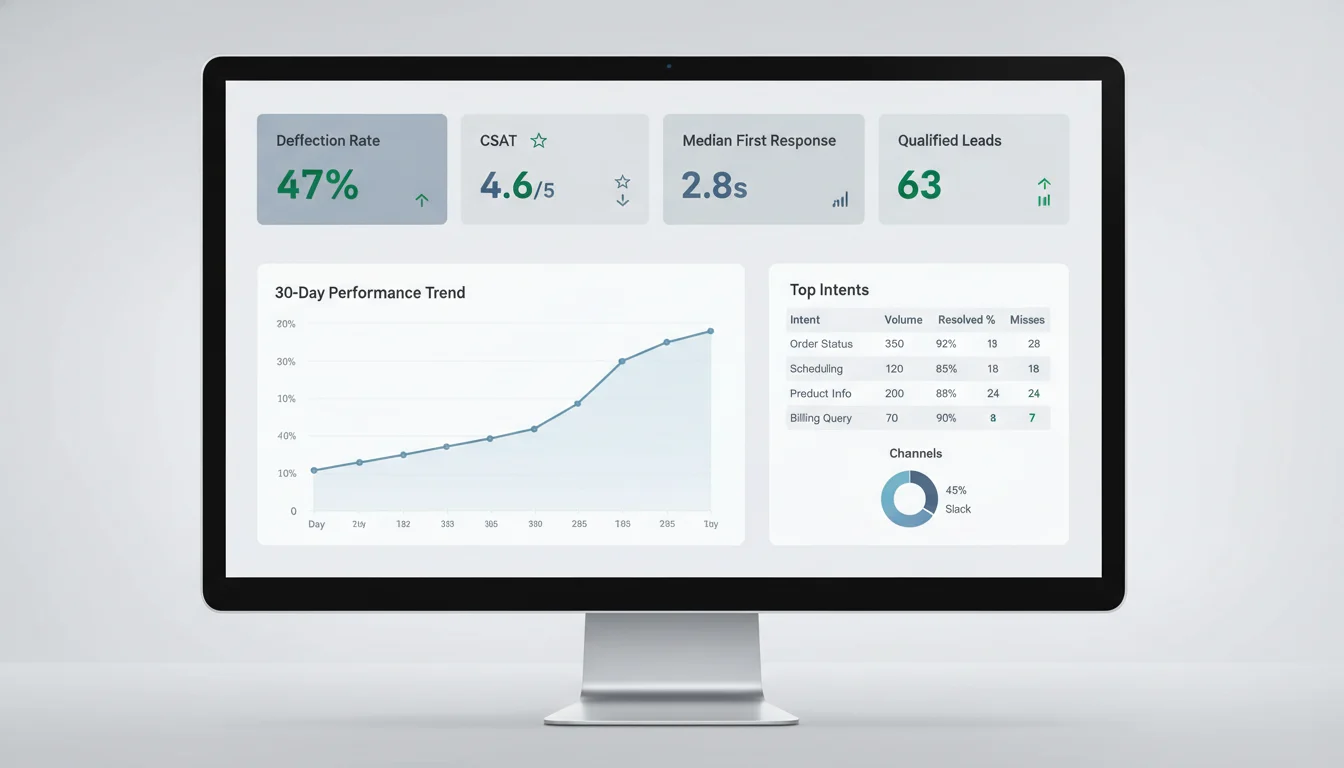
With goals and tracking in place, the next step is our path to launch and the timeline to get you live. Ready to see this on your site? Book a quick discovery call at 314‑657‑7421 or email jc@stlcodescape.com to get your measurement plan set up.
How it works: from kickoff to live in days, not months
A fast, done‑for‑you implementation with clear ownership and daily check‑ins. Typical timeline: 8–10 business days to go live when content is ready and approvals turn around in 24–48 hours. Ready to move? Lock your start date: jc@stlcodescape.com or 314‑657‑7421.
-
Step 1: Discovery and content intake (day 0–2)
- Kickoff (60 minutes): goals, top use cases and intents, success metrics (support deflection, qualified leads, bookings). Quick, focused, and designed to get you value fast.
- Content sources: share approved materials (site URLs or sitemap, PDFs, knowledge base exports, product sheets, policies). Mark anything out of bounds. We provide a secure upload link and read‑only access options—just drag, drop, done.
- Brand and rules: tone and voice examples, compliance notes, escalation and handoff criteria, CTAs we can use—so every answer sounds like you.
- Ownership: you supply sources and guardrails. STL CodeScape supplies the intake checklist and confirms scope. As soon as you approve the source list, we start building.
-
Step 2: Indexing and RAG setup (day 2–4)
- Structured crawl and ingestion of approved content, with exclusions honored (robots and meta noindex). No surprises, no “mystery data.”
- Chunking, embeddings, and vector index creation (pgvector, Pinecone, or Azure AI Search, matched to your stack and data residency needs).
- Metadata and versioning so answers cite the most current source. Confidence thresholds to avoid overconfident guesses.
- Ownership: STL CodeScape implements. You validate the source list and exclusions. Keep feedback within 24–48 hours to stay on the fast track.
-
Step 3: Prompting, guardrails, and brand voice (day 4–6)
- System prompts tuned to your brand and audience, with style and formatting rules (links, bullets, disclaimers) so every response is on‑brand and useful.
- Safety rules: refusal policies, off‑topic boundaries, PII handling, and restricted topics to protect customers and your reputation.
- Conversation design: escalation to humans, lead capture scripts, booking flows, and fallbacks that turn chats into conversions.
- Rapid test loop with a seed set of your real questions. We iterate and document changes so you know exactly what’s improving.
- Ownership: STL drafts and tests. You review tone, rules, and escalation paths. Approve, and we’re on to integration.
-
Step 4: WordPress integration and QA (day 6–8)
- Install a lightweight, async chat widget (or Gutenberg block or shortcode) that defers JS, respects your caching and CDN, and matches your theme. No jQuery dependency. Accessible and keyboard navigable. Built to keep Core Web Vitals happy.
- Optional role‑based access in WordPress for your team to review analytics and tune content.
- Staging QA: top 100 intents across mobile and desktop, guardrail tests, fallback coverage, and performance checks (target under 100 ms main‑thread impact for the widget).
- Ownership: STL handles integration and fixes. You approve on staging before production. Want a quick walkthrough? We’ll demo it live. Curious about caching and speed details? Read our take on performance optimization and caching.
-
Step 5: Soft launch, analytics wiring, and training (day 8–10)
- Low‑risk production launch window and post‑launch monitoring so you’re supported when it matters most.
- Analytics: GA4 events, conversions, and funnels. Transcript logging with privacy controls. CRM piping (HubSpot or Salesforce) for qualified leads. Optional Clarity or Hotjar session tagging. See impact from day one.
- Dashboard setup: engagement rates, deflection rate, missed intents, satisfaction scores, and revenue assist for WooCommerce.
- Handoff training (45–60 minutes): how to update sources, review chats, label intents, request tweaks, and measure impact—your team leaves knowing exactly what to do.
- Ownership: shared. STL monitors and applies a first optimization pass within the first 7–14 days. You’ll get a quick win report and next‑step recommendations.
Optional: Multichannel rollouts and integrations (week 2–3)
- Extend to WhatsApp or SMS, Facebook Messenger, Microsoft Teams or Slack, or help desks like Zendesk or Intercom—grounded on the same approved content.
- Workflow hooks: ticket creation, meeting scheduling, WooCommerce order lookup, inventory FAQs, or internal KB access with role‑based gates.
- Compliance and SSO checks before each new channel goes live. Start on web, expand when you’re ready.
Notes on timing: this plan assumes timely content access and 1–2 day feedback cycles. Complex permissions or regulated data can add a few days. We’ll flag those at kickoff and keep you on a clear, no‑surprises timeline.
Have assets ready or want a quick fit check? Email jc@stlcodescape.com or call 314‑657‑7421 and we’ll get your kickoff on the calendar. Wondering how we keep answers accurate, on‑brand, and safe? Next, we walk through the data approach: how we ground responses on your approved sources, enforce guardrails, and protect sensitive information.
Data accuracy and safety: grounded answers, not guesses
Your chatbot gives answers your team can stand behind. We ground every response in your approved content using retrieval‑augmented generation. We sync only the sources you choose (WordPress pages and posts, ACF fields, FAQs, PDFs, WooCommerce product data, and help‑desk articles), then chunk and index them for fast, precise retrieval. Each reply is composed from the most relevant sources and includes clickable citations back to the exact page or document section—so customers (and auditors) can verify in one click. We set confidence thresholds to match your risk tolerance. If the bot isn’t sure, it asks a clarifying question, links to a verified resource, or hands off to your contact form, ticketing, or live chat—instead of guessing. Curious how we connect to private systems securely? Read our guide on connecting AI to databases and APIs securely.
Safer by design. Moderation and PII handling are built in. All prompts and replies pass through safety filters, with custom guardrails to prevent regulated advice (medical, legal, financial) or off‑brand behavior. We detect and redact sensitive information (emails, phone numbers, addresses, SSN or credit‑card patterns, birthdates) before logging or analytics. For sensitive environments, we enable HIPAA‑ and GDPR‑aware settings, minimize data retention, and can disable provider‑side data training by default.
Access control that matches how your organization works
- Public vs. internal knowledge: keep separate collections so the public widget shows only customer‑safe answers, while a logged‑in member or staff widget can use private docs.
- WordPress roles and capabilities: restrict internal answers based on user role—e.g., only Editors or Support can access certain playbooks.
- Staging vs. production: content changes go to a staging index for review, then promote to production with one click.
- Optional SSO for internal bots (Microsoft 365 or Okta) and rate‑limiting or IP controls for the public widget.
Model options that fit your stack and compliance
- OpenAI or Azure OpenAI, Anthropic (Claude), and Google (Gemini) supported.
- Bring your own API keys with region selection and data‑retention settings. We default to no training on your data.
- Route different tasks to different models (fast FAQ vs. complex reasoning) and fail over automatically if a provider has an outage.
Secure operations and transparent analytics
- API keys and secrets are stored in an encrypted secrets manager with limited, audited access. Logs are minimized and can be anonymized. Retention windows are configurable.
- The analytics dashboard shows top questions, deflection rates, missed intents, and CSAT so we can close content gaps and improve prompts—without exposing PII.
Mini architecture at a glance
- Your data sources (WordPress, PDFs, KB, WooCommerce, CRM excerpts)
- → Vector index (chunking and embeddings, staging and production)
- → LLM (OpenAI or Azure, Anthropic, Google) with policies and guardrails
- → Chat widget (web and optional channels) with human handoff
- → Analytics (insights without PII)
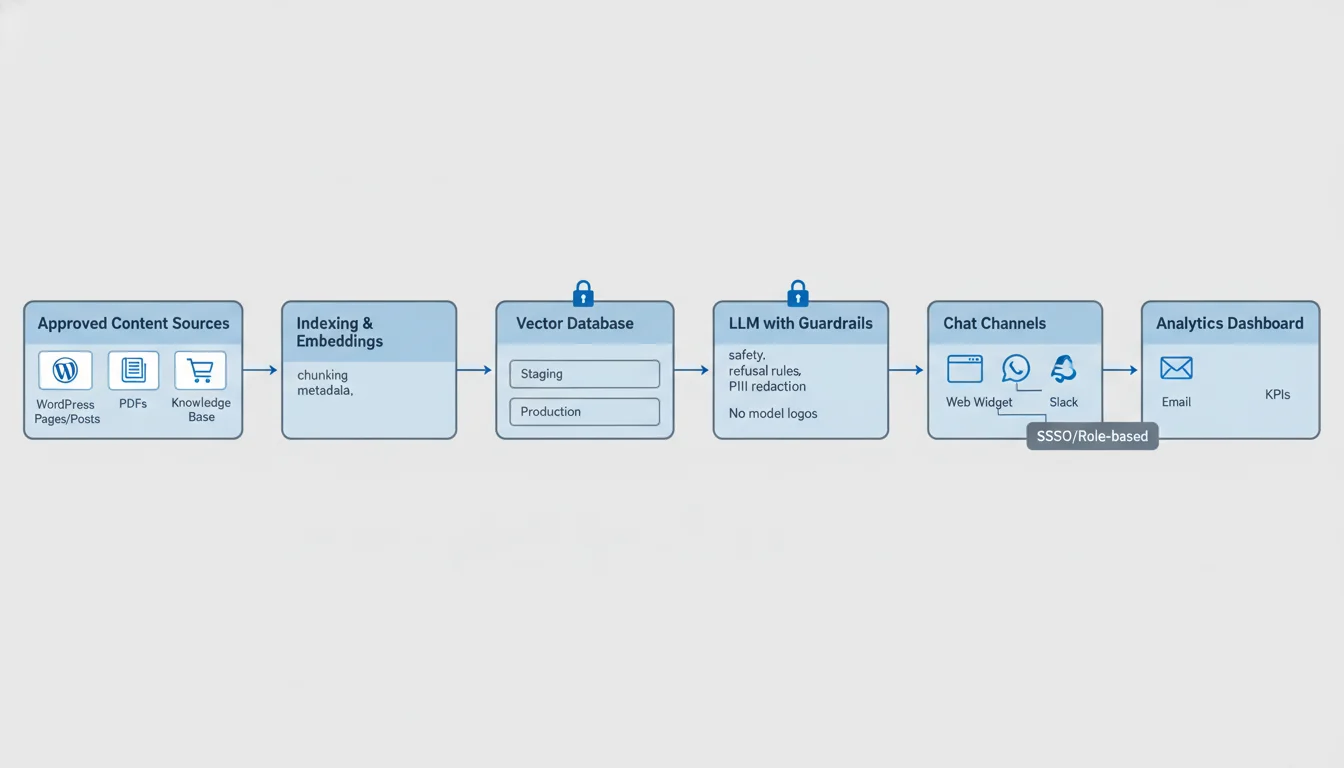
Want to see it on your content? We’ll run a quick sync and accuracy test—no risky data exposure, no guesses. Email jc@stlcodescape.com or call 314‑657‑7421 to book a 15‑minute walkthrough.
WordPress‑first performance and UX
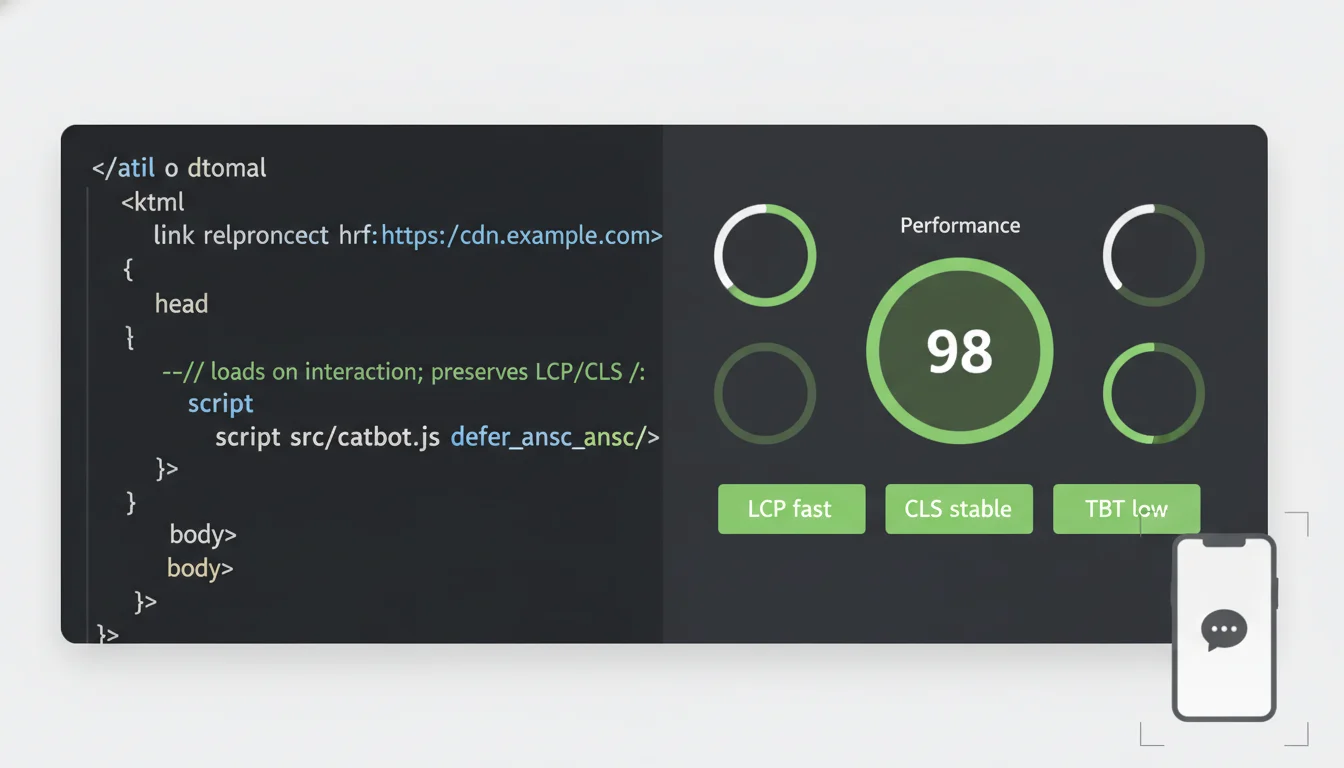
Your chatbot should feel invisible to performance tools and effortless for users. We engineer the embed for Core Web Vitals and accessibility from day one—so Lighthouse stays green and customers get instant answers without slowing your WordPress site.
Speed by default
- Injected with async and defer so nothing blocks initial render and your LCP stays fast.
- Minimal, framework‑free JS with code‑splitting and no render‑blocking CSS to keep payloads tiny.
- Loads on user intent or idle time, with preconnect to API endpoints to cut TTFB and reduce server load.
- Zero layout shift. Launcher space is reserved to avoid CLS spikes and protect SEO.
Compatible with your caching and CDN stack
- Full pages remain cacheable. The bot loads client‑side and won’t break WordPress page caching—no cache‑busting surprises.
- Tested with Cloudflare (including APO), WP Rocket, and common edge/CDN setups; we validate on your stack before launch. Learn more about our performance optimization and caching approach.
- Versioned, long‑lived assets for CDN caching. Chat API routes carry proper cache headers and are excluded from page cache for reliability.
- No PHP sessions or query‑string tricks that kill cache—your performance tooling keeps working as expected.
Smart loading for complex themes and SPAs
- Lazy hydration only when the launcher enters the viewport or after first interaction, preserving initial page speed.
- Route‑aware re‑init for headless or SPA navigation to prevent duplicates and memory leaks.
- Works with Gutenberg and block themes, Elementor, Divi, and custom React or Vue fronts—headless‑ready out of the box.
Accessible and inclusive by design
- Full keyboard navigation (Tab and Shift+Tab), Esc to close, proper focus trapping—usable by everyone.
- ARIA‑complete: launcher as button, chat as dialog, aria‑labelledby, and aria‑live=”polite” for assistive tech.
- WCAG 2.2 AA color‑contrast defaults, tested with NVDA and VoiceOver, and respects prefers‑reduced‑motion for compliance and comfort.
Mobile‑first UX and on‑brand theming
- Responsive from 320 px. On mobile it opens as a bottom sheet with safe‑area insets for a native feel.
- Themable via CSS variables to match your typography, colors, radii, icons, and dark mode—pixel‑true to your brand.
- RTL support and high‑contrast options for global, inclusive experiences.
Want to see your Core Web Vitals before and after? Ask for a quick demo or a no‑pressure performance check: 314‑657‑7421 or jc@stlcodescape.com. If you also need hosting tuned for speed, see our Hosting Solutions.
Integrations we support
Connect your chatbot to the tools you already rely on—without plugin bloat or risky workarounds. Our integrations are API‑first, load asynchronously, and fail safely so chat stays fast. Share your stack and we’ll confirm compatibility in a quick 15‑minute call.
WordPress: Gravity Forms, WooCommerce, ACF, MemberPress
- Gravity Forms: turn qualified conversations into form submissions, trigger existing workflows, and capture consent plus UTM and source data automatically.
- WooCommerce: answer product questions from your catalog, check order status by email or order ID, and route high‑value intents to humans.
- ACF: ground answers on structured fields (specs, pricing, policies) for precise responses.
- MemberPress: verify membership, personalize answers for members vs. guests, and surface gated resources when users are authenticated.
- Not seeing your plugin? Ask us—we build lightweight adapters for well‑documented extensions. Need deeper WordPress help? Explore our WordPress Specialists.
CRMs: HubSpot, Salesforce, Zoho
- Create or update contacts and companies, log conversations, score and tag leads, and open deals or tasks when buying intent appears.
- Deduplicate by email or domain, respect CRM ownership rules, and map properties cleanly so sales ops stays happy.
Help desks: Zendesk, Freshdesk, Intercom
- Deflect common questions with grounded answers, then escalate with one click.
- Auto‑create tickets with full transcripts, priority, and topic tags so agents have context from the start.
Messaging: WhatsApp, SMS, Slack, Microsoft Teams
- Run the same assistant across web chat, WhatsApp (Meta Cloud API), SMS (Twilio), Slack, and Teams.
- Set channel‑specific guardrails and hand off to the right team based on channel and user role.
Analytics: GA4 and privacy‑friendly event tracking
- Track start and stop, resolved vs. escalated, lead captures, revenue assists, and top intents.
- Support cookieless modes and server‑side forwarding to keep PII out of analytics while preserving useful metrics.
Webhooks and custom APIs for proprietary systems
- Connect to ERPs, inventory, booking, or internal knowledge bases via signed webhooks or custom adapters.
- We handle OAuth or token management, rate limits, retries with backoff, and structured logging.
Implementation details you can expect: non‑blocking, deferred script loading; least‑privilege API scopes; environment separation (dev, stage, prod); and useful error telemetry. Want a quick integration plan for your tools? Email jc@stlcodescape.com or call 314‑657‑7421 and we’ll map it out.
Ownership, control, and compliance
Your chatbot, your rules. We configure everything so your team stays in control from day one—no black boxes, no surprises.
You retain full ownership and admin access
- You own your content index (knowledge base and embeddings), chat logs, and all bot configuration, prompts, and guardrails.
- We document where each data class lives (WordPress, object storage, vector database) and give you credentials with least‑privilege access.
- We include a plain‑English handoff guide so your team—or your IT partner—can manage confidently.
Bring your own keys and pick where data lives
We support BYOK (Bring Your Own Keys) for model and embedding providers (OpenAI, Azure OpenAI, Anthropic) and for storage and vector layers (AWS, GCP, Azure, Postgres/pgvector, Pinecone, Qdrant). You choose the region for data residency. Where supported, we disable vendor training on your data by default and apply encryption in transit and at rest. Prefer a specific cloud or vendor? Tell us during your consult and we’ll meet you there.
Leave any time with everything you need
- Knowledge base and index export (source files plus embeddings as JSON or CSV).
- Bot configuration export (system prompts, tools, guardrails, routing) as JSON or YAML.
- Conversation transcripts, user feedback, and analytics as CSV or JSON.
- Uninstall checklist for WordPress and any third‑party services, plus reversion steps.
We also include a short screencast showing how to re‑import your configuration elsewhere. Want to see what an export looks like? Ask for a sample package in your consult.
Privacy, roles, and retention built in
We configure consent notices, optional PII masking and redaction, and adjustable retention windows for logs and files. Access is role‑based: WordPress roles (editor or admin) can view analytics and tweak content, while developer or service roles manage integrations. All changes are tracked with audit trails. Have internal policies we should mirror? We’ll align settings to your governance requirements.
GDPR and HIPAA‑aware builds available on request
For GDPR, we supply a data map, DPA templates, cookie and consent settings, data subject request workflows, and region‑pinned storage. For HIPAA‑aware builds, we limit PHI exposure (redaction, private endpoints), select vendors that execute a BAA, and define security roles with least privilege. We’ll review your compliance needs up front and deliver a written configuration and policy summary at handoff. Need a quick stakeholder review? We can brief your legal or security team.
If you want the detailed data‑flow diagram and security checklist we use on projects, ask during your consult and we’ll share a sample. Ready to keep ownership and compliance airtight? Call 314‑657‑7421 or email jc@stlcodescape.com, and we’ll walk you through options that fit your team and budget.
Pricing and engagement options
Pick the path that fits how you want to work today. Own it in‑house after launch, or keep us on to improve results month to month. Not sure yet? Request a quick scoping call and we’ll recommend the best‑fit option for your goals and team capacity.
Setup Only (you own it)
Ideal if your team wants full control with a clean handoff and predictable costs.
- Fixed‑scope implementation of a production‑ready chatbot for your WordPress site
- Data onboarding and grounding (RAG) from approved sources
- Typical starter scope: your public website plus a limited number of private repositories (Google Drive, SharePoint, Notion) defined in the SOW
- Clear content and crawl limits documented up front; larger knowledge bases can be added later
- Brand‑voice tuning, answer guardrails, and fallback or escalation paths
- Performance‑first WordPress embed (async or deferred load, minimal JS footprint)
- Basic integrations (lead capture form, email alerts, CRM handoff if already in place)
- Launch QA, accessibility checks, and security review
- Admin handover: playbooks, configuration docs, and live training for your team
Next step: Ask for a fixed quote and launch plan. Email jc@stlcodescape.com or call 314‑657‑7421.
Setup + Ongoing Optimization (hands‑off growth)
Best if you want steady, compounding gains without adding internal headcount.
Everything in Setup Only, plus managed improvements:
- Monthly strategy and review call (performance trends, top intents, gaps)
- Continuous prompt, retrieval, and knowledge updates as your content changes
- A/B testing of prompts, response styles, and call‑to‑action flows
- Conversation analytics and issue triage (misfires, low‑confidence answers)
- Quarterly reports with recommendations tied to your KPIs (deflection, leads, CSAT)
- Proactive experiments (multilingual variants, channel expansion, richer handoffs)
- Optional managed integrations (ticketing or CRM workflows) as your stack evolves
Next step: Book a 20‑minute fit call to set targets and get a right‑sized monthly plan. If you’re also automating internal steps, explore our Business Process Automation.
What’s included vs. out of scope
Included in both paths
- Discovery and requirements workshop
- Data ingestion pipeline and grounding on your approved sources
- WordPress implementation and launch support
- Baseline analytics dashboard and alerts
- Team training and documentation
We document all assumptions and limits in your SOW so there are no surprises.
Out of scope (available as separate projects)
- Net‑new custom app development or bespoke APIs and services
- Purchasing third‑party licenses (CRM, ticketing, SMS or WhatsApp providers)
- Formal compliance audits or certifications (we build with best practices and support your auditors)
- Complex enterprise SSO or SCIM beyond standard OAuth or SAML connectors
- IVR or voice bot deployments
Platform usage costs and billing
- LLM tokens: you pay for model usage (prompts and answers) to the model provider. We support bring‑your‑own keys (OpenAI, Azure OpenAI, Anthropic, Google) or can provide managed keys.
- Storage and search: if we deploy a private vector index or search service (Azure AI Search, Pinecone, OpenSearch), you pay the provider directly (your account) or we meter usage on your monthly invoice if we host or manage it.
- Reranking and embeddings: some builds use separate embedding or rerank models. These follow the same billing approach.
- Billing options:
- Your account: all usage is billed directly by each provider. STL CodeScape invoices only for services.
- Our managed account: we add metered usage to your monthly invoice at provider rates, plus an admin and ops fee. No long‑term lock‑in; switch to your own keys anytime.
Want a clear cost picture? We’ll model expected usage and give you a simple forecast before you commit.
Not sure which path fits? If you want full control with a clear handoff, choose Setup Only. If you want steady gains without adding internal headcount, choose Setup + Ongoing Optimization. Still deciding? Email jc@stlcodescape.com or call 314‑657‑7421 and we’ll guide you in 1 business day.
Continuous improvement: optimization and management
Launch is the starting line. From there, we manage the chatbot like a product: measure results, close content gaps, and expand capabilities safely—so every month is smarter than the last. Prefer to stay hands‑on? We’ll co‑manage and translate the data into clear next steps your team can act on.
What we review every month
- Analytics and outcomes: top intents, unanswered questions, containment or deflection rate, user satisfaction, human handoffs, and cost per conversation.
- Funnel impact: qualified leads created, tickets deflected, bookings started and completed, and any revenue‑related events you track.
- Action list: we turn insights into a visible, prioritized backlog of fixes, tests, and additions—so owners, timelines, and expected impact are crystal clear.
Want to see the format? Ask for a sample monthly scorecard or a 20‑minute walkthrough. We also highlight trends and issues in customer feedback so content and retrieval improve where it matters.
Content refresh and change management
- Cadence: we sync new and updated content from your WordPress site and approved docs on a set schedule, with hotfixes as needed.
- Governance: proposed knowledge updates and bot replies are tracked in tickets, previewed in staging, and released with notes and rollback options.
- Source of truth: we tag authoritative pages and fields (ACF, WooCommerce FAQs, policy PDFs) so retrieval favors the most current, approved answers.
Prompt and retrieval tuning
- Brand voice and accuracy: iterative updates to system prompts, tone, and examples. We test before and after for precision and recall.
- Retrieval quality: adjust chunk size, embeddings, synonyms, and similarity thresholds to reduce “I don’t know” and prevent overconfident answers.
- Safety: guardrails for PII, restricted topics, and tool usage. We add capabilities (create a ticket, check order status) behind allow‑lists and rate limits, with audit logs.
Roadmapping what’s next
- Channels: plan rollout beyond the website (SMS or WhatsApp, Facebook or Instagram DMs, Slack or Teams) based on your audience and goals.
- CRM and help desk automation: stage integrations with HubSpot or Salesforce, Zendesk or Freshdesk, add human handoff and SLA‑aware triage.
- Advanced workflows: lead scoring and routing, appointment scheduling, membership and portal support, and post‑chat surveys or NPS introduced with A/B tests and clear success criteria.
Below are quick before and after snapshots and client quotes that show how this approach adds up. Want the same momentum? Email jc@stlcodescape.com or call 314‑657‑7421 to schedule an optimization kickoff or request a sample report.
Results that matter: mini case snippets
Project 1 — Fewer support tickets, faster answers (WooCommerce retailer)
Challenge: a regional HVAC parts store on WordPress and WooCommerce was drowning in “Where’s my order?” and return policy questions. Average first reply from the help desk was 6+ hours and weekend tickets piled up.
What we set up: a WordPress‑first chatbot trained on approved FAQs, policies, and product pages, with live order status via shipping API, Zendesk deflection, and guardrails to avoid off‑topic answers. Async, deferred widget to protect Core Web Vitals.
Outcome (first 60 days vs. prior 60 days, similar traffic):
- 38% reduction in new Zendesk tickets overall, 54% self‑service resolution on the top 50 intents
- Median time to answer dropped from 6h 14m to 2.7s
- 92% helpfulness rating on 1,148 rated chats
- Page speed impact: +13 KB JS, no measurable change to LCP or CLS on mobile
“We cut repetitive tickets without adding headcount, and customers get instant order updates, even on Sundays.”
— Operations Manager, HVAC eCommerce Retailer
Quick takeaway: If WISMO and policy questions clog your queue, we can stand up a WordPress‑native bot that deflects tickets without slowing your store. Want a 15‑minute walkthrough of how this works with your stack? Call 314‑657‑7421.
Project 2 — More qualified leads after hours (B2B services)
Challenge: a St. Louis industrial services firm was missing after‑hours inquiries and seeing low completion on a long contact form.
What we set up: a brand‑tuned chatbot that qualifies prospects with 4–6 dynamic questions, books discovery calls via Calendly, and pushes clean records to HubSpot with source and intent tagging. Private knowledge base for detailed service answers.
Outcome (Q2 vs. Q1, seasonally similar):
- 41% increase in qualified leads captured, 27% of all chats after business hours
- Lead form completion improved from 32% to 68% in chat
- Time to first response down from “next business day” to 3.1s; average booking lag down by 2.3 days
- Sales reported fewer unqualified meetings thanks to consistent pre‑screening
“The bot doesn’t just chat, it fills our pipeline with better leads and books them. It paid for itself in the first month.”
— Director of Marketing, Industrial Services Firm
Quick takeaway: Turn after‑hours traffic into booked, qualified meetings—without extra SDR headcount. Ready to see a targeted demo using your content? Email jc@stlcodescape.com.
Method notes:
- Deflection and helpfulness measured on the top intents with unique‑visitor comparisons. Accuracy validated by manual review of a 200‑session sample.
- Content updates flow from WordPress and approved docs. Changes reflect in the bot’s knowledge within scheduled sync windows.
Want results like these on your site? Let’s map your top 10 intents and an initial launch plan. Call 314‑657‑7421 or email jc@stlcodescape.com.
FAQ: timelines, accuracy, models, and WordPress impact
How long does setup take, and what can affect the timeline?
- Typical: 7–10 business days from kickoff to launch for a standard WordPress site (20–150 pages) with a web widget and knowledge‑base grounding.
- Add 3–10 more days if you need multi‑language content, CRM or help desk integrations, SSO, custom workflows, or legal and security reviews.
- Biggest factors: content readiness (URLs and docs), access (WP admin, DNS, CRM or help desk), approved bot tone and guardrails, and speed of feedback during QA.
- Want to move faster? Share access and content upfront and we’ll often launch inside a week. We’ll give you a written plan with milestones on day one.
How do you keep answers accurate, and how does accuracy improve over time?
- Grounded responses: we use retrieval‑augmented generation so answers come from your approved sources with citations.
- Guardrails: similarity‑score thresholds, “I don’t know” fallbacks when content is thin, and hard blocks for off‑limits topics.
- Continuous tuning: search and ranking tweaks, prompt refinement, and expansion of indexed content based on chat logs and missed‑intent reports.
- Quality checks: pre‑launch evaluation on your top tasks and FAQs, plus post‑launch feedback capture to retrain retrieval or add content.
- Prefer proof before go‑live? We provide a staging bot and a quick accuracy report so you can see it working on your content. Also see our primer on AI limitations to be aware of.
Which AI model should we use, OpenAI, Anthropic, or Google?
- We’re model‑agnostic and choose per use case:
- OpenAI: strong balance of cost, speed, and tool use, great for customer‑facing chat on busy sites.
- Anthropic: excellent long‑context and safety alignment, ideal for nuanced answers from large documents.
- Google: strong vision and Workspace ties, useful if you lean on Drive or Docs or need image‑rich Q&A.
- Privacy or compliance needs: we can deploy with your cloud keys, Azure OpenAI, or an approved open‑source model in a private environment.
- We’ll recommend a primary and fallback model after a short discovery call. For scale considerations, read Can AI systems scale as my usage and traffic grows?
How are new pages and documents added to the bot’s knowledge?
- WordPress‑aware indexing: we can watch your sitemap and auto‑crawl new or updated pages on a set schedule.
- Instant updates: push‑to‑index on publish or update via a lightweight WordPress hook, plus manual upload for PDFs, DOCX, CSV, and knowledge‑base exports.
- External sources: connectors for Google Drive or SharePoint folders. We index deltas so re‑crawls stay fast.
- Governance: staging‑first options so changes are reviewed before they go live in the bot.
- No dev lift needed—just publish. If you’re planning a site restructure, we’ll map redirects and keep the bot’s answers in sync.
Who owns the data, and how do exports work?
- You own everything: the content index, chat logs, prompts, and configuration. No lock‑in.
- Hosting options: keep it in your cloud accounts (your keys and storage) or let us host and hand it over at any time.
- Exports: one‑click CSV or JSON for conversations and a portable JSONL or Parquet export of the vector index with document metadata and embedding references.
- Security: encryption in transit and at rest, role‑based access, optional PII redaction, and deletion SLAs on request.
- Want to review before you commit? Ask us for a sample export format.
What are the ongoing monthly costs?
- Model and API usage: depends on traffic and complexity. We set budget caps and alerts. Most SMBs start with a modest allowance and scale with ROI.
- Storage and indexing: small monthly fee for vector storage and scheduled crawls, based on document count and size.
- Monitoring and analytics: included in our ongoing plan, or we can wire alerts and metrics into your tools (DataDog, Cloudflare, GA4).
- We’ll estimate a range during scoping and configure caps to avoid surprises. Ask for a line‑item estimate tailored to your stack and volume.
Will the chatbot slow down my WordPress site or conflict with caching and CDNs?
- Built for performance: the widget loads asynchronously, deferred, and hydrates only after user interaction. It won’t block rendering or shift your layout.
- Caching‑safe: we exclude dynamic bot endpoints from page cache while keeping static assets cacheable. Works with WP Rocket, LiteSpeed, W3 Total Cache, Cloudflare, and most CDNs.
- Minimal footprint: lightweight JS, preconnect hints, and lazy asset loading help preserve Core Web Vitals. We test on mobile 3G and throttled scenarios before launch.
- We’ll also share before/after Lighthouse and Core Web Vitals snapshots so you can see the impact. Dive deeper into our performance and caching approach.
Does it support multiple languages and handoff to a human?
- Multilingual: automatic language detection and responses in the user’s language. We can ground per‑language content to avoid mistranslations. RTL and diacritics supported.
- Human handoff: options include raising a ticket (Zendesk, Freshdesk, HubSpot), live‑chat transfer (Intercom or Zendesk), or sending a routed email, Slack, or Teams alert with the chat transcript and user details.
- Start with one language and add more as you grow—we’ll stage and QA each addition.
Ready to see it in action or get a tailored estimate? Book a quick consult or ask for a live demo. Call 314‑657‑7421 or email jc@stlcodescape.com.
Ready to see it on your site?
Let’s put a real, on‑brand AI assistant to work on your WordPress site—answering common questions, capturing qualified leads, and staying lightning‑fast without bloating your pages.
- Book a 20‑min consult — no sales pressure. In one call, we’ll review your site, map data sources, align on goals, and give you a clear plan with timelines and transparent, all‑in costs (setup only or setup + ongoing optimization). You’ll know exactly what it takes and what you’ll get. Email us or call 314‑657‑7421.
- See a live demo — try a working chatbot trained on real business content. Ask it tough questions. We’ll show guardrails, handoff options, and how it plugs into your stack. Open demo.
Prefer email or phone? Reach us at jc@stlcodescape.com or 314‑657‑7421.
Short form option
Share a few details and we’ll get back to you within one business day with next steps or a tailored demo plan.
- Your website URL and CMS (WordPress)
- Top goals (support deflection, lead capture, member portal, internal KB)
- Content sources (FAQs, docs, PDFs, help desk, knowledge base)
- Must‑have integrations (CRM, help desk, WooCommerce, WhatsApp or SMS)
Not quite ready to chat? No rush—save this page and reach out when it makes sense. When you’re ready, we’ll make the next step easy.