Chat Bot Setup
Chat Bot Setup for WordPress—capture more leads, answer faster, and hand off to humans when it matters
Let’s add a fast, on-brand chatbot to your WordPress site so visitors get instant answers, qualified leads get routed to the right next step, and your team jumps in the moment a human touch is needed. More conversations, less wait time, no extra busywork.

Built by STL CodeScape, a St. Louis–based WordPress agency serving clients nationwide. Your bot matches your site’s style and tone, is trained on your content (pages, FAQs, PDFs), and connects to your tools—forms/CRMs, help desks, calendars, and Slack or Teams. Basic setup takes days. Custom flows and integrations usually take 1–3 weeks, depending on scope.
Explore Custom AI Chatbot Setup
What you get
- On-brand chat widget and welcome prompts that feel native to your site
- Training on your approved content plus guardrails to prevent off-topic or risky answers
- Lead qualification and capture, with push to your CRM (HubSpot, Salesforce, Zoho—or simple email)
- Instant scheduling via Calendly or your Google/Outlook calendar
- Help desk routing (Zendesk, Freshdesk) and real-time alerts in Slack/Teams
- Human handoff with full chat context so your team can pick up seamlessly
- Analytics and transcripts to spot opportunities and tune responses over time
Performance comes first. Our lightweight, async loader won’t slow your site or hurt SEO, and it works with your cache/CDN and Core Web Vitals. We also set up privacy-friendly data capture and opt-ins by default. See how we handle performance and caching.
Ready to see it in action?
- Book a 15-minute setup consult
- See a live demo (or try it on this page)
Keep scrolling for results and proof this works.
Trusted by local teams and national brands
From St. Louis nonprofits and healthcare groups to national ecommerce and B2B manufacturers, teams trust STL CodeScape to launch on-brand chat experiences that capture more leads, answer customers 24/7, and keep WordPress sites fast—without adding plugin bloat or tech debt. Curious what this could look like on your site? Request a quick demo or book a 15‑minute consult and we’ll talk through your top FAQs and goals.
“What impressed us most was the speed to value. Within days, the bot was handling common questions and routing hot leads to our sales inbox, response times dropped and form fills went up without adding workload.”
— Marketing Director, Midwest B2B manufacturer
Quick ways to get started
- Request a 10‑minute demo of the chat experience
- Send us your top 5 FAQs for a tailored plan and estimate
- Book a 15‑minute consult to confirm fit and timeline
Trust badges
- WordPress-first implementation: hand-coded, cache/CDN aware, WooCommerce-friendly (no theme bloat)
- Performance-safe: asynchronous loading and Core Web Vitals conscious (keeps pages fast)
- Security-minded: least-privilege integrations and clear data/retention controls (enterprise-friendly)
- Accessible: keyboard and screen reader–friendly widget options (AA-aware patterns)
Agency-friendly
White-label partnerships welcome. We co-build with branding and marketing agencies that need a dependable development partner. Ask about our partner process and rate card.
Here’s exactly what’s included in our Chat Bot Setup—scroll to see the details, or contact us for a fast, no-pressure quote.
What you get with our Chat Bot Setup
You get a complete, production‑ready chatbot for WordPress—planned, built, and tested for real use—so it starts answering questions, booking appointments, and capturing leads from day one.
Discovery
- Clarify goals, audiences, and top use cases (pre‑sale Q&A, appointment booking, order status) so the bot aligns with real business outcomes.
- Define success metrics up front: deflection rate, lead conversion rate, average response time, CSAT proxy events—then build to hit them.
Outcome: a clear success plan your team can rally around.
Content sourcing
- Curate training material from your website, sitemap, FAQs, and documents (PDF/HTML) to keep answers accurate and current.
- Optional knowledge bases: Notion, Google Drive, SharePoint, or public support portals.
- Set an update cadence so new or changed content is reflected without retraining hassles.
Outcome: reliable answers without extra lift for your team.
Training and prompting
- Structured ingestion with scoping and prioritization for on‑topic, on‑point replies.
- Clear tone and voice controls to stay on brand—marketing can fine‑tune without dev cycles.
- Citations in answers where the platform supports it to build trust.
- Fallback behavior for unknown intents and low‑confidence answers to prevent dead ends.
Outcome: helpful, brand‑safe conversations that drive action.
Guardrails
- Confidence thresholds with safe responses and links to verified resources.
- Off‑limits topics and profanity filters to protect your brand.
- Human escalation rules for sensitive queries, account‑specific requests, or repeated failures.
Outcome: coverage for the edge cases that matter.
Branding and UI
- Widget styling to match your site (colors, fonts, icons, dark mode as available).
- Conversion‑minded welcome messages, suggested prompts, and lead‑capture copy.
Outcome: a seamless, on‑brand experience that nudges visitors to take the next step.
WordPress install
- Lightweight plugin or script embed with async/defer, plus preconnect/dns‑prefetch where useful.
- Cache/CDN handled (exclude the bot from minify/deferral if needed, Cloudflare/APO settings)—see our approach to performance and caching.
- Consent‑mode compatible, no render‑blocking, staging‑first deployment with rollback plan.
Outcome: fast, stable performance without hurting Core Web Vitals.
Integrations
- CRM/help desk/form mapping: HubSpot, Salesforce, Zendesk, Help Scout, Intercom.
- Scheduling and comms: Calendly, Slack/Microsoft Teams alerts.
- Automation: Zapier/Make for leads, tags, and workflows; optional Google Sheets logging. For broader workflow design, explore Business Process Automation.
Outcome: leads and conversations flow straight into the tools your team already uses.
Human handoff
- Routing by hours, departments, and channels (email, ticket, chat).
- Conversation transcript forwarding and instant alerts to inbox or Slack/Teams.
- Clear “talk to a person” paths.
Outcome: a smooth bridge from bot to human—no frustration, no lost prospects.
Analytics
- Event tracking via GTM/GA4 (conversation started, resolved, deflected, escalated, lead submitted).
- Dashboard/report setup with key trends.
- Weekly insights during the first month to highlight quick wins and gaps.
Outcome: see what’s working, fix what isn’t, and prove ROI.
Acceptance testing
- Test plan covering top tasks, edge cases, and failure modes.
- Accessibility checks (keyboard navigation, focus management, ARIA roles, contrast).
- Cross‑device/browser verification and formal sign‑off.
Outcome: confidence before you go live. For broader launch hygiene, review our website launch checklist.
Admin training
- Quick‑reference docs for updating sources, adjusting prompts/guardrails, and reviewing logs.
- Handover call to walk your team through workflows and best practices.
Outcome: your team stays in control without needing a developer.
Post‑launch tuning
- 14–30 days of optimization included (package‑dependent): prompt refinements, content gap fills, A/B tests on welcomes and CTAs, threshold adjustments, and integration tweaks.
Outcome: steady gains in deflection and conversion right after launch.
Every deliverable follows WordPress best practices: lightweight, cache/CDN friendly, and maintainable. Your chatbot runs reliably without hurting Core Web Vitals—so you capture more leads without slowing anything down.
Want a bot that starts delivering value quickly and keeps getting smarter? Let’s talk about your use cases and stack. Book a quick consult to get your Chat Bot Setup scoped and priced.
Built for WordPress performance from day one
Your chatbot should feel native to your WordPress site, stay fast and accessible, and match your brand. It should not hurt Core Web Vitals or your editor workflow. We design the setup for WordPress so it’s stable and easy to maintain—then we prove it with before/after speed checks. Want a quick fit check? Book a 15‑minute call and we’ll recommend the lightest install path for your stack. Need WordPress expertise? See our WordPress Specialists.
Install options that protect speed
- Lightweight plugin (preferred) with settings in WP Admin, or a direct script embed via a code‑snippet plugin or child theme.
- Scripts load async/deferred with no render‑blocking CSS/JS, and we preconnect to vendor endpoints to keep LCP and INP in the green.
- The widget is CLS‑safe and loads after initial paint so your content stays the priority.
- We include a Lighthouse snapshot and RUM tracking hooks so you can verify performance.
Theme and builder compatibility
- Works with block themes, classic themes, and builders like Elementor and Beaver Builder.
- We match your typography, color tokens, and spacing so the widget and chat window look on brand across breakpoints.
- Visual QA across devices is included, so what you approve is what ships.
WooCommerce aware
- Train on product data and FAQs via the REST API or curated exports (titles, attributes, categories, availability, return policy).
- Where supported, enable order‑status lookups through secure endpoints and scoped tokens.
- Pass context from the cart and product pages (items, variants, price) so answers reflect what the shopper is viewing, without exposing PII.
Outcome: fewer “where’s my order?” tickets and higher pre‑purchase confidence.
Works with caching and CDNs
- Compatible with WP Rocket, W3 Total Cache, and Cloudflare. We retain full‑page caching and use page‑level exclusions only when necessary.
- Edge/CDN caching stays intact. The chatbot loads asynchronously from its own cacheable assets.
- No stack overhaul required—keep your current performance tooling.
Staging first, version controlled
- We deploy to staging, QA the experience, then promote to production.
- All configuration (prompts, guardrails, data sources, UI settings) is version controlled and exportable, which makes rollbacks simple.
- Approve on staging before anything touches production. Prefer a pilot? We can start there.
Multisite and role‑based access
- Compatible with WordPress Multisite for network‑wide or per‑site activation.
- We map capabilities so only approved roles can view logs, edit training sources, or update API keys.
- We’ll align permissions to your team’s SOPs.
Accessibility built in
- Full keyboard navigation (open/close, focus trap in the modal, ESC to dismiss).
- Proper ARIA roles, labeled controls, visible focus states, and WCAG‑compliant color contrast.
- Screen‑reader announcements via aria‑live for new messages and status changes.
Here’s our step‑by‑step process with realistic timelines to get you live—most sites launch in 1–2 weeks. Ready to see it on your site? Request a quick demo or performance check and we’ll map the fastest path to launch.
How setup works (and how long it really takes)
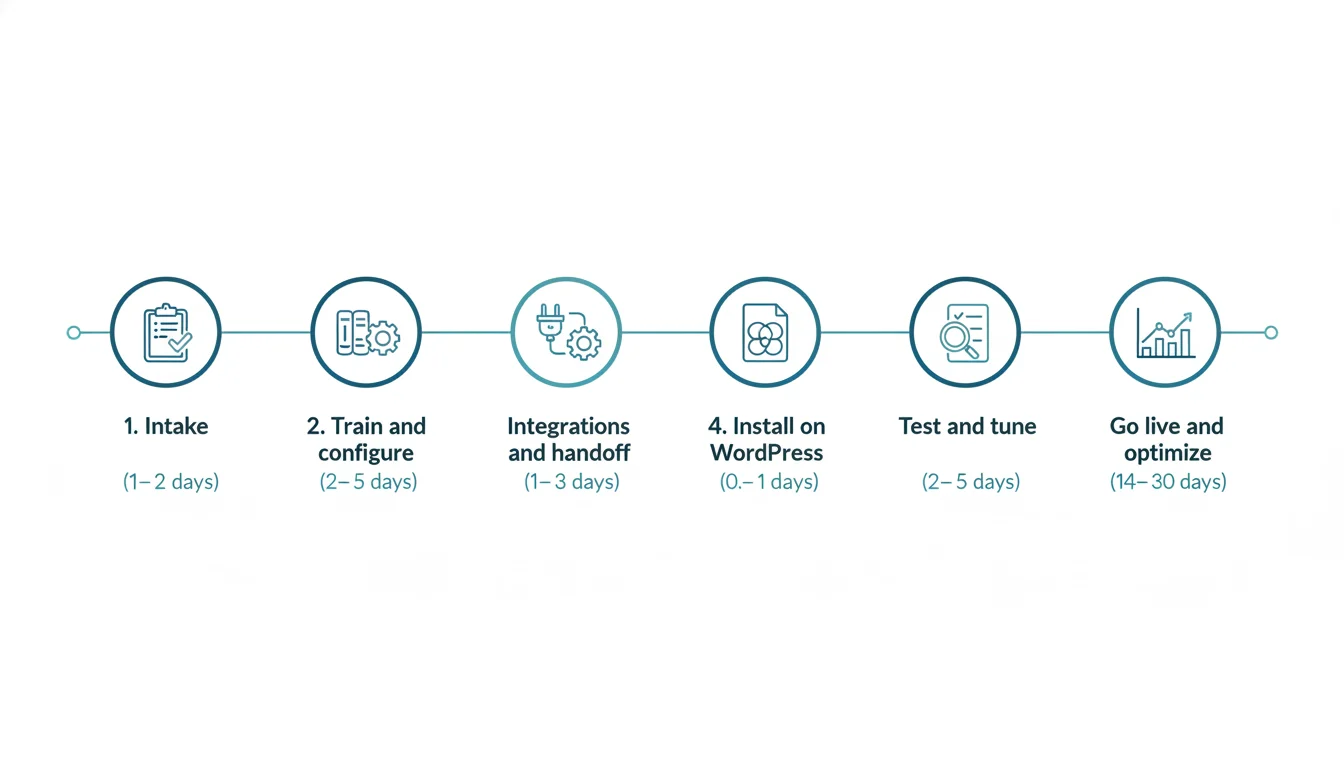
Here’s the path from kickoff to a live, on‑brand chat experience that captures leads and deflects support—without slowing your site. Most sites launch in 7–16 days, then we tune with real traffic for 14–30 days. If your content sources are ready, we can usually start this week.
-
1) Intake (1–2 days): We clarify goals, success metrics, and use cases; inventory content sources (site, docs, KB, PDFs); define brand voice and tone; and list required integrations and channels. We also capture escalation rules, hours, and SLAs for human handoff. Quick, focused, and decision‑oriented so you leave with a clear plan and timeline.
-
2) Train and configure (2–5 days): We ingest approved sources, map common intents and flows, and set guardrails to reduce wrong answers (source‑bounded answers, confidence thresholds, safe fallbacks, and citations where supported). We tune on‑brand messaging, PII redaction in logs, and when to offer forms, booking, or a human.
-
3) Integrations and handoff (1–3 days): We connect your stack, including CRM/help desk for lead and ticket creation, scheduling (Calendly), Slack/Teams alerts for hot leads or failed intents, and optional webhooks/Zapier for custom actions. We configure human handoff and routing rules. Wondering how this fits your stack? Here’s how AI integrates with existing workflows.
-
4) Install on WordPress (0.5–1 day): We deploy to staging first, add the widget via a lightweight script or plugin, and load it asynchronously or deferred to protect Core Web Vitals. We verify cache/CDN compatibility and QA across theme and mobile breakpoints.
-
5) Test and tune (2–5 days): We run acceptance testing against real FAQs and key journeys, complete an accessibility pass, wire analytics (GA4 events, conversions, chatbot analytics), and refine prompts and thresholds based on results.
-
6) Go live and optimize (14–30 days): After launch, we monitor transcripts and KPIs such as answer accuracy, support deflection, lead capture rate, booked meetings, escalation success, and page speed impact. We ship weekly improvements and share a concise report with next actions.
What you provide
- Approved content sources (URLs, documents) and what to exclude
- Integration credentials and test/sandbox access
- Brand voice guidance and any restricted phrases or claims
- Escalation contacts, hours, and SLAs for human handoff
- Compliance/privacy requirements and consent language (if any)
- A primary stakeholder for quick reviews and sign‑offs
If any of this isn’t ready, we’ll help you gather it—no need to wait to start.
Milestones and sign‑offs are documented at each step to keep the project on track. Ready to see if your content is a fit and get a start date? Send your top URLs for a quick viability check, or book the intake to lock your timeline. Next, see the ecosystems and channels we can connect so the bot fits your workflow.
Channels and integrations we support

We plug your chatbot into the tools you already use—without slowing down your WordPress site. Installs load asynchronously, respect your cache/CDN, and match your brand. We handle the setup end to end so you can launch in days, not weeks. Want to confirm compatibility? Book a quick 15‑minute integration check and we’ll map your stack.
Web/WordPress
- Lightweight, async WordPress widget that works on desktop and mobile.
- Optional full‑page, messenger‑style chat (for example, yoursite.com/chat) for campaigns.
Commerce
- WooCommerce context for product specs, availability, order status, and returns.
- Optional Shopify data sync for hybrid stacks.
CRMs
- HubSpot, Salesforce, and Pipedrive with lead routing, ownership rules, and attribution.
- Create or update contacts, deals, and custom fields from qualified chat conversations.
Help desks
- Zendesk, Help Scout, Intercom, and Freshdesk for instant ticket creation and deflection.
- Auto‑tag common issues and surface relevant KB articles before escalating.
Scheduling
- Calendly plus Google/Outlook calendars for one‑click booking, time‑zone handling, and routing.
Team handoff
- Slack and Microsoft Teams alerts to private channels with conversation context.
- One‑click “claim” and threaded replies so nothing gets lost.
Messaging connectors (optional)
- Facebook Messenger, WhatsApp, and SMS via supported providers.
Automation
- Zapier/Make and custom webhooks to trigger workflows or notify external systems—see our Business Process Automation services for end‑to‑end process design.
Analytics
- GA4 via GTM with events for chat started, qualified lead, meeting booked, ticket deflected, escalation, and conversions.
- Dashboard options for conversation quality and outcomes.
Data sources
- Crawl URLs/sitemaps and ingest PDFs, plus connectors for Notion, Google Drive, and SharePoint.
- Source scoping and permissions so the bot uses only what it should. For secure connectivity, see connecting AI to databases and APIs securely.
Don’t see your platform? Ask—we likely connect to it. Send us your stack for a same‑day compatibility check. Ready to see it live? Grab a quick demo, then see how these integrations translate into results with examples.
Outcomes you can expect
Here’s what a solid chatbot rollout delivers in your first 30–90 days—measurable wins you can see in your analytics and CRM.
Lead capture and qualification
Ask the right questions (budget, timeline, service interest), score the lead, and push to your CRM (HubSpot, Salesforce, Pipedrive) with attribution: UTMs, landing page, referrer. Route by territory or service to the right inbox or Slack channel, and trigger follow‑ups. On WordPress, we can sync with native forms or replace them with high‑intent chat flows. Learn how AI can help score and prioritize leads and tickets.
Support deflection
Auto‑answer common questions from your site, knowledge base, and policy docs, then deflect tickets when appropriate. We set confidence thresholds, provide citations, and escalate to a human or create a helpdesk ticket only when needed.
Scheduling
Let visitors book directly via Calendly, Google/Microsoft 365, or HubSpot Meetings. The bot can pre‑qualify, route by team availability, and drop confirmed appointments on calendars with context.
Ecommerce Q&A
For WooCommerce and other carts, the bot answers product specs, compatibility, stock or variant questions, shipping times, and return policies, guiding shoppers to the right PDP, cart, or checkout. It can also triage “Where’s my order?” and policy questions to reduce tickets.
Example targets
- 20–50% deflection of repetitive questions
- 10–30% more qualified leads from chat vs. static forms
- Faster first response, higher show rates for booked calls, and better conversion on high‑intent pages
Mini example
A B2B services client had a 2–4 hour average time to first response from a shared inbox. After launch, the chatbot answered common questions instantly and routed sales‑ready chats to the right rep, cutting first response to 15–30 seconds. Within 60 days, chat drove a 24% lift in booked consultations and reduced low‑value support emails by about one‑third.
We track results in GA4, your CRM, and a chatbot analytics dashboard, so you can see what’s working and what needs tuning. Want a quick forecast for your site or a short demo with your content? Book a 15‑minute fit call. Ready to pursue outcomes like these? Next up, transparent pricing and package options.
Simple pricing and packages
Pick the level of build and care you need. Clear scope and timelines. Not sure which tier fits? Share your URL and top goals, and we’ll point you to the smallest package that achieves them—no pressure.
Quick Start (one-time): $1,500–$3,500
Best for: standard FAQs, on‑site lead capture, and human handoff.
What’s included: content intake and scoping, training on your existing site/KB, guardrails to reduce wrong answers, on‑brand widget styling, WordPress install via lightweight script or plugin, GA4 event tracking, email/Slack lead routing, acceptance testing, and a short admin walkthrough.
Typical timeline: 5–10 business days once content and access are ready.
Custom Build (one-time): $3,500–$8,500+
Best for: complex flows, multiple integrations, or WooCommerce depth.
What’s included: everything in Quick Start plus custom intents and flows, multi‑step lead or support triage, CRM/helpdesk/calendar integrations, WooCommerce hooks for product Q&A and order‑related lookups, role‑based routing, staging and QA, and advanced guardrails.
Typical timeline: 2–6 weeks depending on integrations and approvals.
Managed Optimization (monthly): $300–$1,200+/month
Ongoing care to keep the bot accurate as your content and business evolve.
What’s included: regular log reviews, model/prompt updates, new intents and answers, syncing with new site/KB content, A/B testing of flows and CTAs, analytics dashboard and monthly report, security patches and dependency updates, and a quarterly roadmap session. Typical turnaround for small updates: 2–3 business days.
Add‑ons
- Multilingual support
- Additional brands or websites
- Messaging channels (WhatsApp, Messenger)
- SSO (Google, Microsoft, Okta)
- Advanced analytics (custom GA4 events, Looker Studio reports, data layer enhancements)—see Google Analytics setup
Bundle any add‑ons into your quote so you see a single, clear number.
Payment terms and what affects cost
- Payment: 50% deposit to kick off, 50% at launch. Managed plans are month‑to‑month; cancel anytime with 30 days’ notice.
- Third‑party platform fees (chatbot SaaS, LLM usage) are billed at cost and discussed up front.
- Timeline and pricing depend on content readiness, number of intents, integration complexity, WooCommerce customizations, and approval cycles.
Fast, accessible, and SEO-safe
Your chatbot should be invisible to performance and search until a visitor opens it. We install it the same way we build WordPress sites: fast, accessible, and measurable—so you capture more leads without risking rankings or Core Web Vitals.
Non‑blocking, lazy loading
- Script is enqueued in WordPress with async/defer and served from a CDN. We lazy‑initialize on user intent, after first idle, or post‑LCP.
- No layout shift: the widget is an off‑canvas overlay with reserved dimensions and smooth transitions.
SEO‑safe by design
- The bot is an overlay that never gates or replaces crawlable content.
- If a vendor hosts any chat pages, we add noindex/canonical as needed.
Core Web Vitals you can trust
- We validate on staging with Lighthouse and PageSpeed Insights before launch, and again in production after deploy.
- Performance budgets guide decisions so LCP, CLS, and INP stay in the green.
Accessible, WCAG‑friendly widget
- Fully keyboard operable with proper roles, labels, and aria‑live announcements.
- Color contrast meets WCAG AA and motion respects user preferences.
Thoughtful mobile UX
- Responsive placement, non‑intrusive defaults, and a 44px minimum target for close.
- No auto‑open on first visit and careful z‑indexing to avoid covering important UI.
Analytics you can act on
- Google Tag Manager events for chatbot_open, chatbot_conversation_start, chatbot_intent_resolved, chatbot_lead_submit, and chatbot_handoff_to_human.
- Useful parameters (page, intent, confidence, lead status) for GA4 funnels and attribution.
Want to see this on your site before you commit? Ask for a quick staging demo or a performance/SEO risk check—we’ll share Lighthouse reports, load traces, and example analytics events.
Data safety, governance, and guardrails
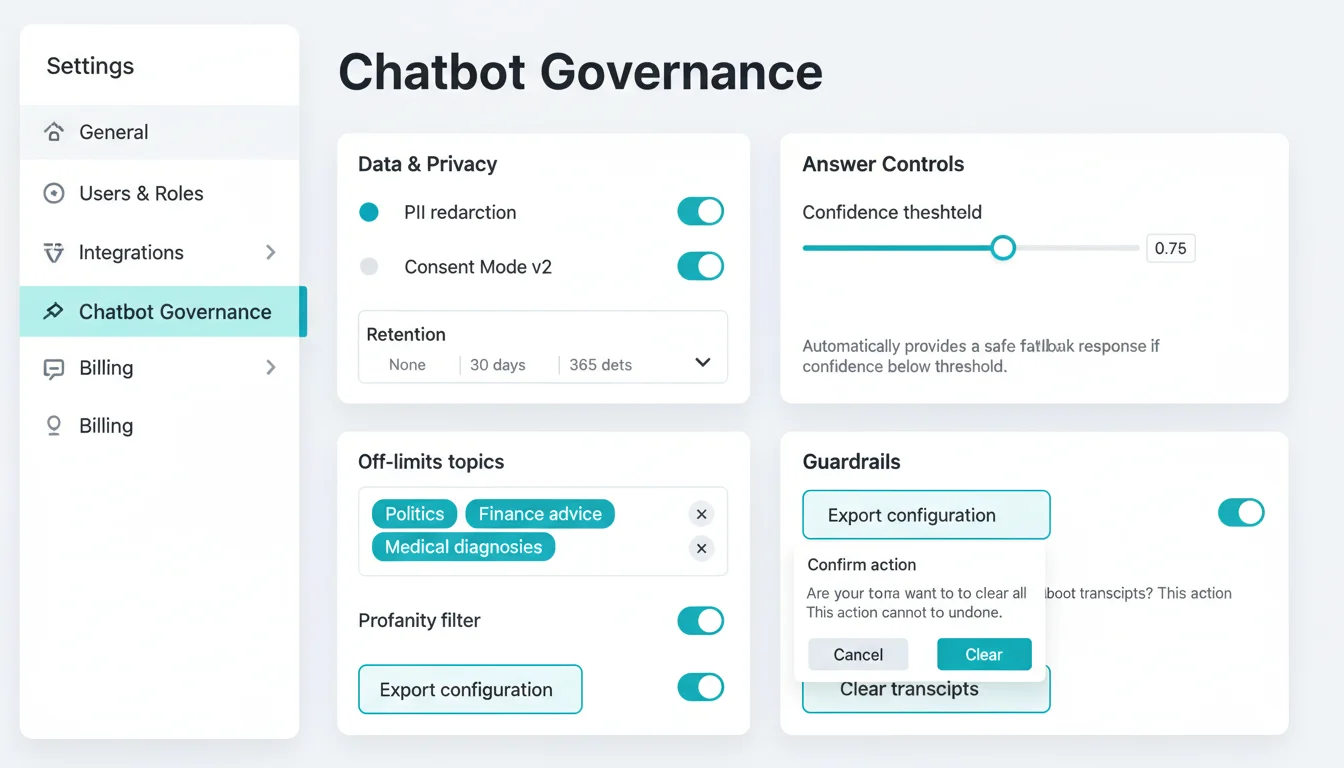
Your chatbot is a front‑of‑house system. We treat it with the same care you expect for your website and CRM. If you have security or legal stakeholders, we involve them early, map to your internal policies, and we’re happy to sign an NDA and share our security overview. For regulatory context, see how we handle GDPR/HIPAA compliance with AI.
Content scoping and approvals
- We train only on designated sources you approve and can exclude paths or private sections.
- Updates follow a change workflow with staging reviews and versioned training snapshots.
PII handling
- Filters to detect and redact PII and optional server‑side redaction before model calls. Learn more about secure AI connections to databases/APIs.
- For sensitive forms, we hand off to secure first‑party forms or your CRM.
Logging and retention
- You choose transcript retention (none, 30, 90, 365 days) with anonymization options.
- Admin‑only access and export/delete on request.
Consent and privacy
- Respects your cookie/consent banner and Google Consent Mode v2.
- Clear data‑use notice in the chat UI with links to policies.
Model and hosting options
- OpenAI, Azure OpenAI, Google Vertex AI, or managed open‑source models based on your needs.
- We outline trade‑offs for accuracy, latency, cost, and governance.
Hallucination controls
- Retrieval‑augmented generation with citations where supported.
- Confidence thresholds, safe fallbacks, topic/profanity filters.
Escalation policy
- Handoff on low confidence, sensitive topics, VIP pages, or high‑intent sales.
- Create tickets, open live chat, book meetings, or post to Slack/Teams with full context.
Audit trail
- Admin dashboards track configuration and content changes with timestamps and exports.
Compliance support
- DPA available; GDPR‑friendly practices by design; regional hosting options.
- PHI avoidance by design; BAAs supported via compliant vendors when required.
WordPress‑specific guardrails
- Asynchronous, conditional enqueue; respects consent and roles.
- Transcripts/settings stored outside WordPress unless you opt‑in to on‑site storage.
- Performance budgets and Core Web Vitals monitoring in place.
If this matches your risk posture, we’ll likely be a great fit. Next, see who we help and the projects we take on—or book a 20‑minute fit call and ask for our security and governance one‑pager.
Is STL CodeScape a fit for you?
We’re a strong match when:
- You run a WordPress site and want clear gains with trackable metrics.
- Your team can provide content sources and is ready for alerts or handoffs via email, Slack, HubSpot, or your help desk.
- You’re a branding or digital agency that needs a dependable, white‑label WordPress development partner.
We’re probably not the best fit if:
- There’s no content to train on and no plan to create it.
- You need a heavily customized, non‑WordPress, internal‑system chatbot with no web presence.
Setting expectations
Chatbots augment your team; they don’t replace expert support overnight. We put guardrails and human paths in place, set measurable targets, then iterate to improve accuracy, containment, and conversions over time. For context on trade‑offs, review the limitations of AI.
If this aligns with your goals, the next step is simple:
- Request a quick demo using your own content
- Book a 20‑minute fit call to talk goals, integrations, and timeline
- Ask for a scoped plan and estimate
Why STL CodeScape
WordPress‑first craftsmanship
We hand‑code implementations that respect your stack. One lightweight, asynchronously loaded script, cache/CDN safe, tested against your theme, plugins, and Core Web Vitals. We deploy via staging with version control so nothing breaks your site or SEO. Want proof before you commit? Ask for a staging‑only pilot and a compatibility check—or see how our WordPress Specialists approach projects.
Governance over gimmicks
Your bot is trained on an approved, living source of truth. We add guardrails, citations where possible, confidence thresholds with friendly refusals, and human handoff when needed. PII redaction, configurable logging and retention, and prompt/version audits are built in. Read more on AI compliance (GDPR/HIPAA).
Design polish that converts
The widget looks and feels native: brand‑matched styles, tone of voice, custom icons, and microcopy that nudges the next step. It’s accessible, supports dark mode, and uses budgeted animations. We A/B greetings, triggers, and CTAs to lift engagement and lead quality. See our approach to UX and conversion‑focused design.
Transparent pricing and realistic timelines
You’ll see clear setup pricing and optional monthly optimization with typical timelines. Milestones, acceptance testing, and training are included. Ask for a line‑item estimate and we’ll map scope to budget—no long‑term contracts required. Curious how builds are estimated? Here’s what impacts build timelines.
Long‑term care aligned to your goals
Expect proactive tuning cycles, transcript reviews, and dashboards you can act on: deflection/containment rate, accuracy, time to first response, qualified leads, and revenue assist. We keep training data current and run experiments that move the numbers you care about.
St. Louis‑based, responsive, and partner‑ready
Local, reachable, and easy to work with, whether you’re a business owner or an agency that needs a dependable dev partner. Collaboration‑friendly with white‑label options. Prefer to see it live? Book a short demo.
Have questions about tooling, privacy, or scope? The next section covers the most common ones. Or schedule a 15‑minute consult to get a tailored plan and quote.
FAQs
How long does setup take and what affects timing?
Most WordPress sites launch a first version in 3–5 business days once we have access and content. Adding human handoff, CRM or ticket mapping, or custom flows typically takes 1–2 weeks. Multilingual, complex ecommerce catalogs, heavy content cleanup, or strict compliance reviews can extend timelines to 2–4 weeks. The biggest variables are content readiness, number of integrations, approvals, and revision cycles. We often ship an MVP quickly, then iterate.
Which platforms/LLMs do you implement and how do you choose?
We work with OpenAI, Anthropic, Google, and Azure OpenAI. For orchestration we use either a proven SaaS builder or a custom Node/Python stack with retrieval‑augmented generation. We recommend a stack based on accuracy in your domain, compliance, latency and cost, integration fit, and long‑term governance. You’ll see options, trade‑offs, and pricing before we build. See more on our AI Integrations.
Can it hand off to a human via chat, email, Slack/Teams, or help desk?
Yes. We support live chat, email fallback, Slack/Teams channels, and help desks like Zendesk, Help Scout, Freshdesk, or Gorgias. The bot packages the conversation, page URL, and captured fields, sets priority, and routes based on business hours or intent.
How do you prevent wrong answers and control tone/brand voice?
We train only on approved sources with RAG, use confidence thresholds and citations, add “do not guess” and topic guardrails, and apply PII detection/redaction. A brand voice pack keeps replies on brand. We run scripted QA and review “no‑answer” and escalations during optimization.
What’s the impact on site speed and SEO?
The widget loads asynchronously and defers until interaction. It’s compatible with WordPress caching and CDNs and won’t block LCP, INP, or CLS. Chat content is not crawlable by default, so it doesn’t create duplicate indexation. We baseline Lighthouse/Core Web Vitals and won’t ship if we see regressions. Learn more about our performance and caching approach.
Who owns the data, training content, and configuration?
You do. Prompts, training sets, vector indexes or KB exports, and configurations are yours. Where possible, provider and analytics accounts are in your name. We set log retention to your policy and restrict access. For secure connectivity, see connecting AI to databases and APIs securely.
Can it be multilingual and handle regional variations?
Yes. The bot can auto‑detect and respond in 50+ languages. For best accuracy, we maintain per‑locale knowledge bases. The widget can display a localized UI and supports right‑to‑left languages. If content isn’t available in a language, it can politely fall back or escalate.
How are updates handled when our content changes?
We set up an update pipeline. Webhooks or sitemaps trigger re‑indexing within hours; external docs are re‑crawled on a schedule. You’ll also get a “Push to bot” option for immediate updates. Changes are versioned, with alerts if a sync fails.
What if we already use HubSpot/Salesforce/Zendesk—can you map fields and tickets?
Yes. We map contact and deal fields and custom objects in HubSpot/Salesforce and create or update deals based on intent. For Zendesk/Help Scout/Freshdesk/Gorgias we create tickets with tags, priority, and full transcripts. We also fire GA4/Meta events and respect your routing rules. Explore our AI Integrations.
What’s included in monthly optimization and can we cancel anytime?
Month‑to‑month, cancel anytime. The plan typically covers analytics review, prompt and guardrail tuning, KB curation and re‑indexing, 1–2 new intents or flows, A/B tests, integration health checks, model/version upgrades, accessibility checks, and a quarterly strategy session. If you cancel, you keep all configs, content, and exports.
Want to see it before you commit? Try the live demo, or browse examples and demos we’ve built, then book a 15‑minute setup consult to map your best first use case.
See it in action
Kick the tires in under two minutes—no signup needed. Use the chat bubble at the bottom-right of this page, or launch the full-screen demo to see how a WordPress chatbot can qualify leads, book meetings, and answer policy questions without slowing your site.
Prompts to try
- “I’m interested in a website redesign. What do you need from me to get a quote?”
- “Can you collect my email and send me your capabilities deck?”
- “Do you integrate with HubSpot and Salesforce?”
- “Book a 15‑minute consult with your team next Tuesday afternoon.”
- “Show me the next available time and send a calendar invite.”
- “I need to reschedule my meeting. What are my options?”
- “What’s your turnaround time for a custom WordPress build?”
- “How do you handle site security and data privacy?”
- “What’s included in your monthly website management plan?”
What to notice
- Fast, on-brand answers grounded in your website and doc sources
- Smooth human handoff when confidence is low or a sales convo starts
- Lead details routed to your CRM and meetings booked without leaving the page
- Lightweight embed designed not to slow down Core Web Vitals
Ready to add this to your WordPress site?
Get started
Ready to add a fast, on‑brand chatbot to your WordPress site? Choose the path that fits you best and we’ll make it simple to move forward—on your timeline.
Book a 15‑minute setup consult
Use the calendar on our contact page to pick a time. We’ll meet on Zoom with a WordPress/AI specialist to review goals, your tech stack, and the fastest path to launch. You’ll leave with an actionable plan and clear next steps. No pressure, no jargon.
Request a custom quote
Prefer email? Submit the short form (name, email, website URL, one‑line goal). We’ll reply within one business day with scope options and a ballpark estimate. Ideal if you’re comparing vendors or need a number for budgeting. RFPs welcome.
Not ready yet? Download the free Chatbot Readiness Checklist
Get a concise guide covering content sources to include, governance and guardrails, human handoff policy, integrations to verify (CRM/help desk/calendaring), and launch KPIs. Enter your email and we’ll send it. No spam—unsubscribe anytime.
What to prepare for your consult
- Your website URL and any help docs or knowledge sources
- Top 10 questions customers ask (sales and support)
- Tools you use today (CRM, help desk, forms, scheduling)
- Must‑haves for handoff to a human and success metrics
Don’t have it all handy? No problem—come as you are. No admin access needed for the consult.
What happens next
- Same‑day or next‑business‑day confirmation and a brief intake checklist (3–5 minutes)
- 15‑minute consult with a technical lead from our St. Louis team
- A clear plan: recommended approach, timeline, and pricing options sent within one business day after the call
Have a question right now?
Email: hello@stlcodescape.com
Phone: (314) 555‑0137
Hours: Mon–Fri, 9am–5pm CT
Heads up: we take on a limited number of new chatbot projects each month to keep quality high. Have a launch date in mind? Grab a spot on the calendar now to secure your place.