AI Systems Setup for WordPress and Everyday Workflows
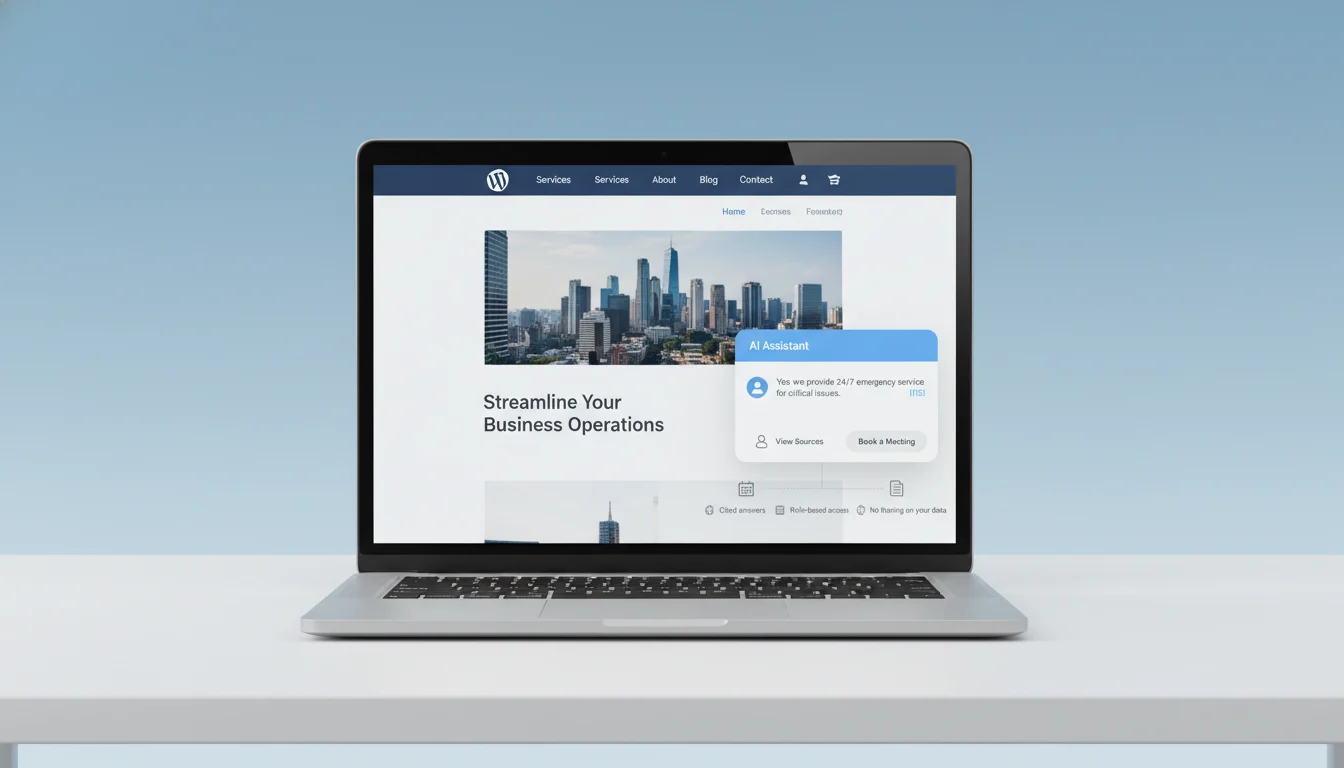
Turn your WordPress site and daily workflows into a secure, on-brand AI assistant that replies in minutes—not hours—without ripping out the tools you already use. We’ll automate the repetitive work, reduce errors, and cut support costs while keeping a human-in-the-loop where it matters.
What this can include
- Site chat that’s trained on your policies, products, and docs (and respects permissions)
- Smart form intake and lead enrichment that syncs to your CRM
- Ticket triage and suggested replies for support teams
- AI-assisted content drafting and approvals inside WordPress
- Summaries, reminders, and document Q&A across Microsoft 365 or Google Workspace
We fit the right AI models and tools to the stack you already use—WordPress, Microsoft 365, Google Workspace, your CRM, and internal knowledge. No rebuilds. Every build is custom-coded for speed, accessibility, and long‑term control. Your data stays yours with role-based access, audit trails, and clear retention settings.
Request your AI Readiness Snapshot Delivered in 3 business days. You’ll get a prioritized 2‑week plan with quick wins, data and security notes, and pilot recommendations for your site and workflows.
See a 2‑week Starter Plan (Quick‑start Packages)
Why trust us
- St. Louis–based, responsive partner
- Security‑first: access controls, PII safeguards, audit trails
- Custom code you own, not a black box
Prefer to talk it through? 314-657-7421 or jc@stlcodescape.com
Up next: See what we set up so you can pick what fits your team.
What We Set Up
-
On-site AI search and RAG for WordPress
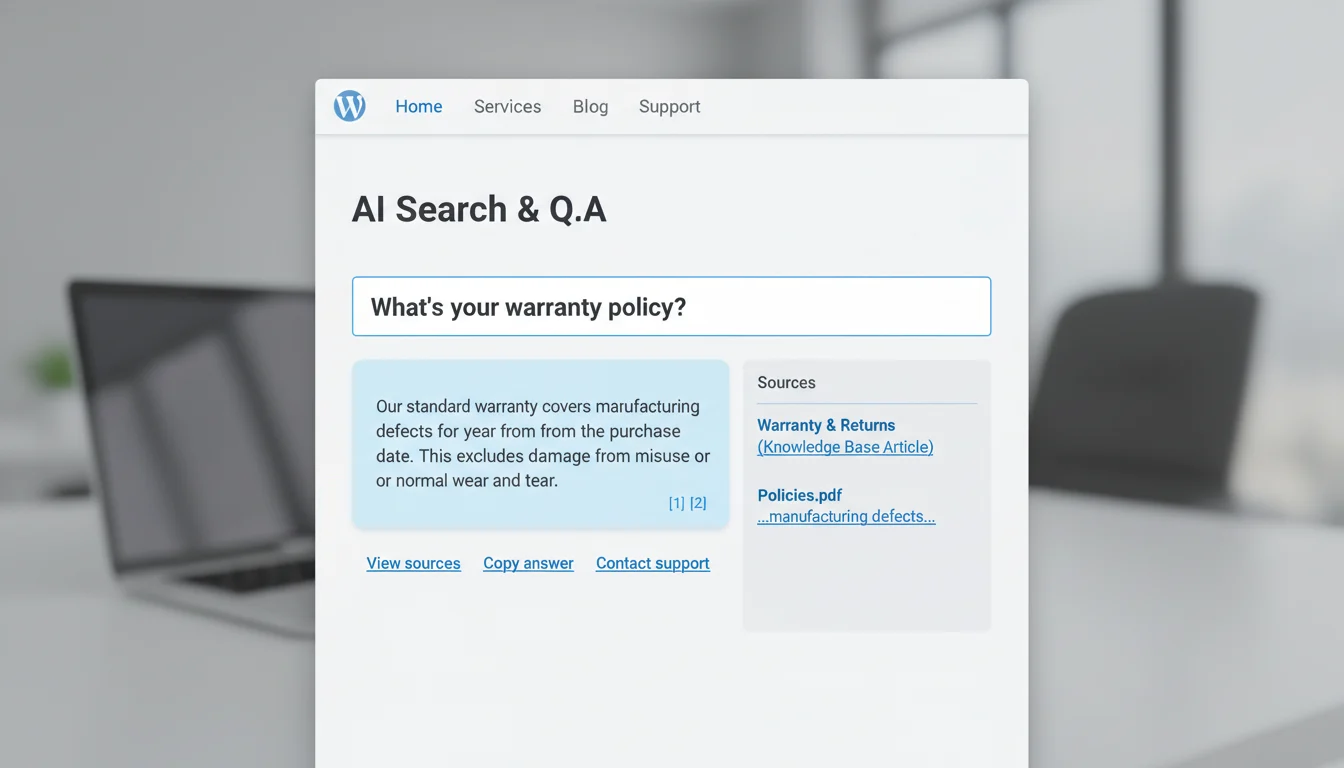
We add semantic search and Q&A to your site. It indexes pages, PDFs, and your private knowledge base so visitors and staff get cited answers with sources. Built as a lightweight WordPress integration with your chosen vector store and LLM via our AI Integrations. It respects permissions, supports multiple languages, and keeps your data in your control. Want to see it on your content? Ask for a 1-day staging demo with your own docs.
-
AI chat and voice agents
Lead intake, support triage, scheduling, post-call summaries. Website widget, SMS, or a phone line. Agents qualify leads, route support, book meetings, and write clean summaries to your CRM. We include escalations, business hours, and clear disclaimers. No dead ends. We’ll spin up a test number and site widget so your team can try it this week.
-
Workflow and document automation
From intake to CRM, invoice prep, contracts, and SOP assistants. We connect your forms and inboxes to your systems so you can stop copy/paste. Auto-create CRM records, draft proposals and invoices from templates, generate first-draft contracts with your clauses, and set up an SOP assistant so the team follows the process. Bring us your top two time-sinks—we’ll automate one in the first sprint with our Business Process Automation.
-
CRM and office suite integrations
Microsoft 365, Google Workspace, HubSpot, Salesforce, Slack/Teams. We add AI integrations to the tools you already use: calendars, email, files, chat, and CRM. Actions like “summarize this thread to a ticket,” “file this doc to SharePoint,” or “update this deal in HubSpot” just happen. Tell us one repetitive task; we’ll turn it into a button or slash command.
-
Content and insights systems
Content briefs and drafts into WordPress, analytics, KPI dashboards. Get SEO briefs and brand-safe drafts pushed as pending posts in WordPress for editorial review—see our AI Content Creation for WordPress. We pair that with dashboards that combine GA4 and tracking you can trust, Search Console, ad platforms, and CRM data so you can see what’s working and which AI-assisted pieces drive leads and revenue. Prefer to start small? We can pilot on one content stream and one dashboard first.
-
Governance, security hardening, and monitoring
Access controls, audit trails, cost controls. Role-based access, key and secret management, PII redaction, retention rules, logging, and alerts are standard. We set budgets and usage caps, enforce least-privilege, and document model and data handling for your risk team. Need our controls list or a sample DPIA? We’ll share it before we start. For a deeper look, see how we handle compliance such as GDPR or HIPAA.
-
Training, documentation, and handoff
You get a plain-English playbook, architecture diagram, admin checklists, and short video walkthroughs. We run live training, provide 30 days of hypercare, and can stay on to manage and improve if you want. Your team will be confident on day one—no black boxes.
With the menu clear, here’s our path from discovery to launch, including pilot options and timelines. Want to see what fits your stack? Book a quick consult at stlcodescape.com, call 314-657-7421, or email jc@stlcodescape.com.
How It Works
A clear path from idea to production—often in weeks, not months. Most pilots ship in 2–4 weeks. Broader rollouts land in 6–12 weeks depending on scope. Have a use case in mind? Call 314-657-7421 or email jc@stlcodescape.com for a 15‑minute fit check.
Step 1: Discover
- Meet with stakeholders to define goals, success metrics, and today’s bottlenecks so we know exactly what “good” looks like.
- Inventory data sources and systems (WordPress, CRM, M365/Google Workspace, ticketing, knowledge bases, cloud storage) and note compliance or access limits.
- Map quick wins that can be piloted without disrupting current work, so you see value fast.
Output: discovery notes, data and source inventory, and a quick-win shortlist tied to outcomes.
Quick start: if you already have a priority workflow, we can often go straight to a scoped pilot.
Step 2: Readiness and Roadmap
- You receive an AI Readiness Snapshot PDF with prioritized use cases, a data readiness score, integration points, tool options with pros and cons, security notes, and a 2–12 week plan.
- We recommend the best fit across providers (OpenAI, Anthropic, Azure, Gemini, Cohere, or open source; Pinecone, Qdrant, pgvector; Zapier, Make, Power Automate; LangChain, LlamaIndex) and explain why.
See how AI integrates with your existing tools and workflows.
CTA: Want this for your team? Ask for an AI Readiness Snapshot at jc@stlcodescape.com.
Step 3: Build and Integrate
- Stand up a prototype or pilot tied to your data, often starting with a custom WordPress AI module (on‑site chat/search, RAG, lead intake, support assistant) and workflow connectors to your CRM/help desk/document repositories via secure APIs.
- We build in your environments whenever possible—your WordPress, cloud, and vendor accounts—so security and IT stay comfortable.
Output: working pilot in staging, code in your repo, and clear configuration docs.
Ownership: you own all code and configuration. No lock‑in.
Prefer to start small? Ask about a tightly scoped pilot to prove value first.
Step 4: Test and Safeguards
- Validate with evaluation sets and focused red‑teaming to look for failure modes and bias.
- Add safeguards: role‑based access and SSO, PII redaction and content filters, audit logging, and human review where needed.
- Set cost guardrails and rate limits to prevent runaway usage.
How we connect to databases and APIs securely
Step 5: Launch
- Promote from staging to production against agreed acceptance criteria.
- Go‑live checklist covers backups, monitoring, permissions, and stakeholder comms, with a rollback plan ready if needed.
Output: production deployment, go‑live record, and a concise runbook. We stay close during launch week to ensure a smooth handoff.
Step 6: Optimize and Manage
- Included 14‑day optimization: prompt and retrieval tuning, UX refinements, and quality improvements based on real usage.
- Monitor accuracy, latency, costs, and user feedback with weekly reviews; provide training and handoff.
- Optional managed service: updates, embedding refreshes, security patches, and monthly reporting.
Grow at your pace: extend to new use cases once the first win is locked in.
Timeframes
Pilots typically 2–4 weeks. Broader rollouts 6–12 weeks, depending on integrations, data prep, and approvals. We’ll give you clear dates up front.
Planning for growth? See how AI systems scale as usage grows.
Our selection criteria and transparency
- Every tool choice comes with rationale on fit, security, and cost.
- Code, prompts, embeddings, datasets, and configuration live in your accounts for full control and portability.
Next, see a few before‑and‑after examples that show the day‑one impact. Or skip ahead and schedule a quick scoping call at 314-657-7421—tell us your top workflow, and we’ll outline a pilot path you can approve.
Before and After: A Day With AI vs. Without
Lead intake on your website
- Without AI: A basic form dumps unqualified leads into your inbox. Someone answers FAQs, sends a scheduling link, and retypes data into the CRM.
- With AI: A 24/7 on-site assistant in your WordPress theme qualifies prospects, answers FAQs, handles objections, books meetings, and writes clean records to your CRM with tags, UTM/source, consent flags, and next steps.
- Measurable outcomes: under 1-minute first response; 20–40% higher meeting-book rate; no manual data entry; cleaner CRM data.
Want this working on your site? We’ll implement and QA the full flow—assistant, calendar, and CRM—so you see results fast. See our Custom AI Chatbot Setup.
Internal knowledge assistant
- Without AI: Staff dig through threads, shared drives, and old PDFs, or wait on a subject-matter expert.
- With AI: A private assistant on your domain or in Slack/Teams answers questions using your policies, SOPs, and past proposals. It retrieves from your WordPress knowledge base and SharePoint or Google Drive with citations, respects permissions, and links to the source.
- Measurable outcomes: answers in under a minute instead of 10–20; fewer SME interruptions; faster onboarding.
Ready to try this with your policies and SOPs? We’ll connect it securely and train your team in one session. This typically uses our AI Integrations.
Customer service triage
- Without AI: The shared inbox is a firehose. Tickets get misrouted, first replies lag, and agents rewrite the same responses.
- With AI: Website chat and your inbox auto-classify intent and priority, route to the right queue, and suggest replies that match your policies and tone. Tickets are created or updated in Help Scout, Zendesk, or Freshdesk. Edge cases are flagged for human review.
- Measurable outcomes: 60–90% faster first response; 20–35% lower handling time; fewer back-and-forth emails; higher CSAT.
Using Help Scout, Zendesk, or Freshdesk already? We’ll wire this in and put guardrails in place so your team stays in control. Related read: Can AI help score, tag, or prioritize incoming leads and tickets?
Content workflow
- Without AI: Call notes get lost. Writers start from a blank page. Drafts bounce between Docs and WordPress. SEO and schema get missed.
- With AI: Recordings turn into briefs, outlines, and on-brand drafts mapped to your WordPress content model. The system suggests titles, meta, internal links, alt text, and schema, then saves a compressed, media-ready draft in WordPress for editor approval.
- Measurable outcomes: 50–70% faster draft-to-publish; consistent metadata and structure; fewer revisions; steadier organic growth.
Want to see this end to end? We’ll connect your meeting recordings to WordPress and walk you through the publish-ready flow. Explore AI Content Creation for WordPress.
Want to see the “before and after” with your tools? Book a quick walkthrough: 314-657-7421 or jc@stlcodescape.com. Prefer to start small? We can pilot one workflow and measure its impact.
Security, Privacy, and Data Ownership
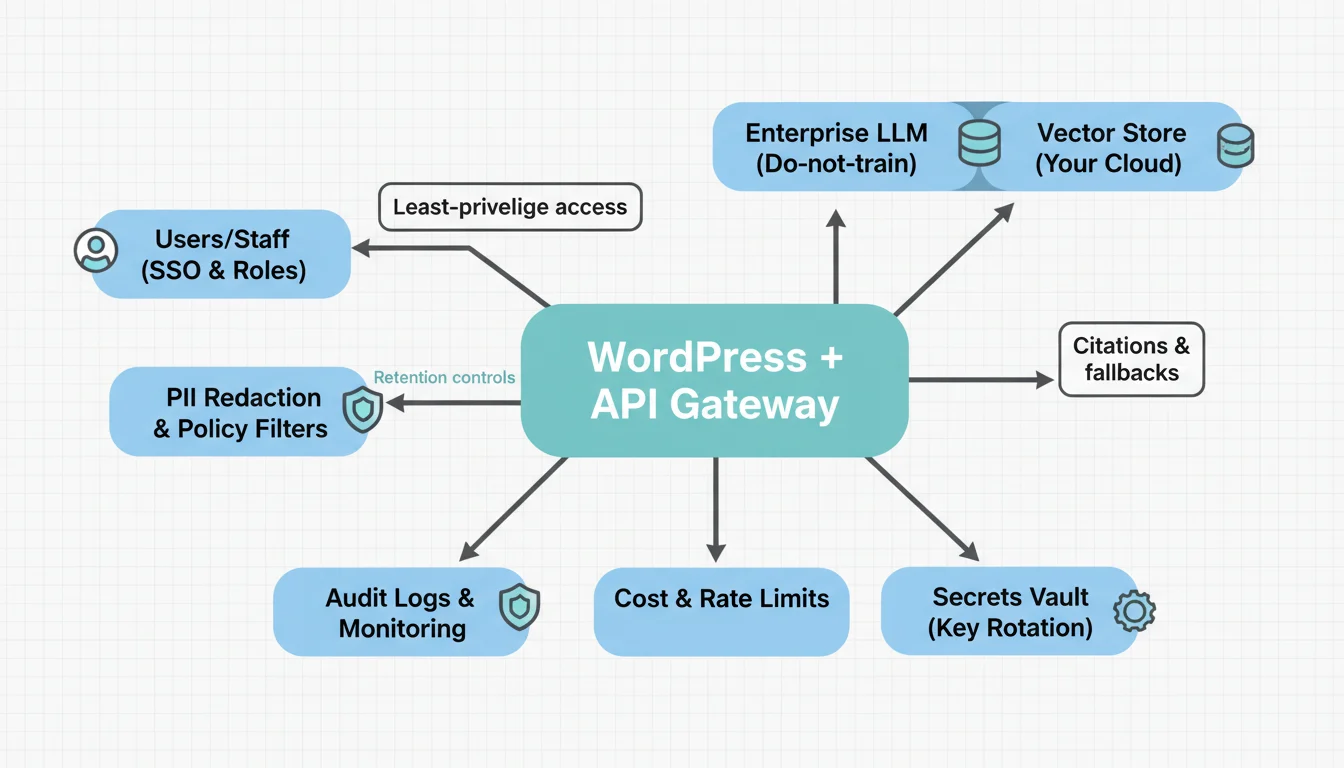
We build security into every design so your team can adopt AI with confidence and control—without giving up speed or ownership. If you need to pass an internal review or reassure stakeholders, we’ll document and explain every safeguard in plain English.
Data handling by default
- No public model training on your data unless you opt in. We disable data retention on provider APIs and use enterprise endpoints when available.
- Data minimization: prompts include only what’s needed. Sensitive fields are excluded or masked before any call leaves your server.
- Want a quick sanity check? We’ll map your current data flows in a 30-minute consult and flag easy wins.
See: Is it possible to connect AI to my databases and APIs securely?
PII and secrets protection
- Automated redaction of PII and secrets at the edge (names, emails, account numbers, keys) with patterns tuned to your data.
- Encryption in transit (TLS 1.2+) and at rest (AES-256 or provider equivalent).
- Secret vaulting and key rotation using your stack (Azure Key Vault, AWS Secrets Manager, or host-managed env vars). No secrets hard-coded in WordPress or themes.
- Least-privilege access to servers, WordPress admin, repos, and vendor consoles. Temporary, auditable elevation only when needed.
Access controls and audit
- Role-based access that matches how your team works. WordPress roles and capabilities extend to AI tools, automations, and knowledge bases.
- SSO where available (Microsoft 365 or Google) and MFA for admin roles.
- Activity logs for prompts, model calls, content changes, and automations, exportable for compliance.
- Change management in Git with pull requests, staging-to-production approvals, and rollback plans.
Model and vendor governance
- Providers chosen based on risk, data residency, performance, and cost (OpenAI, Anthropic, Azure OpenAI, AWS Bedrock, Google Vertex, or vetted open source).
- Documented vendor risk review, optional pen-test or architecture notes, and DPAs as appropriate.
- Clear portability with abstraction layers so you can switch models or vendors without a rebuild.
- Prefer US- or EU-only processing? We’ll align providers to your residency needs.
More on compliance: How do you handle compliance requirements such as GDPR or HIPAA with AI?
Responsible AI in production
- Human-in-the-loop options for sensitive workflows (approvals or queues in WordPress or your CRM).
- Content moderation, safety filters, and policy prompts tailored to your brand and industry.
- Evaluation datasets and regression tests to measure quality before and after changes.
- Rollback and kill switches for agents and automations, plus incident runbooks and alerts.
Cost and usage controls
- Per-agent and per-user rate limits, token budgets, and caching or RAG strategies to cut spend.
- Budget alerts and monthly usage reports with line-item visibility by tool, model, and team.
- Prompt library governance with versioning, approvals, and scheduled reviews.
Clear ownership
- You own your WordPress codebase, custom plugins, prompts, vector indexes and embeddings, evaluation sets, and configuration exports.
- Systems are deployed under your accounts (hosting, cloud, vendors) with full admin access, documentation, and handoff runbooks.
- No black boxes. Your stack, your keys, your data.
Want to see how this would look in your environment? Book a security-first AI consult and we’ll outline a low-risk rollout plan. Call 314-657-7421 or email jc@stlcodescape.com.
Why STL CodeScape
Custom WordPress + AI integration
Hand‑coded themes and lightweight modules built for your workflows. We embed AI in your front end (search, chat, product Q&A) and admin (content helpers, data syncs) with clean, maintainable code. Share your use case—we’ll prototype the highest‑value piece first. Want a quick demo? Email jc@stlcodescape.com. For complex builds, see our WordPress Specialists.
Performance and accessibility standards
Sites ship fast and inclusive by default: Core Web Vitals targets, optimized assets and caching, and WCAG 2.2 AA practices. Secure patterns like least‑privilege access, secrets management, audit trails, and PII minimization are built in. We baseline current performance and show before/after results so you can see impact. Deep dive: How we handle performance optimization and caching.
Transparent code and documentation
You get the keys: a clean Git repo in your org, environment parity and config exports (LLM settings, vector index schemas, automation flows), plus admin guides, short videos, and live training so your team can run day to day. No black boxes—ask for a sample repo and docs. Also see our Web Development services.
Tool selection without lock‑in
We recommend a stack that fits your budget, data sensitivity, and IT standards. LLMs (OpenAI, Anthropic, Azure OpenAI, Google), vector stores (pgvector/Postgres, Pinecone, Weaviate), and connectors or orchestration (Make, Zapier, n8n, Microsoft 365/Graph, Slack, HubSpot). Designs are portable, and we’ll outline tradeoffs and costs up front. Explore our AI Integrations.
Local, responsive team
Based in St. Louis with direct access to the engineers doing the work. We partner well with branding and creative agencies, are flexible on process, and communicate clearly. Meet the team on a 20‑minute discovery call: 314‑657‑7421.
Long‑term management available
Ongoing updates, security and performance monitoring, model and prompt evaluations, analytics and A/B tests, and quarterly roadmap planning to keep your systems effective. Start small, then extend as results compound. For managed hosting and care, see our Web Hosting Company services.
Next up: low‑risk, time‑bound starter packages that make it easy to begin and prove value fast. Ready to talk through options? Email jc@stlcodescape.com or call 314‑657‑7421 to schedule a quick walkthrough.
Quick-start Packages and Timeline Snapshot
Start quickly and ship something useful—without a big commitment. Each package is a fixed-scope pilot with clear acceptance criteria, built on your WordPress site and everyday tools so you see value within weeks, not months. Not sure where to begin? Book a quick Readiness Snapshot and we’ll point you to the right starting package and give you a timeline and price range.
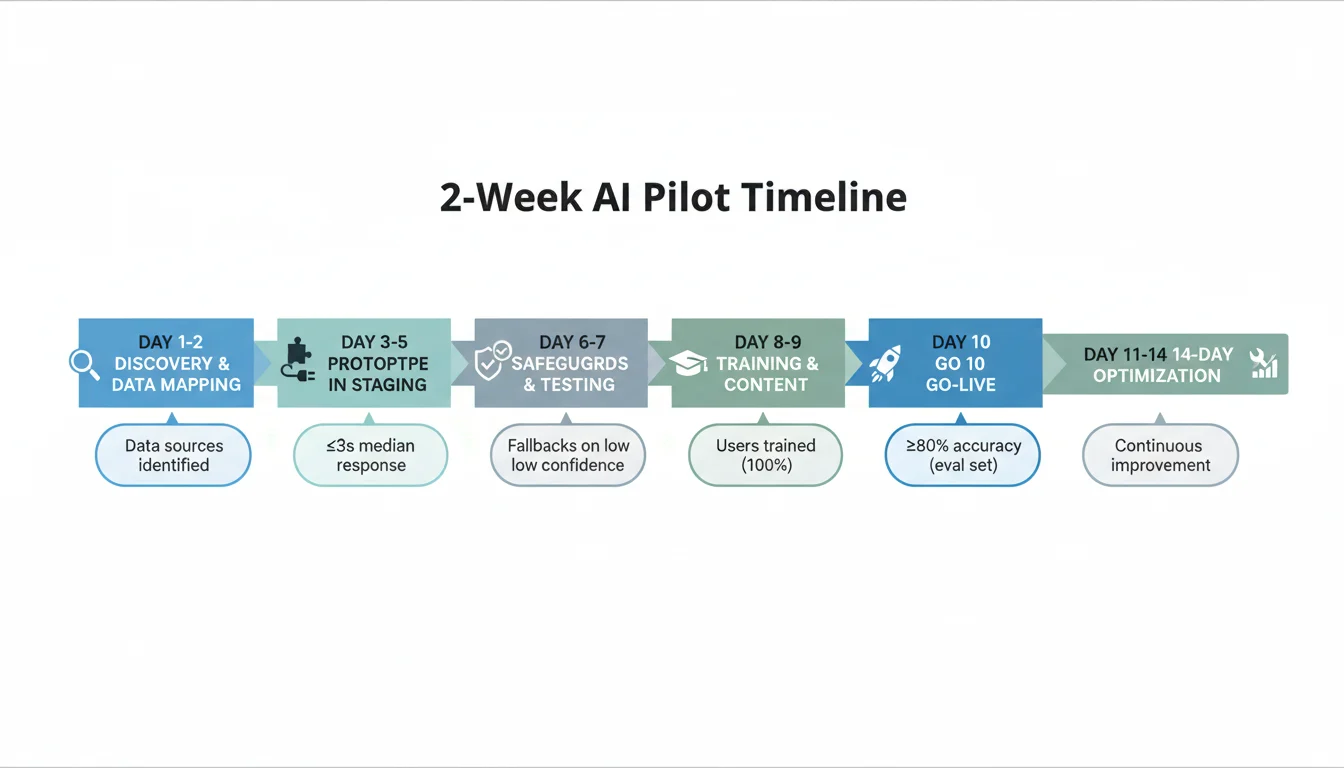
Package 1: 2-Week Pilot Setup
Best for: Teams that want a quick, low-risk proof that AI can handle one meaningful job (on-site AI search or a lead-intake/chat agent).
Why this works: Tight scope, fast results, zero lock-in. See it on your site in 10 business days.
Scope
- One primary use case configured end to end.
- Data mapping from WordPress, docs, or forms; light cleanup and normalization.
- Working prototype on staging or a protected page on your domain.
- Evaluation set with 30–100 real questions or tasks and expected outcomes.
- Security guardrails (PII scrubbing, role-based access, rate limits, content filters, audit logs).
- Admin training (60–90 minutes) and a quick-start SOP.
- 14-day post-launch optimization.
Timeline: 10 business days to launch the pilot, then 14 days of optimization.
Acceptance criteria (examples)
- Answer accuracy ≥ 80% against the evaluation set.
- Median response time ≤ 3 seconds on web; ≤ 10 seconds when calling external APIs.
- Fallback to human or form on all low-confidence cases.
You own at handoff: source config and prompts, connector code, evaluation set and scoring sheet, admin guide, rollback plan.
Quick next step: Request a sample evaluation sheet or book a 20‑minute scoping call at 314-657-7421 or jc@stlcodescape.com.
Package 2: Sales and Support Agent
Best for: Teams handling repeat questions and inbound leads across website chat and a shared inbox, with CRM capture.
Why this works: Deflect common questions, speed up replies, and never lose a lead—while your team keeps full oversight.
Scope
- Website chat widget and shared inbox triage that routes to the right queue or person.
- CRM sync (HubSpot, Salesforce, or similar) with lead and contact enrichment.
- Saved replies and tone or brand guardrails; calendar and scheduling integration.
- Analytics dashboard (deflection, response times, bookings, qualified leads).
Timeline: 3–5 weeks to go live, depending on CRM and calendar setup.
Acceptance criteria (examples)
- ≥ 25–40% deflection of Tier-1 inquiries within 30 days.
- ≥ 95% CRM log completeness on AI-handled conversations.
- Bookings or qualified leads captured with ≥ 90% field completeness.
You own at handoff: chat widget or agent config, CRM workflows, prompt library, analytics dashboard, playbooks, and code/config in your repos and accounts.
Quick next step: Send us your current chat/CRM setup and we’ll confirm a go-live window and cost range within one business day. Related service: Custom AI Chatbot Setup.
Package 3: On-site AI Search and Knowledge
Best for: Teams with a growing WordPress knowledge base or docs that need accurate, cited answers on-site.
Why this works: Faster self-service for users and fewer tickets for your team—every answer is sourced and auditable.
Scope
- Ingest WordPress posts, pages, and KB content with scheduled re-indexing.
- Vector index tuned for your content with embeddings stored in your cloud.
- Answer UI with citations and source links, plus copy and share options.
- Fallback rules (search, contact form, ticket) when confidence is low.
Timeline: 2–3 weeks for the first launch. Complex role models may add a week.
Acceptance criteria (examples)
- Top-3 answer coverage ≥ 85% for the evaluation set.
- 100% of AI answers show at least one citation.
- Confidence-based fallback triggers on all low-confidence queries.
You own at handoff: indexing scripts, schema and mappings, UI components, citation logic, governance settings, and admin docs.
Quick next step: Share a sample of your content types, and we’ll validate coverage and a launch plan on a short call.
Pricing and guarantee
- Fixed-fee pilots with a clear change-order policy. If a request is out of scope, we estimate and get written approval before work begins.
- Typical timelines and cost ranges are shared after your Readiness Snapshot so we can match scope to your data, tools, and risk profile. Book yours now: 314-657-7421 or jc@stlcodescape.com.
- Guarantee: every package includes a 14-day optimization window with measurable success criteria agreed before launch. If we miss acceptance criteria, we prioritize fixes within that window at no extra cost.
Ready to see what’s possible on your site in weeks, not months? Call 314-657-7421, email jc@stlcodescape.com, or request your Readiness Snapshot below.
Use Cases by Industry and Department
Common, high‑impact setups we build and connect to your WordPress site and tools—without ripping out what already works. Every system is designed for security, clear data ownership, and measurable results. Not sure where to start? Tell us your stack and we’ll show a targeted demo and a right‑sized pilot plan.
Professional services
- Intake bots that qualify leads on your site, route to the right service, and book time automatically.
- Proposal assistants that assemble first drafts from your service catalog, case notes, and pricing rules.
- Client portal Q&A that answers from project docs, timelines, and deliverables inside a login-gated WordPress area.
Outcome: faster proposals, cleaner pipelines, and fewer no‑shows. Want a 2–3 week intake-to-proposal pilot? Let’s map it. Related: Custom AI Chatbot Setup.
Healthcare clinics
- Appointment triage that guides patients to the right visit type and captures pre-visit info.
- Post-visit instructions that give patients approved guidance pulled from your care sheets.
- Policy-aware assistants for staff that respect PHI rules with access controls and audit logging on BAA-backed vendors.
Outcome: shorter phone queues and safer, consistent guidance. We can scope a HIPAA-safe pilot on a quick call.
Legal firms
- Matter intake that gathers parties and issues, applies routing rules, and kicks off checklists.
- Document clause search across your brief and contract libraries with snippet previews and source links.
- Precedent Q&A that cites the exact documents and paragraphs used.
Outcome: less admin time, more defensible answers. Ask for a redacted demo using your doc structure.
Home services
- Estimate request flows that collect photos, address, and job details, then schedule a visit or create a rough quote.
- Smart scheduling tied to your calendar or dispatch tool with reminders and rescheduling.
- Post-job follow-ups with review prompts and routing of issues to the right team.
Outcome: more booked jobs and faster response times. Try a “photo + address” estimator pilot to prove it.
E-commerce and retail
- On-site product Q&A that understands specs, compatibility, and fit, grounded in your catalog and policies.
- Post-purchase support for order lookups, how-to guidance, and warranty questions.
- Return automation that checks eligibility, creates RMAs, and updates customers without an agent.
Outcome: higher conversion and fewer support tickets. We’ll connect to your catalog and policies in weeks.
Sales (department enablement)
- Lead qualification bots that score and enrich inbound leads, then create clean CRM records.
- Meeting prep briefs that summarize the account, last emails, open opportunities, and likely objections.
- CRM hygiene that deduplicates, fills missing fields, and flags stale records.
Outcome: reps spend more time selling, less time searching. Learn more about our AI Integrations.
Operations
- SOP assistants that walk staff through procedures step by step, sourced from your WordPress wiki or drive.
- Ticket triage that classifies, prioritizes, and routes requests with suggested replies.
- Inventory or schedule updates answered in chat from live feeds, with change requests sent for approval.
Outcome: lower backlog and clearer accountability. See our Business Process Automation.
HR
- Policy Q&A for employees that answers from your handbook and benefits docs, restricted by SSO and roles.
- Onboarding checklists that guide new hires and surface the right how-tos on your intranet.
- Role-based knowledge hubs so managers and staff see only what they should.
Outcome: fewer repeat questions and faster ramp-up. We’ll align access by role and audit everything.
Finance
- Invoice prep that drafts invoices from time entries, orders, or milestones for review in your system.
- Expense categorization that proposes accounts and tags with confidence scores and learns from corrections.
- Variance explanations that narrate month-over-month changes and link to the underlying transactions.
Outcome: cleaner books with explainable automations. Start with a read‑only pilot and expand once validated.
All of the above can be piloted in weeks, measured for accuracy and safety, and managed long term. Next, see real outcomes from clients using these systems—or get a 15‑minute fit check at jc@stlcodescape.com or 314-657-7421.
Results and Social Proof
Here’s what recent STL CodeScape AI setups delivered for St. Louis–area clients. These outcomes are real and measured in the client’s analytics and CRM. Project details are anonymized for privacy and can be shared under NDA. Want to see the dashboards live? Ask for a 15‑minute walkthrough and we’ll show you exactly how we measured impact.
Professional services intake assistant (WordPress + AI chat + CRM)
- Median lead response time dropped from 14 hours to 3 minutes after launch.
- 38% more qualified consultations booked in 90 days (vs. prior quarter).
- About 10 staff hours per week saved by auto-triaging common questions and gathering intake details.
- Measured via HubSpot, Google Analytics events, and phone logs.
Curious if this would work in your CRM? We’ll map your current flow and model potential lift in a no-pressure consult.
Multi-location home services knowledge assistant (RAG on WordPress + docs)
- 29% fewer inbound support emails in 60 days as customers self-serve on the site.
- First answer time down from about 45 seconds of site search to 6.2 seconds on average via the AI assistant.
- 17-point improvement in first-contact resolution on common issues.
- Measured via Help Scout, GA4, and on-site event tracking.
Want the playbook? We can share anonymized prompt strategies and content structure under NDA.
“What stood out was how easy it was for the team to adopt. We stayed in WordPress and Outlook, no new dashboards, and within weeks we saw a 30%+ lift in qualified leads. It felt like an upgrade we could use on day one.”
— Operations Manager, St. Louis professional services firm
Selected partner ecosystem: WordPress, OpenAI, Microsoft 365, Cloudflare, Zapier. See related work: stlcodescape.com/work/
Ready to explore similar results for your site? Email jc@stlcodescape.com, call 314-657-7421, or request a quick demo and fit check.
FAQs
How long does setup take?
Pilots: 2–4 weeks. Typical flow: Week 1 discovery and data prep, Week 2 prototype, Week 3 safeguards and UAT, Week 4 training and launch.
Full rollouts: 6–12 weeks depending on data sources, compliance needs, and integrations (for example, Salesforce or SharePoint). We confirm a timeline in your Readiness Snapshot.
Have a hard deadline? Tell us—we can sequence a fast-track pilot while the full build is scoped.
What tools and platforms do you support?
- LLMs: OpenAI (GPT‑4.x, o3‑mini), Azure OpenAI, Anthropic Claude, Google Gemini, and open-source models (Llama 3, Mixtral) via Ollama, Bedrock, or containers.
- Vector stores/RAG: Pinecone, Weaviate, Qdrant, pgvector/Postgres, Redis, OpenSearch/Elasticsearch.
- Automation/integration: Zapier, Make, n8n, webhooks, custom Node/Python workers.
- CRM and suites: HubSpot, Salesforce, Zoho; Microsoft 365/SharePoint/OneDrive/Teams; Google Workspace/Drive/Sheets; Slack, Notion, Airtable.
- WordPress: custom plugins, WPGraphQL/REST, WooCommerce, on-site AI search and assistants.
Already standardized on something else? We integrate with your stack rather than rip-and-replace—share your tools in the Readiness Snapshot for an exact fit. See our AI Integrations for details.
What access do you need, and how do you handle credentials?
- Least-privilege, time-boxed access to WordPress, hosting/staging, and relevant SaaS tools. You provision API keys in your own vendor accounts.
- Secrets stored in your chosen vault (1Password, Bitwarden, AWS Secrets Manager, Azure Key Vault) and never hard-coded.
- MFA, SSO where possible, IP allowlisting for admin endpoints, and separate keys per environment.
- All changes tracked in Git with deploy logs; optional audit logs for agents, data updates, and admin actions.
Prefer to start without production access? We’ll work in staging with masked data. Ask for our security overview when you request your Snapshot.
Who owns the code, prompts, and data after handoff?
You do. Custom code, plugins, workflows, prompt libraries, embeddings/indexes, and configuration belong to you upon final payment. Third-party tools remain under their licenses in your accounts. We provide full documentation and export paths. No vendor lock-in—your team can run, extend, or move the system as you see fit.
What training and change management are included?
Role-based enablement for admins, content editors, sales/support, and ops. Typically 2–3 live sessions (60–90 minutes), recordings, quick-reference guides, a prompt playbook, and an admin runbook. We help nominate internal champions, run pilot feedback loops, and set governance rules. Deeper enablement is available via workshops or office hours.
Do you provide maintenance and SLAs?
Yes. Managed options include monitoring, model/version management, index refreshes, usage and cost reporting, WordPress and security updates, and iterative UX improvements.
Response targets: critical production issues within 2 business hours, high within the same business day, normal within 1 business day. After-hours or 24×7 coverage is available as an add-on.
Can you support compliance requirements (HIPAA-like, data residency)?
We design for privacy by default: encryption in transit and at rest, strict access controls, PII redaction where appropriate, audit trails, and do-not-train settings.
For PHI/PII, we can deploy via Azure OpenAI or AWS Bedrock with US-region residency and, where needed, BAAs through those vendors. We are not your compliance auditor, but we implement the technical safeguards your policies require and document them. We coordinate with your security and legal teams and provide architecture diagrams for review. Read more: How do you handle compliance requirements such as GDPR or HIPAA with AI?
How are ongoing token/API costs controlled?
- Budgets and alerts per environment; right-sized models.
- Caching and retrieval to reduce prompt size; batch/summarize long docs.
- Vendor billing remains in your name; usage dashboard and monthly cost report; hard caps and fallbacks.
Planning ahead? See how AI systems scale as usage grows.
We’re not on WordPress. Can you still help?
Yes. We integrate AI with most CMS and e-commerce platforms (Shopify, Webflow, Squarespace, headless), or run standalone agents and data services that embed on any site. If you plan to move to WordPress, we can migrate or build a headless setup on a schedule that fits your timeline. Explore our broader capabilities: Software Company.
We’re a branding/creative agency. How do you partner?
We act as your flexible dev/AI arm, white-label or co-branded. Figma-to-code, API design, content ops, and on-site AI experiences that match the brand. Shared Slack/Notion, clear scopes, and we’ll join client calls as the technical lead while protecting your relationship. Ask for our partner pack with sample scopes, timelines, and collaboration playbooks.
Ready to see what this looks like for your team? Request your no-obligation AI Readiness Snapshot for a tailored systems map, risk and governance checklist, 2-week starter plan, and budget ranges. Call 314-657-7421, email jc@stlcodescape.com, or request it at https://stlcodescape.com/.
Ready to See Your AI Readiness Snapshot?
Let’s turn AI from buzzword to business results. We’ll help you plug practical AI into your website and the workflows your team uses every day—securely, quickly, and without locking you into black-box platforms. Expect fast, maintainable automations, chat and voice agents, and WordPress-native experiences built for your stack.
Get my AI Readiness Snapshot — delivered within 3 business days
What you’ll get
- A concise scorecard showing where AI can create impact now (and what to defer)
- A prioritized 2-week starter plan with quick wins and effort/impact notes
- Tool recommendations that fit your current stack and budget
- Clear guardrails for security, data handling, and governance
- Next-step options you can execute with us or in-house
Note: Not on WordPress? You’ll still get platform-agnostic recommendations, plus WordPress-native options if relevant.
Quick micro-form (about 60 seconds)
Prefer to reach out directly?
- Call: 314-657-7421
- Email: jc@stlcodescape.com
- Visit: 2940 Melton Dr, Arnold, MO 63010
Privacy and response time
- We will not train public models on your data. Your information is used only to prepare your Snapshot and to follow up on your request.
- We typically reply the same business day and confirm your delivery window (within 3 business days).
Not ready to submit the form yet? Explore our services and recent client wins in the footer. When you’re ready, request your Snapshot and get a clear, actionable plan.