Website Hosting and Maintenance
Website Hosting and Maintenance
Managed WordPress hosting + maintenance, built and cared for in St. Louis
Meet the St. Louis team that hand‑codes your WordPress site—and keeps it humming every day. If you want a site you don’t have to babysit, we’ve got you. Our proactive care keeps your site fast, secure, and worry‑free with:
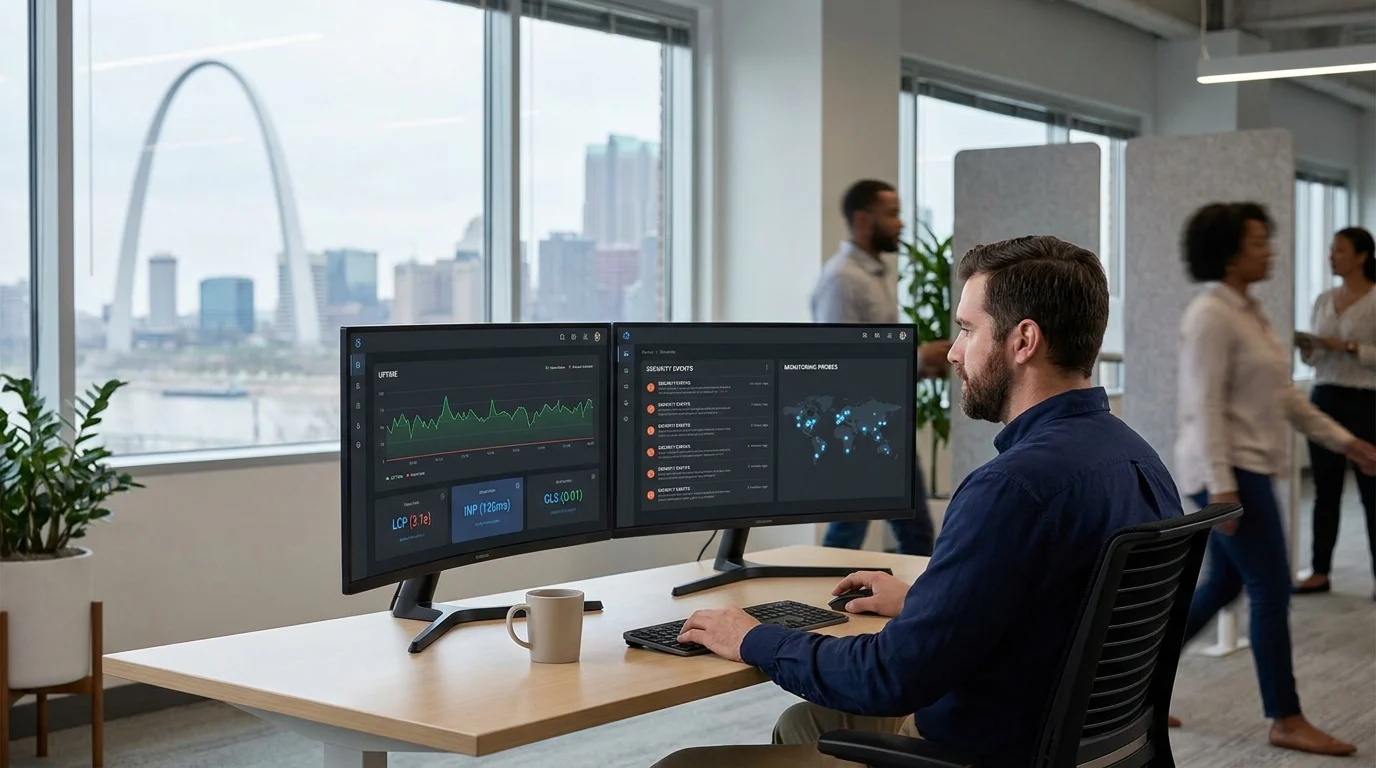
- Speed and UX tuning
- Hardened security
- Tested updates before they go live
- Continuous monitoring
- Fast, human support when something needs attention
You focus on your business—we’ll make sure your site performs every day, not just on launch day.
Get a plan recommendation — Tell us a bit about your site and we’ll match you to the right coverage.
See plans & pricing — Clear options for where you are today and where you’re headed.
Prefer to talk it through with someone local?
St. Louis–based and ready to help:314-657-7421
jc@stlcodescape.com
2940 Melton Dr, Arnold MO 63010
Not sure if this is for you? See who benefits most and the problems our hosting and maintenance solve.
Who this is for—and the outcomes you get
STL CodeScape’s managed WordPress hosting and maintenance is a fit if you recognize yourself here:
- Marketing and growth teams that need speed and dependable uptime so campaigns, SEO, and analytics work as expected—even during spikes. If your results depend on a fast, available site, we’ll keep it that way.
- Non-technical owners who want hands-off care, one accountable partner, and a predictable budget without surprise “break‑fix” bills. We handle the tech so you can focus on the business.
- Branding and creative agencies that need a reliable development partner to host, maintain, and enhance client sites with clean processes, staging, and clear SLAs. Hand us the build or the baton—we’ll run with it.
- WooCommerce stores that need extra protection for checkout and orders, strong performance, and updates that won’t interrupt sales. Keep revenue flowing while we handle the moving parts.
The outcomes you get:
- Faster load times across devices and measurable Core Web Vitals gains (LCP, CLS, INP), tracked monthly with before/after baselines—so you can see the impact, not just hear promises.
- Fewer incidents through monitoring, security hardening, timely updates, and a documented emergency path—less fire‑drill, more momentum.
- Predictable costs with flat monthly care for updates, monitoring, and backups. Add capacity or enhancements only when you need them.
- Clear accountability from one St. Louis team owning hosting, maintenance, and performance, with a named contact and transparent logs.
- Safer changes and faster recovery. Staging‑tested updates, off‑site backups with clear recovery targets, and restore drills so you’re never guessing.
Not sure where you fit? Take a 2‑minute assessment to get a plan recommendation. Prefer to talk it through? Call 314-657-7421 or email jc@stlcodescape.com for a quick, no‑pressure fit call.
Then compare the plans below. Each maps to these use cases so you can choose the right level of care from day one.
Plans & pricing
Pick a care plan that fits today and scales with you. Pay monthly or switch to annual any time. No long‑term contracts. Upgrade or downgrade as your needs change. Our St. Louis–based team manages everything with proactive monitoring and clear SLAs, so you can focus on your business.
Essentials: entry‑level care for marketing and brochure sites
- Hosting resources: Managed WordPress on our performance‑tuned cloud stack with CDN, server‑level caching, and a staging site. Standard resources ideal for small sites.
- Backups: Daily offsite backups with 30‑day retention. Regular test restores.
- Included edits: 30 minutes/month for copy, images, menus, and minor styling tweaks.
- Updates: Monthly core, plugin, and theme updates tested on staging, then deployed.
- Monitoring: 5‑minute uptime checks, SSL/domain renewal alerts, weekly security scans.
- Response‑time SLA: Reply within 1 business day (Mon–Fri, 9–5 CT). Site‑down triage within 4 business hours.
- WooCommerce: Not included. Choose Commerce for stores.
- Great fit when you need a reliable, fast site without the overhead.
Growth: most popular for growing organizations
- Hosting resources: Upgraded resources with CDN, advanced caching, Redis object caching, and staging.
- Backups: Twice‑daily offsite backups with 60‑day retention.
- Included edits: 90 minutes/month.
- Updates: Weekly, staged with visual checks. Critical patches within 1 business day.
- Monitoring: 1‑minute uptime checks, daily malware scans, monthly Core Web Vitals tracking.
- Response‑time SLA: Reply within 4 business hours. Site‑down triage within 2 business hours (business hours as above).
- WooCommerce: Not included. Best for non‑transactional sites.
- Ideal for teams that want faster performance, tighter security, and regular improvements.
Commerce: built for WooCommerce and transactional WordPress
- Hosting resources: High‑performance resources tuned for WooCommerce (Redis/object caching, image optimization, dedicated staging).
- Backups: Hourly database plus daily full backups with 90‑day retention. Order integrity verification.
- Included edits: 2 hours/month for content updates, product setup, and promotions.
- Updates: Weekly on staging with functional checkout tests. Same‑day deployment for critical security patches.
- Monitoring: 1‑minute uptime checks, synthetic checkout and payment gateway tests, real‑time error logging, inventory and webhook monitors.
- Response‑time SLA: Reply within 2 business hours. After‑hours emergency path for site‑down or checkout issues with 1‑hour critical response.
- WooCommerce: Fully covered.
- Best when uptime and checkout reliability directly impact revenue.
Enterprise: tailored infrastructure, tooling, and SLAs
- Hosting resources: Dedicated VPS or cluster, custom CDN/WAF configuration, application performance monitoring (APM), separate staging and pre‑prod environments.
- Backups: Custom frequency up to near real‑time with multi‑region retention and compliance options.
- Included edits: From 5 hours/month or a pooled retainer. Priority queue.
- Updates: Continuous cadence with change windows, automated visual regression testing, and approval workflows.
- Monitoring: Custom dashboards, API/cron/queue monitors, synthetic user journeys, SLA reporting.
- Response‑time SLA: 1‑hour response during business hours and 24/7 on‑call with defined critical‑incident response.
- WooCommerce: Advanced stores, including memberships, subscriptions, and multi‑currency, supported.
- For organizations that need dedicated infrastructure, governance, and an extension of their in‑house team.
Ready to choose your plan?
Compare hosting options Talk to an engineer
- Start now and we’ll schedule onboarding right away, or book a quick call to pick the right tier.
- Not sure which plan fits? Send your URL and goals—we’ll recommend the best option within one business day.
- Call 314-657-7421 or email jc@stlcodescape.com for a same‑day quote.
No long‑term contracts. Easy plan changes as you grow.
Want the details? Next, see exactly what’s included across all plans: our hosting stack, security layers, backups, update process, and monitoring.
What’s included in every care plan
Every plan includes the essentials your WordPress site needs to stay fast, secure, and steadily improved, managed by a hands‑on St. Louis team that knows your codebase. No black boxes. No guesswork. Think of us as your on‑call web ops team—proactive, accountable, and local.
- Managed hosting stack: Premium WordPress‑tuned hosting with free SSL, HTTP/2/3, global CDN, server‑side and page caching, current PHP, and a staging environment for safe testing—so pages load fast and customers stick around.
- Security hardening: Web application firewall and CDN layer, least‑privilege access, 2FA on admin tools, daily malware scans, brute‑force protection, and vulnerability patching—to cut risk and stop threats before they become incidents.
- Automated, offsite backups: Scheduled backups stored in separate cloud locations with versioned retention and point‑in‑time restores—because if something breaks, we can roll back quickly and confidently.
- Staging‑tested updates: Core, plugin, and theme updates applied on staging first, validated with visual and functional checks, then safely deployed to production—no surprise breakages after “routine” updates.
- Uptime and performance monitoring: 24/7 uptime checks, alerting, and ongoing performance tracking, including Core Web Vitals, with proactive fixes—so issues are handled before customers (or Google) notice.
- Monthly reporting: A clear summary of updates, uptime, backup health, security findings, performance metrics, and recommended next steps—know exactly what we did and what’s next.
- Dedicated support channel: A single, prioritized inbox for requests and incidents, with defined response times and an escalation path for urgent issues—one place to ask, fast answers when it counts.
Badges
- Published SLA: Response times are documented by plan. Critical issues are acknowledged quickly and worked to resolution with priority.
- Defined RPO/RTO: Default targets are set during onboarding (e.g., RPO 24 hours, RTO 4 hours) and can be tightened for higher‑risk sites like WooCommerce.
- St. Louis‑based team: Managed by local WordPress engineers in St. Louis, MO.
Working with a brand or marketing agency? We plug into your workflow as the development arm that keeps sites humming.
Want to see a sample report or our SLA? Email jc@stlcodescape.com. Prefer to talk it through? Call 314-657-7421 for a quick 15‑minute fit check.
Up next, we’ll break down each pillar—hosting, security, backups and recovery, update process, monitoring and performance, and reporting—so you know exactly how we protect and improve your site.
Managed hosting stack (built for WordPress)
We provision your site on a right‑sized, single‑tenant environment—containerized or a dedicated VPS—based on traffic, complexity, and compliance needs. Translation: you get the resources you need (and only pay for those), plus isolation for security and performance. Modern PHP with OPcache, persistent object caching via Redis, and layered caching built for WordPress come standard. Server‑level and page cache at the origin, plus smart edge caching for anonymous traffic. Commerce and membership flows are cache‑aware, so carts, checkouts, and logged‑in pages stay accurate and fast. Want a quick benchmark against your current host? We’ll size it up and show you the delta, no jargon.
Global delivery and efficient media are built in. Your assets use a worldwide CDN with HTTP/2–3 and Brotli. Images are optimized on the fly with WebP or AVIF where supported, responsive sizes, compression, and lazy‑loading. We place your primary data center close to your audience—common US options include Midwest/Chicago, East/N. Virginia, or West/Oregon—keeping latency low while meeting data‑location needs. Expect stronger Core Web Vitals, better SEO signals, and a site that just feels snappier. If most of your traffic is regional, we’ll put you nearby and show a before/after.
Every site includes an isolated staging environment for safe work. We sync database and media, run updates and checks there, then ship to production with one‑click deploys and an automatic restore point. For insight, we add APM so we can pinpoint slow queries, plugins, or external calls in real time. Prefer transparency? We’ll share read‑only APM access and walk you through what we’re watching.
We also right‑size compute, lean on edge caching to cut origin requests, and prefer energy‑efficient regions and providers—keeping costs predictable while shrinking your footprint. Let’s map out the setup that fits your traffic curve and growth plan.
Want to see how this would look for your site? Call 314-657-7421 or email jc@stlcodescape.com to schedule a quick stack review.
From platform fundamentals, we’ll move into how we harden and protect your site every day.
Security & compliance
Security isn’t a plugin. It’s a practice. Our St. Louis team builds and maintains your WordPress site with a layered program that prevents most issues and prepares for the rare emergency. Prevention first, recovery ready. Want a quick read on where you stand today? Request a no‑pressure security posture check at jc@stlcodescape.com or 314-657-7421.
Edge protections and threat mitigation
- Web application firewall (WAF) and global CDN to block common exploits (SQLi, XSS), filter bad traffic, and absorb DDoS at the edge.
- Bot management and rate limiting to stop credential stuffing, scraper bots, and brute‑force attempts while allowing good bots.
- TLS 1.2/1.3 with HSTS and modern ciphers. Automatic certificate renewals.
All configured, monitored, and tuned by our team—no “set it and forget it” security plugins.
Malware prevention and detection
- Continuous malware and file‑integrity scanning at application and server layers.
- Real‑time login protection, lockouts, reCAPTCHA or Turnstile on forms, and IP reputation blocking.
- Vulnerability monitoring for WordPress core, themes, and plugins tied to public CVE feeds.
If something looks off, we alert you fast and take point on remediation so you don’t have to.
Vulnerability patching cadence
- Critical security fixes: validated and deployed via staging within 24 hours on business days.
- High severity: within 72 hours.
- Routine updates: bundled weekly with change logs.
- Emergency out‑of‑band patches when exploit activity is observed.
Updates are tested in staging first and scheduled to avoid peak traffic—no surprises.
Access control and identity
- Least‑privilege, role‑based access for WordPress, SFTP/SSH, and hosting control panels.
- Enforced 2FA for WordPress admins. Optional SSO with Microsoft or Google.
- Key‑based server access only. Credentials and API keys stored as encrypted environment secrets, not in code.
- Time‑boxed vendor access and quarterly access reviews.
We’ll handle onboarding/offboarding and keep the keys tight.
Auditing and accountability
- Activity logging for logins, content changes, updates, deployments, and server access.
- Log retention for at least 90 days by default. Extended retention on request.
- Monthly security summaries included with your maintenance report.
Need proof for a board, client, or RFP? We’ll package clear evidence and summaries.
Documented incident response, with hack cleanup where included
- Defined response times by plan, as fast as 1 hour for emergencies.
- Triage and containment, snapshotting, forensic scan, malware cleanup, and hardening.
- Root‑cause analysis with fixes to prevent recurrence.
- Compromised credential rotation and API key reissue.
- Search console and reputation checks, plus a written post‑incident report within 48–72 hours.
- Hack cleanup is included on plans that list remediation, or offered at a fixed, pre‑approved rate.
Not a current client but need help now? Call 314-657-7421 and we’ll jump in.
Compliance‑minded by design
- Privacy‑first defaults: data minimization, secure transmission, and restricted access to PII.
- Support for GDPR and CCPA readiness: cookie consent, data retention settings, DSAR workflows, and opt‑out mechanisms.
- Evidence on request for reviews and audits: access logs, update and change logs, vulnerability reports, backup and restore test records, uptime and performance reports, and a current sub‑processor list.
- We’ll map our controls to your questionnaires and coordinate with your legal or IT teams. If you require regulated hosting (HIPAA or PCI), we’ll integrate with your compliant provider.
Whether you’re an SMB or an agency with strict client requirements, we’ll right‑size the controls and paperwork.
Ready to make your site a hard target? Let’s talk about your security plan and timelines: jc@stlcodescape.com • 314-657-7421
Backups & disaster recovery
When something goes wrong, speed and precision matter—so you don’t lose sleep or sales. We run automated, encrypted backups and keep multiple copies in separate cloud locations so your site can be restored quickly and cleanly. If you’d like, we can review your current backup setup and flag any gaps before an incident happens.
Choose the coverage that fits your risk and budget
- Essentials: Nightly full‑site backups (files and database), 30‑day retention, offsite cloud storage in one primary region with weekly secondary replication. RPO target 24 hours. RTO target same business day, up to 8 hours.
- Growth: Nightly full plus hourly database incrementals, 60‑day retention, dual‑region offsite storage. RPO target 2 hours. RTO target 6 hours or less.
- Commerce/Enterprise (High‑Traffic): Nightly full plus continuous incremental backups every 5–15 minutes with multi‑region redundancy and 90‑day retention. RPO target 1 hour or less, often 15 minutes. RTO target 4 hours or less.
Not sure which tier is right? Tell us how much an hour of downtime costs your business—we’ll recommend the right fit and align RPO/RTO to match.
What those targets mean
- RPO (Recovery Point Objective): how much data you could lose if we have to restore.
- RTO (Recovery Time Objective): how fast we bring the site back online after an incident.
Tested restores, not guesses
- We verify every backup with checksums and perform scheduled recovery drills: twice a year for Essentials, quarterly for Growth and Commerce/Enterprise.
- Restores are rehearsed in staging first to validate design, functionality, forms, and logins before we switch traffic.
- Your runbook documents recovery steps, targets, and contacts. We report backup status and test results monthly.
Commerce and dynamic content care
- For WooCommerce and other transactional sites, we support point‑in‑time database restores to protect order integrity.
- If a live rollback is required, we reconcile orders with your payment gateway and fulfillment system to prevent duplicates or gaps, and we can re‑import any orders created after the restore point.
- Continuous incremental backups on Commerce/Enterprise minimize the chance of lost carts, orders, or submissions.
How a restore works
- We identify the safest restore point based on your RPO and incident timing, spin up a staging restore, and validate the site.
- You approve the restore. We schedule a low‑impact deployment window, or execute immediately for emergencies, and communicate status.
- We restore to production, run post‑checks for uptime, forms, checkout, and admin access, and keep a rollback option ready until verification is complete.
With recovery covered, we reduce the need to use it by handling updates the safe way. Staging first, tested, then deployed with a rollback plan.
Let’s make outages a non‑event. Call 314-657-7421 or email jc@stlcodescape.com to get your backup and recovery plan dialed in.
Updates & change management (staging → test → deploy)

Updates are the most common cause of surprise breakage on WordPress. We remove the risk with a staging‑first workflow built for custom themes and busy, business‑critical sites—so you get improvements without the anxiety and your team stays focused on the work that matters.
Our update cycle
- Cadence: Core, plugin, and theme updates run monthly by default; weekly for higher‑change or e‑commerce sites. Critical security releases are handled within 24 hours.
- Staging first: We clone production to a staging environment that matches your PHP, database, and caching stack. For stores or membership sites, we delta‑sync recent orders and users so tests reflect reality.
- Visual checks: Automated screenshot diffs compare key templates across common breakpoints to catch layout shifts early—before your customers do.
- Functional tests: We verify forms, search, logins, carts and checkout, payment gateways, email sends, analytics tags, and any custom integrations. WooCommerce sites also get test orders through each live gateway.
- Approval when it matters: For major releases or UX changes, we provide a staging link and short release notes so you can sign off before go‑live. Prefer approvals in Slack or Teams? We’ll match your workflow.
- Maintenance windows: Deploys occur during low‑traffic windows, typically Tue–Thu, 7–10 pm CT. We take a fresh on‑demand backup, deploy, clear caches, and run post‑deploy smoke tests. Most updates have no downtime. If read‑only mode is needed, we’ll schedule and notify in advance.
- Rollback plan: If something misbehaves, we roll back code or restore the pre‑deploy backup within minutes. We target sub‑15‑minute rollbacks for emergencies.
Licenses and compatibility
- We manage premium plugin and theme licenses in a secure vault, keep renewals current, and track dependencies per site.
- Our compatibility matrix flags breaking changes, such as major core or PHP upgrades. We’ll pin versions, defer risky updates, or open a task for remediation before advancing.
- Custom theme and build tooling are updated in lockstep, with asset builds verified in staging.
Documentation you can trust
Every cycle produces a clear, plain‑English changelog: what updated, from‑and‑to versions, tests performed, any user‑visible changes, and follow‑ups for next month. You’ll have a clean audit trail for your records.
Once updates are live, monitoring and rapid response pick up—so issues are spotted and fixed before they impact revenue.
Want this level of care for your site? Book a quick maintenance consult and get a clear, no‑pressure plan for your updates. Call 314-657-7421 or email jc@stlcodescape.com.
Monitoring & alerting
We don’t wait for a customer to report an issue—your site is watched around the clock with global uptime probes, performance telemetry, and error monitoring. When a threshold is crossed, alerts go to our on‑call engineer and escalate if not acknowledged, so problems get addressed before they cost you leads or sales. Want this kind of vigilance on your site? Call 314-657-7421 or email jc@stlcodescape.com to get started.
What we watch and how we respond
- 24/7 uptime monitoring and escalation: Minute‑by‑minute checks from multiple regions to avoid false positives. If two probes fail, we alert via email, SMS, or pager to the on‑call engineer. If not acknowledged within 5 minutes, we escalate to a senior engineer, then to a principal at 10 minutes.
- Performance trend tracking: Continuous tracking of TTFB, database query time, cache hit rate, memory and CPU, queue and cron health, 404 and 500 rates, and front‑end error rates. We flag degradations early and correlate them to recent changes to prevent slowdowns from chipping away at conversions.
- Error and log monitoring: Centralized PHP and WordPress error logs, server logs, and JavaScript error capture. We watch for vulnerability notices, failed logins, unusual IP activity, and slow queries—so you’re protected from both sneaky bugs and suspicious behavior.
- Synthetic user‑journey checks on applicable tiers: Scripted tests that verify key flows like contact form submit, on‑site search, WooCommerce add‑to‑cart and checkout with test payment, and any site‑specific lead or booking flows. Failures create high‑severity incidents with screenshots and traces to speed diagnosis and recovery.
Response‑time SLA by severity
- Critical (P1): Full site outage, checkout or lead form failures, security incidents. Human response within 1 hour, 24/7. We begin remediation immediately and provide status updates at least every 60 minutes until resolved.
- High (P2): Partial outage, major performance regression, broken navigation or templates affecting many users. Response within 4 business hours.
- Standard (P3): Minor bugs, non‑urgent content or styling issues. Response within 1 business day.
Notes: Response time is time to human acknowledgment and start of investigation. Resolution time varies by incident. For after‑hours emergencies, call 314-657-7421 or email jc@stlcodescape.com.
This monitoring feeds our monthly reporting and, more importantly, the optimization work we do to raise and stabilize your Core Web Vitals over time. Next, see how we turn these signals into measurable gains—or reach out now to schedule a quick, no‑pressure walkthrough of our monitoring dashboard.
Performance & Core Web Vitals
Performance isn’t a one‑time tune‑up. During onboarding we run an initial optimization to lock in quick wins and a stable baseline. Then we keep it that way—because faster pages lift SEO, conversions, and ad ROI.
- Smart caching strategy: full‑page and server cache plus browser cache rules tuned per template
- Code minification and concatenation with HTTP/2 multiplexing
- Lazy loading for media and iframes, with priority hints for above‑the‑fold assets
- Modern image formats (WebP/AVIF) with responsive srcsets
- Critical CSS extraction and deferring non‑critical styles
- Font strategy: subsetting, preloading key files, and managing FOIT/FOUT
We continuously track Core Web Vitals (LCP, INP, CLS) using real‑user data and scheduled lab tests, so you’re never guessing. Reports show trends and regressions, and higher tiers include quarterly performance sprints that target the highest‑impact templates first. Work may include template refactors, media reprocessing, third‑party script governance, and server‑level tuning. Want to see what’s possible on your stack? Ask us for a quick baseline review and plan recommendation.
APM‑driven diagnostics guide our work when things slow down. We profile requests to find:
- Expensive or uncached database queries
- Plugin bloat or conflicts
- Third‑party scripts blocking render or tying up the main thread
- Slow external APIs, webhooks, and search endpoints
- Assets that exceed the performance budget
You’ll get clear next steps and before/after proof—no finger‑pointing, just fixes.
Optional targets by tier
- Essentials: Improve and maintain a “Passed” CWV status for the homepage and one key template on mobile at the 75th percentile under typical 4G conditions (LCP ≤ 2.5s, INP ≤ 200ms, CLS ≤ 0.1).
- Growth: Maintain “Passed” CWV on three to five key templates with monthly tracking and remediation in the next sprint if a metric slips for two weeks in a row.
- Commerce/Enterprise: Maintain “Passed” CWV across primary commerce flows and keep checkout LCP ≤ 2.5s with a 95th‑percentile INP ≤ 200ms during business hours. Quarterly sprints include third‑party script audits and field validation with RUM.
Note: third‑party platforms and compliance scripts can affect outcomes. When that happens, we present tradeoffs and mitigation paths such as deferring, conditional loading, or replacements.
Performance holds only if day‑to‑day changes respect the budget. That’s why the next layer is hands‑on human support for fast content edits and minor changes that keep your site fresh without undoing the gains. Send us your updates and we’ll keep them within budget. Ready to lock in faster load times? Email jc@stlcodescape.com or call 314-657-7421 to get your performance baseline.
Content edits & support time
Know exactly what’s covered, how to get help, and how we keep you moving. Clear scope, quick approvals, and fast turnaround so your site never stalls.
What counts as a content edit vs. custom development
- Content edits (included in your monthly time): swapping text or images, adding or editing posts and pages, updating menus and widgets, adjusting existing form fields, adding redirects and SEO metadata, light CSS tweaks, minor layout adjustments using existing blocks or components, configuring settings in already‑installed plugins.
- Custom development (scoped separately): new page templates or custom blocks, new features or workflows, third‑party integrations, complex form logic, custom post types and taxonomies, performance refactors, accessibility fixes beyond quick changes, WooCommerce feature changes, plugin or theme development.
Not sure which bucket your request falls into? Send it anyway—we’ll confirm scope, give a quick estimate if needed, and keep you moving.
Included monthly edit time by plan
- Essentials: 30 minutes/month
- Growth: 90 minutes/month
- Commerce: 120 minutes/month
- Enterprise: From 5 hours/month or a pooled retainer
Rollover policy: Unused time rolls over one month, up to your plan’s monthly allotment. Example: on Essentials you can bank up to 30 minutes from the previous month. Banked time is used first. No wasted minutes—use what you’ve paid for.
Overage: If you approve work beyond your included time, it’s billed at $150/hour in 15‑minute increments. We’ll give a quick estimate and get your OK before we begin—no surprises.
How to request help
- Email: send requests to jc@stlcodescape.com. Attachments and links welcome. Your email creates a ticket in our help desk. Pro tip: include the page URL, a screenshot, and what “done” looks like for the fastest turnaround.
- Phone: 314-657-7421 during business hours for time‑sensitive issues.
- Business hours: Monday–Friday, 9:00 a.m.–5:00 p.m. Central.
Have a change in mind? Email us now and we’ll get it queued.
Response targets
- Essentials: initial response by next business day
- Growth: within 4 business hours
- Commerce: within 2 business hours, with checkout issues treated as priority
- Enterprise: 1 hour during business hours; 24/7 on‑call for critical incidents
After‑hours emergencies (P1 incidents)
For site‑wide downtime, security incidents, or a broken checkout or lead flow outside business hours:
- Call 314-657-7421 and leave an “Emergency” message
- Email jc@stlcodescape.com with subject “Emergency”
Growth, Commerce, and Enterprise include on‑call escalation for P1 incidents. Essentials clients can enable after‑hours coverage as an add‑on, or we’ll begin remediation the next business day. After‑hours work may be billed at emergency rates; we’ll confirm before proceeding when possible. Want peace of mind 24/7? Ask about upgrading coverage.
Escalation and communication standards
- Severity levels
- P1 Critical: site down, security breach, checkout or lead forms failing. Immediate triage. Post‑incident summary provided.
- P2 High: major feature impaired, significant user impact. Triage same day. Fix window communicated.
- P3 Standard: routine content edits and minor tweaks. Scheduled and completed within your plan’s response targets.
- Process you can count on
- Acknowledgment: we confirm receipt, severity, and next steps.
- Estimate and approval: if a request may exceed included time or require custom dev, we provide an estimate for approval.
- Safe changes: we use staging for anything that affects templates, checkout, or sitewide styling. You’ll get a preview link for sign‑off.
- Clear closure: you’ll receive a summary of what changed, time used, and any follow‑ups.
Prefer to talk it through? Call 314-657-7421. Ready to hand us your to‑do list? Email jc@stlcodescape.com and we’ll get started. You’ll also see everything in your monthly report—updates, time spent, uptime and security status, and recommended actions to keep momentum going.
Monthly reporting & roadmap
Know what’s happening with your site—without the guesswork. Each month our St. Louis team sends a clear, decision‑ready report with a live dashboard link. You’ll see site health, performance, and what improved, plus what’s next, so you can act quickly and confidently.
Your monthly report includes:
- Updates performed: WordPress core, plugins, and theme updates staged, tested, and deployed. Notes on deprecations, conflicts resolved, and any postponed items with reasons.
- Uptime and incidents: Monthly uptime percentage, any downtime events, detection‑to‑resolution time, and synthetic checks for forms or checkout if applicable.
- Backups and recovery: Backup frequency and retention, timestamp of last successful offsite backup, recent restore test status, and current RPO and RTO posture.
- Security events: WAF and firewall blocks, malware scan results, vulnerability patches applied, user and role changes, and any remediation.
- Performance and Core Web Vitals: LCP, INP, and CLS by key templates and device types, server response and TTFB, CDN and cache hit rate, page weight, and month‑over‑month deltas.
- Recommendations: A prioritized list of fixes and enhancements with expected impact and estimated effort. This covers UX and content tweaks, speed wins, accessibility items, SEO and CWV opportunities, and optional automations.
You’ll also get a plain‑English executive summary with the top 3–5 actions to take next—easy to share with your leadership team.
Quarterly roadmap check‑ins (Growth, Commerce, and Enterprise)
- A 60–90 minute session with your team to align on goals and campaigns.
- Review conversion funnels, search insights, and CWV trends. Translate findings into a prioritized backlog for the next quarter.
- For WooCommerce: validate checkout tests, order integrity, inventory and webhook health, and any seasonal or promo needs.
- Decide sprint priorities and allocate included support hours. Flag any infrastructure updates ahead of time.
Want to see what this looks like? Download a sample report to preview the format and depth. Prefer a walkthrough? Book a quick call and we’ll show you how the live dashboard keeps you in control.
Ready to put your site on a predictable, improvement‑driven cadence? Call 314-657-7421 or email jc@stlcodescape.com.
Next up: our step‑by‑step onboarding and migration process so you know how we get you into this rhythm smoothly.
Onboarding & zero‑downtime migration
Switching to STL CodeScape is fast, secure, and planned to avoid visitor downtime. Here’s how we handle it—and how we make it easy on your team. Want a quick, no‑pressure assessment? Ask for a free migration readiness check and a firm launch date.
Typical timeline (3–7 business days)
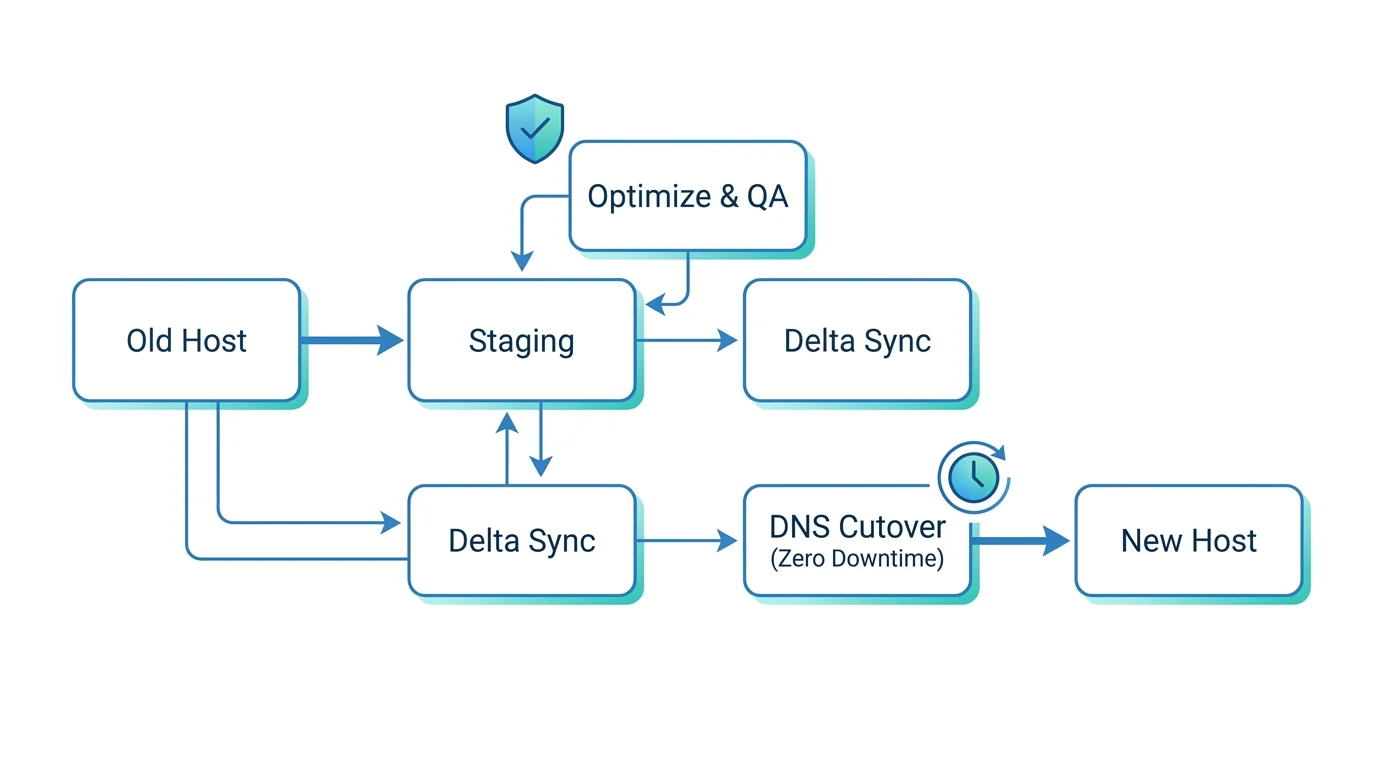
- Access handoff (Day 0): We collect credentials via an encrypted handoff and confirm scope, traffic patterns, and any critical dates. We lower DNS TTL to speed up cutover. You’ll know exactly what we need and when—no guesswork.
- Environment setup (Day 1): We provision production and staging on our managed WordPress stack, enable SSL/TLS, CDN/WAF, server‑level caching, real‑time monitoring, and automated backups. You get a secure, performance‑tuned foundation from day one.
- Staging clone and optimization pass (Days 1–2): We clone your site to staging, update PHP and extensions, remove bloat, tune the database, configure caching rules, and set up APM and error logging. We establish a Core Web Vitals baseline so you can see measurable gains.
- Review and delta‑sync prep (Days 2–3): You review staging. We map redirects, validate forms and integrations, and schedule a short content freeze window if needed for the final sync. For dynamic sites, we prepare delta‑sync for new orders, users, and form entries—so nothing is lost.
- Zero‑downtime launch (Day 3–5): We run a final delta‑sync, switch DNS or origin during a low‑traffic window, verify SSL, caching, and redirects, and keep the old host hot for 48–72 hours as a fallback. Visitors should not see downtime. Editors may see a brief admin freeze of 5–15 minutes during final sync. Prefer after‑hours or weekend cutover? We’ll schedule around you. Need it faster? Rush options are available.
Secure credential exchange and least‑privilege access
- No passwords over email. We use an encrypted portal or secure share link with auto‑expiry.
- We create separate, least‑privilege accounts: per‑environment SFTP and database users, scoped WordPress roles, and read‑only access where possible. 2FA is enforced on our side. Audit logs are enabled.
- You keep ownership of your domain registrar, DNS, analytics, and third‑party services. We can operate via delegated access. You stay in control at every step.
Acceptance checklist for go‑live
- Visual and functional review: templates, navigation, search, forms, login, and any gated content.
- Performance: caching headers, CDN coverage, image formats, Core Web Vitals compared to baseline.
- SEO: redirects and canonicals, robots.txt and sitemaps, schema carry‑over.
- Integrations: payment gateways, CRMs and marketing automation, webhooks, and transactional email.
- Ops: backups verified with a test restore, uptime and error monitoring active, cron and scheduled tasks confirmed, 404 monitoring enabled.
- Security: WAF rules, security headers, admin protections, least‑privilege accounts in place.
- Final go/no‑go call with a documented rollback path.
We don’t launch until you’re comfortable. Want a quick walkthrough video for your team before go‑live? Just ask.
Rollback plan if needed
- Full pre‑launch snapshots of both old and new environments.
- DNS TTL reduced ahead of time for quick reversals.
- Option to flip back to the previous origin within minutes while we remediate.
- Old host retained briefly post‑launch to ensure a clean transition.
You likely won’t need it, but this safety net is built in—no surprises.
Migration pricing
- Annual Website Care plans include standard migrations at no charge for most single‑site WordPress installs.
- Month‑to‑month plans: a one‑time migration fee applies, quoted upfront after a quick audit.
- Complex scenarios such as multisite, very large media libraries, or custom stacks are scoped with a fixed, no‑surprises quote. Discounts may apply with an annual plan.
Want a firm number fast? We’ll provide a clear, written quote after a brief review—typically within one business day.
Have a store, membership, LMS, or other high‑change site? The next section covers the extra steps we take for WooCommerce and complex, dynamic sites to protect orders, inventory, and customer sessions during and after migration.
Ready to plan your move? Email jc@stlcodescape.com, call 314-657-7421, or request a 15‑minute migration consult to secure your preferred launch window.
WooCommerce and high‑traffic care
If your site takes payments, books appointments, or powers member access, it needs care designed for revenue—not just uptime. Our WooCommerce and high‑traffic coverage keeps sales flowing with stability under load, zero‑loss recovery, and airtight checkout integrity. These sites must be on our Commerce or Enterprise tiers so we can apply the safeguards that matter when money’s on the line.

What we do for commerce and mission‑critical sites
- Checkout flow testing every update: We validate add‑to‑cart, shipping and tax calculations, coupon logic, payment gateway sandbox runs, order emails, and post‑purchase redirects on staging before anything goes live—so promos and paydays don’t break.
- Order and webhook integrity checks: We reconcile WooCommerce order states with gateways and services such as Stripe or PayPal, fulfillment, and CRM by monitoring webhooks, confirming 2xx responses, retrying failures with backoff, and alerting if anything is stuck—catching silent failures before customers do.
- Correct caching rules for dynamic pages: We set cache exceptions and cookie‑based bypasses for cart, checkout, my account, and any personalized endpoints to prevent stale prices, tax, or inventory. Catalog pages are aggressively cached and pre‑warmed. Transactional paths are not. Result: fast browsing, accurate carts.
- Real‑time or high‑frequency backups: Commerce includes database backups as often as every 15 minutes. Enterprise offers near real‑time. Code and media snapshots are taken before deployments. Offsite retention is extended, and restores are test‑drilled—because backups only matter if you can restore quickly.
- Defined recovery targets: Typical targets are RPO 15 minutes or less on Commerce, 5 minutes or less on Enterprise, and RTO within 30–60 minutes depending on scope, so your team knows exactly what “back up” means in practice.
- Staged update windows: Updates are built and tested on staging, then deployed during a low‑traffic window with a short maintenance page and a rapid rollback plan. For active stores, we use delta‑syncs to keep orders and customers in step—no data left behind.
- Scale for launches and events: We provision surge capacity, enable object caching with Redis, tune database indices and queries, and push static assets to CDN with warm‑ups so landing and product pages stay fast under load—whether it’s a drop, a sale, or a TV mention.
- Inventory and bot protection: We apply WAF rules and bot mitigation to stop scalping, carding, and add‑to‑cart bots. We add rate‑limits and challenges on sensitive endpoints and harden checkout with anti‑fraud, reCAPTCHA or hCaptcha, and payment intent practices to protect margins and stock.
Plan requirement
WooCommerce, donation, membership/LMS, or any site with high‑stakes conversions requires our Commerce or Enterprise tier so we can apply the testing, backup frequency, surge capacity, and bot controls that protect revenue. Not sure which tier fits? We’ll size it to your order volume, traffic patterns, and risk tolerance.
Want eyes on your checkout before the next campaign? Call 314-657-7421 or email jc@stlcodescape.com to schedule a quick readiness review or migration plan. If you’re mid‑launch or fighting an issue now, mention “priority commerce” for same‑day triage.
Ready to do more than maintain? The next section covers optional enhancements like AI‑powered support, advanced analytics, and conversion optimization.
Add‑ons: AI and growth accelerators
Turn ongoing care into steady growth. Add these options to any hosting and maintenance plan and we’ll wire them into your WordPress stack, analytics, and reporting—so you can see exactly what’s working and what to do next. Want a quick walkthrough or pricing? Call 314-657-7421 or email jc@stlcodescape.com. For technical details, explore our AI integrations for WordPress.
What we can add
- AI website assistant for lead capture and support triage
- Trained on your site content, PDFs, product data, and policies
- Captures qualified leads with UTM and context, hands off complex issues, and logs transcripts
- Guardrails, source citations, and human review options
- Optional CRM or helpdesk integration (HubSpot, Zendesk, email routing)
- Outcome: turn more visits into conversations 24/7 without adding headcount
- Content automation pipelines
- SEO briefs, outlines, and first‑draft posts or product descriptions from your topics and keywords
- Human‑in‑the‑loop editing inside WordPress. We publish only what you approve.
- Auto‑tagging, internal link suggestions, and image alt‑text help
- Outcome: ship quality content faster while keeping your voice and standards
- Analytics you can act on
- GA4, Search Console, and form or phone tracking in a single dashboard
- Event and funnel tracking for key journeys such as quote requests or cart to checkout
- Anomaly alerts and monthly “what changed and why” insights included in your report
- Outcome: one source of truth that surfaces the next best move
- A/B testing and conversion optimization
- Tests for headlines, CTAs, layouts, forms, and pricing sections
- Heatmaps and session replays to find friction, with sample‑size and test‑length planning
- Safe update flow: stage, QA, then timed rollout. Core Web Vitals maintained.
- Outcome: continuous, low‑risk improvements that compound
- Social media management that feeds your site
- Strategy and calendar aligned to campaigns and offers
- Content creation, scheduling, and community engagement
- UTM conventions and pixel tracking so every post maps to on‑site traffic and conversions
- Monthly reporting shows channel‑to‑site impact, not just vanity metrics
- Outcome: social that actually drives leads and sales—not just likes
How pricing works
- Bundles, discounted vs. à la carte
- Growth Bundle: AI assistant, analytics insights, and A/B testing/CRO
- Traffic Bundle: Social media management and analytics insights
- Full Accelerator: AI assistant, content automation, CRO, and social
- Not sure which fits? Tell us your goals and we’ll recommend the best starter bundle.
- À la carte
- Pick any single add‑on and bolt it onto your current plan
- Start with one, expand as results show up—no long‑term lock‑in
- Terms
- Month‑to‑month with a one‑time setup for AI and tracking. Cancel anytime.
- Clear scope and approvals. Larger campaigns or custom dev are quoted separately.
Typical integration timeline
- Week 0: Kickoff, goals, and success metrics. Access and security handoff.
- Week 1: Tracking audit, GA4/events cleanup, UTM framework, baseline report.
- Weeks 1–2: AI assistant trained in a sandbox, content pipeline configured, staging install and QA.
- Weeks 2–3: First A/B test live with monitoring, social calendar finalized, initial posts scheduled.
- End of Month 1: Review results and prioritize the next experiments and content with your team.
- Your time required: light check‑ins; we handle setup, QA, and deployment.
All add‑ons roll into your monthly care‑plan report, so you see hosting health and growth KPIs together. Ready to plug one in for a pilot month? Email jc@stlcodescape.com or call 314-657-7421. Next, see local results from this approach.
Results our clients see
Here’s what changes when we host and care for your WordPress site: faster pages, fewer fires, better conversions. Most gains hit in the first 30–60 days—often without a redesign.
-
Regional manufacturer (St. Louis County). Before: LCP 4.8s on mobile, INP 420ms, frequent plugin conflicts, 62% bounce on key product pages. After 60 days: LCP 1.6s, INP 110ms, 99.99% quarterly uptime, and a 42% lift in RFQ form submissions. Updates now ship same day after staging tests. Ready to turn more visits into RFQs? Call 314-657-7421.
-
Nonprofit with high‑traffic events (Midtown). Previous shared hosting crashed during spikes, and restores took hours. After migration: Cloud CDN and WAF with proactive load testing. Zero downtime during an 8x gala‑week surge, 95th‑percentile server response at 180ms, 29% more completed donations, and tested recovery in 6 minutes with 15‑minute backup points. Planning a big event? Let’s make sure your site stays up when it matters most—jc@stlcodescape.com.
-
WooCommerce retailer (Clayton). Product and checkout pages were laggy (CLS 0.25, rising abandons). Post‑optimization: CLS 0.03, PDP LCP 1.9s, checkout INP 90ms, an 18% drop in abandoned carts, and a 21% increase in revenue per session. Near real‑time backups protect orders. Want to reduce abandons without changing your theme? Let’s chat.
If LCP/INP/CLS sound abstract, we’ll translate them into what you care about: leads, sales, and donations. Ask for a quick performance baseline and hosting risk check—no pressure, just clear next steps.
What clients say
“We stopped worrying about updates breaking the site. Pages are faster, and leads are up 40%.” — Marketing Manager, St. Louis manufacturer
“When our gala traffic spiked, nothing broke. Donations went through faster than ever.” — Development Director, local nonprofit
Selected client logos (displayed with permission on this page): manufacturers | nonprofits | e‑commerce | professional services
Local to St. Louis and ready to meet on‑site across the metro or fully remote. We support organizations throughout the region and beyond. Call 314-657-7421 or email jc@stlcodescape.com to schedule a quick consult.
Have questions about scope, emergencies, or e‑commerce specifics? See the FAQs below—or reach out and we’ll walk you through it.
FAQs
Do we have to use your hosting?
No. We can maintain WordPress sites on approved managed hosts such as Kinsta, WP Engine, or Flywheel if they meet our requirements for backups, staging, and security access. You’ll get the best performance, monitoring, and response times on our managed stack. We don’t offer hosting‑only without maintenance because we can’t stand behind performance and security we don’t manage end to end. Not sure if your host qualifies? Email jc@stlcodescape.com for a quick compatibility check.
What happens if we cancel?
You own your website, code, and data. If you cancel, we’ll provide a complete export (files, database, media) and a list of DNS records upon request. We’ll keep your off‑site backups for 30 days after your term ends, then securely purge them. If you need help moving to a new host or updating DNS, we can assist as a one‑time service. No lock‑in—just email jc@stlcodescape.com when you’re ready and we’ll start the handoff.
Are migrations free?
For most standard WordPress sites, migration to our managed hosting is included when you start an annual care plan. Month‑to‑month plans or complex sites such as very large media libraries or multisite may incur a one‑time migration fee, quoted upfront. Typical timelines: 2–3 business days for brochure sites, 5–7 business days for eCommerce or membership sites. We migrate to a staging URL first and schedule a zero‑downtime DNS cutover. For transactional sites, we use a delta‑sync and coordinate a brief order or user write freeze to protect data. Want a precise plan and quote? Call 314-657-7421 or email jc@stlcodescape.com.
What counts as a content edit vs. development?
Content edits (included within your plan’s monthly support time) are small, non‑structural changes such as:
- Swapping text or images, posting blogs, editing menus
- Updating hours, team bios, or contact info
- Minor styling tweaks and simple form changes
Development requests are larger or technical changes, such as:
- New page templates or components, custom fields, or layouts
- Custom PHP or JS, API integrations, or plugin development
- Complex CSS/JS refactors, performance engineering, or database work
If a request moves into development scope, we’ll estimate it before work begins or apply it to a separate block of dev hours. Not sure which it is? Send the request—we’ll classify it and respond with next steps within one business day.
Do you support WooCommerce and membership sites?
Yes. Transactional sites require our eCommerce care tier so we can include real‑time or incremental backups, checkout monitoring, order and user integrity checks, and staging‑first change management. We schedule deployments during low‑traffic windows and coordinate maintenance to avoid revenue impact. If your site drives revenue, let’s make sure you’re on the right tier—email jc@stlcodescape.com for a quick review.
Do you host email?
We don’t host email. We recommend Google Workspace or Microsoft 365 for reliability and security. We’ll configure DNS (MX, SPF, DKIM, DMARC) as part of onboarding or migration. Need help moving providers? We can coordinate that for you.
How do premium plugin and theme licenses work?
- Our agency licenses: For certain common premium plugins, we can provide our license while you’re on a care plan. If you leave, the plugin keeps working, but you’ll need your own license for future updates and vendor support.
- Your licenses: If you already own licenses, we’ll keep them in place and manage renewals per your preference.
- Custom themes: Custom themes we build for you are yours.
We’ll inventory and document all licenses during onboarding so you have a clear picture of what’s covered.
What are your support hours and emergency escalation?
- Standard support: Monday–Friday, 9:00 a.m.–5:00 p.m. Central (St. Louis). Typical first response within one business day.
- Urgent issues (site down, checkout or forms failing, security incidents): 24/7 escalation. Email jc@stlcodescape.com with “URGENT” in the subject and call 314-657-7421. On managed hosting plans, we acknowledge critical incidents within about an hour and begin triage immediately. Save this info so you have it when you need it.
Do you support WordPress Multisite and how do you handle staging?
We support Multisite with a brief discovery to confirm network size, subsite needs, and plugin compatibility. Pricing reflects the added testing and backup scope. All hosted sites include dedicated staging. We test updates and significant changes in staging first, then deploy to production during agreed maintenance windows. For high‑traffic sites, we’ll coordinate content freezes or database syncs as needed. Have a network now? Reach out for a quick Multisite compatibility check.
Still weighing the risks? Keep reading for our guarantees, clear response times, recovery targets, and migration commitments. Or talk it through with us at 314-657-7421 or jc@stlcodescape.com.
Guarantees, SLAs, and service credits
We put our commitments in writing so you know exactly what we’re accountable for from day one. No vague promises—plain‑English SLAs, transparent reporting, and real credits if we ever miss.
Uptime and incident response SLAs
- Uptime: 99.95% monthly availability target for our managed WordPress stack. Measured from multiple global probes at 1–5 minute intervals. Excludes scheduled maintenance announced 48+ hours in advance (typically under 60 minutes), force majeure, third‑party SaaS outages, domain or DNS issues outside our control, and customer‑initiated changes that bypass our process.
- You’ll get: access to a live status page and monthly uptime reports so you can see exactly what we see.
- Severity and response times
- P1 Critical (site down, checkout failing, security incident): initial human response within 60 minutes, 24/7, with mitigation beginning immediately.
- P2 High (major degradation, key feature broken with workaround): response within 4 business hours.
- P3 Normal (non‑urgent bug, content or layout issue): response within 1 business day. Typical completion 1–3 business days depending on scope.
- P4 Minor (low impact): scheduled in the next maintenance window or sprint.
Data protection targets (RPO/RTO)
- Essentials plan: nightly encrypted offsite backups, RPO ≤ 24 hours, RTO ≤ 4 hours, 30‑day retention, quarterly restore tests.
- Growth plan: hourly incremental plus nightly full backups, RPO ≤ 1 hour, RTO ≤ 2 hours, 60‑day retention, monthly restore tests.
- Commerce plan (WooCommerce and mission‑critical): continuous or 15‑minute backups with order‑safe restores, RPO ≤ 15 minutes, RTO ≤ 60 minutes, 90‑day retention, monthly restore tests and order/subscription validation post‑restore.
Want us to mirror your internal RTO/RPO or audit needs? We’ll document it in your SLA so your team and ours are always aligned.
Risk‑free terms
- 30‑day satisfaction guarantee: try our care plan for 30 days. If you’re not satisfied, cancel for a full refund of your first month’s service—no hoops.
- No long‑term contracts: month‑to‑month billing. Cancel anytime. If you leave, we’ll provide a complete site backup and, if we handled your migration in, we’ll help you migrate out cleanly.
Service credit policy
- Uptime credits applied to your next invoice for the affected site
- 99.0%–99.89% monthly uptime: 10% credit
- 98.0%–98.99%: 25% credit
- 95.0%–97.99%: 50% credit
- Below 95.0%: 100% credit
- P1 response SLA credits: if we miss the 60‑minute P1 response, 5% credit per incident, capped at 25% of the monthly fee.
- How credits work: we auto‑detect and apply credits when possible. You can also request a review within 30 days by emailing jc@stlcodescape.com. Credits don’t apply to excluded events defined under the uptime SLA and are capped at the monthly recurring fee for the impacted plan.
Want guarantees backed by real people and real accountability? Call 314-657-7421 or email jc@stlcodescape.com for a copy of our SLA and a quick walkthrough. Prefer to meet local? We’re St. Louis–based at 2940 Melton Dr, Arnold, MO 63010. Let’s lock in the right care plan and keep your site fast, secure, and always on.
Get your site cared for—starting this week
Ready to stop worrying about updates, patches, and surprise downtime? Hand off hosting and maintenance to the same team that builds high‑performance WordPress sites every day. We’ll secure, optimize, and start monitoring your site this week—no redesign required, and we can coordinate with your current host or IT.
What you can expect:
- Security hardening, core/plugin updates, backups, uptime alerts, and performance tuning—handled for you
- Clear scope up front, a straightforward onboarding process, and plain‑English monthly reporting
Take the next step:
- Primary: Book a quick consult to confirm fit and timeline—or start onboarding if you’re ready to move now.
- Secondary: Compare plans to see exactly what’s included, or request a custom quote for unique requirements (e.g., multisite, advanced compliance).
- Explore our managed hosting
Talk to a real person:
314-657-7421jc@stlcodescape.com
2940 Melton Dr, Arnold MO 63010
Based in St. Louis, we’re easy to reach and easy to work with—local or remote. Same‑week kickoff typically available.
Helpful links: Plans, FAQs, Terms of Service, Privacy Policy.