WordPress Performance Optimization that Improves Real‑User Core Web Vitals

Let’s make your WordPress site feel instantly fast and rock‑solid for every visitor. We optimize for people, not just lab scores, so your LCP, INP, and CLS pass Core Web Vitals in real‑world data—and stay green as traffic and content scale. Faster pages mean better SEO, higher conversions, and happier users.
We build and tune custom, hand‑coded WordPress themes and manage them long term. We remove bloat at the source, tighten server and front‑end architecture, and add safeguards (performance budgets, monitoring, and regression checks) so speed doesn’t slip—without piling on risky, short‑term plugins.
Based in St. Louis. WordPress specialists. Zero downtime: all work happens in staging and deploys safely. We can collaborate with your in‑house team or branding agency and work within your current hosting stack.
- Get a Free Performance Assessment (24–48 hour turnaround with prioritized fixes and quick wins)
- See Before/After Results (ask for examples relevant to your site size and industry)
- Book a 15‑minute intro call to talk through goals and timelines
Below is why speed matters and how we measure it.
Why Speed Matters (and How We Measure It)
Speed is a business metric. When your site responds quickly, more visitors stay, find what they need, and convert. When it lags, bounce rates climb, carts are abandoned, and CPA rises. Google also uses real‑user performance in rankings, so a faster experience can lift organic visibility and traffic quality. If you’re not sure where you stand, ask us for a quick Core Web Vitals snapshot and we’ll walk you through the results.
What we target and why it matters
- Largest Contentful Paint (LCP): how quickly the main content appears. Target 2.5s or faster. Faster LCP reduces early bounces and lifts add‑to‑cart and lead‑form starts.
- Interaction to Next Paint (INP): how quickly the page responds to a tap or click. Target under 200ms. Good INP keeps navigation, filters, and checkout steps feeling instant, improving funnel progression.
- Cumulative Layout Shift (CLS): visual stability as content loads. Target 0.1 or less. Low CLS prevents misclicks, builds trust, and protects conversion steps from UI shifts.
Want a prioritized punch list for your site? We’ll baseline these metrics and show you the top three fixes that move the needle fastest.
Field data first, lab data second
- Lab tools like Lighthouse and WebPageTest are great for diagnostics and predicting impact. We use them early to spot bottlenecks, validate fixes, and prevent regressions.
- Success is proven in the field. Chrome UX Report (CrUX) and Google Search Console’s Core Web Vitals show how real users on real devices and networks experience your site. That is the data Google uses, and it is what we prioritize.
- We segment field data by device, page type, and country to focus improvements where your customers are.
Prefer to see it in a dashboard? We’ll set up reporting you can check at a glance and share with your team.
What to expect and when
- You will see immediate improvements in lab tests as we complete optimization sprints.
- Field metrics settle over a rolling 28‑day CrUX window. Many sites see positive movement within 7–14 days, with full reflection in 28 days.
- We set a speed budget and add controls so gains persist as content, plugins, and campaigns evolve.
Ready to move quickly? Kick off with a 2‑week performance sprint and get a clear before/after report tied to your KPIs.
Tying performance to your KPIs
- Ecommerce: faster LCP and INP increase product views per session, add‑to‑cart rate, checkout completion, and revenue per session.
- Lead generation: improvements raise form start and completion rates, reduce abandonment on long forms, and increase qualified leads from the same ad spend.
- Content and membership: better responsiveness increases scroll depth, time on key articles, and subscription starts.
We’ll connect these wins to GA4 and your CRM so you can see the lift—not just the scores. Need help with analytics setup? We can set up Google Analytics and other tracking tools.
Want to see the impact on your bottom line? Use our quick ROI estimator to model revenue and lead gains from improved Core Web Vitals. Or, book a 15‑minute performance consult and get a no‑obligation action plan for your WordPress site.
Estimate the Impact: Speed‑to‑Revenue Calculator
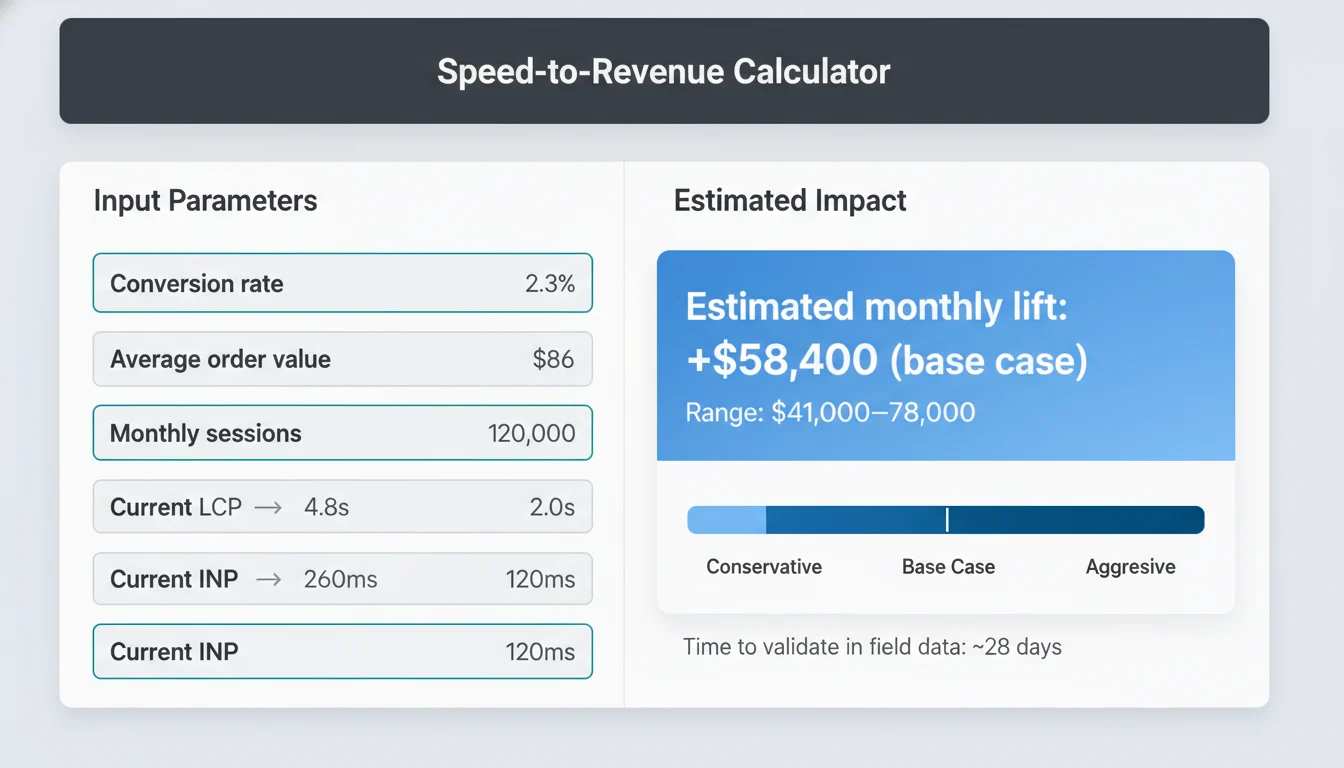
See what a faster site is worth—in dollars, not just scores. This 60‑second calculator turns Core Web Vitals improvements into a forecast of added conversions and revenue for your WordPress site. No login needed; results show instantly.
What you’ll enter
- Current conversion rate (%)
- Average order value (ecommerce) or average lead value (B2B)
- Monthly sessions (optionally split mobile/desktop)
- Current LCP (p75, mobile) and target LCP
- Current INP (p75, mobile) and target INP
Tip: Not sure about your LCP/INP? Add your best estimate now—we’ll help validate with Search Console and CrUX during a quick review.
What you’ll get back
- Estimated monthly lift in revenue or lead value, plus added orders or leads
- A base case and range (conservative to aggressive) based on realistic LCP and INP improvements
- Time‑to‑impact guidance (Core Web Vitals validate on a 28‑day field‑data window)
- Optional payback estimate vs. a typical optimization engagement
- Next‑step recommendations to capture the upside fast
How we model it
- Field‑data first: aligned to CrUX and Search Console p75 metrics, not just lab scores.
- Lift curves: conservative, benchmarked elasticities for LCP and INP by device, calibrated to your current conversion rate.
- Third‑party effects: assumes steady traffic and mix. Big changes to campaigns, UX, or seasonality can shift results.
Quick actions
- Run the calculator to get your forecast
- Email me the full report + industry benchmarks (opt‑in)
- Book a 15‑minute results review with a performance engineer
Disclaimer: This calculator provides directional estimates only. Actual results are validated against your GA4 or CRM after deployment and over the 28‑day Core Web Vitals window.
Ready to turn the forecast into real revenue? Here’s what we optimize in WordPress to make those gains real.
What We Optimize for WordPress (Front to Back)
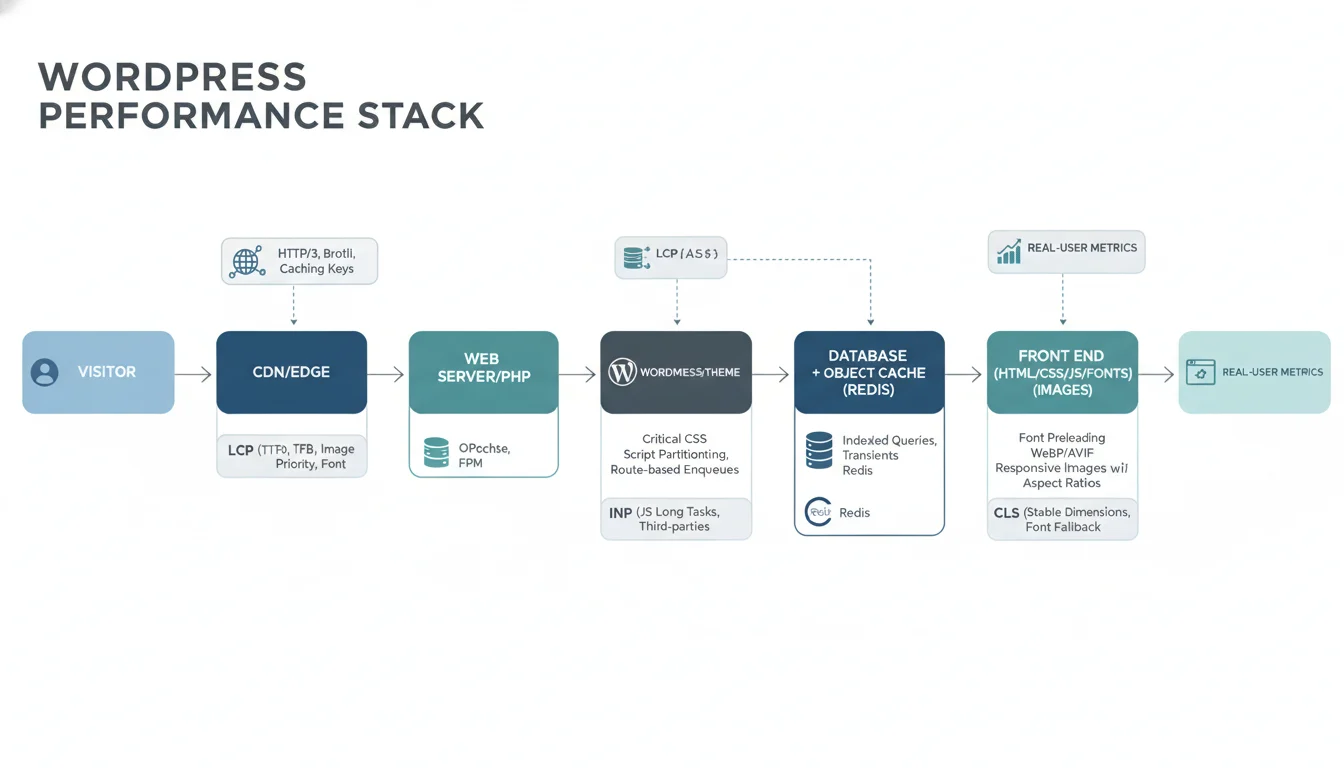
We tune the entire stack — server, database, theme code, and front end — so real users see faster first bytes, stable layouts, and responsive interactions. Every change maps to LCP, INP, or CLS and is checked against field data. If you’re pushing to pass Core Web Vitals (or just want your site to feel instant), this is the work that moves the needle. Want a quick, plain‑English plan for your site? Ask us for a performance check.
Server and TTFB
We review hosting and configure modern delivery (HTTP/2 or HTTP/3, TLS, Brotli), then tune PHP and OPcache to reduce CPU and memory use. Page caching matches your content model, and we add object caching (Redis or Memcached) to cut database trips. If hosting is the bottleneck, we’ll right‑size or migrate you with a zero‑downtime cutover. Result: consistently faster TTFB and lower origin load without losing freshness — and headroom for campaigns and traffic spikes.
Database
We clean up oversized autoloaded options, add or adjust indexes, and profile queries to remove hot spots. Transients get a clear plan for what to cache, where, and how long, with automatic invalidation so content stays accurate. When appropriate, we offload heavy cron tasks and optimize search and meta queries to avoid full table scans. Outcome: a snappier dashboard and filters/search that stop dragging. We’ll show before/after query profiles so you can see the gains.
Theme and code
We remove bloat and dead code, generate Critical CSS for key templates, and strip unused CSS and JS. Scripts load with a deliberate defer and async strategy and are split by route so pages only download what they need. We tighten enqueue logic, replace heavy libraries with lightweight options, and structure templates for minimal DOM and render work. No redesign required — we optimize what you have, or build lean components where it pays off most.
Fonts and media
We subset and preload only the fonts in use, set solid fallback stacks, and prevent FOUT or FOIT. Images are converted to WebP or AVIF with responsive srcset and sizes, correct dimensions, and prioritized preloading for the LCP image. Lightweight placeholders and intrinsic aspect ratios eliminate CLS while keeping lazy‑loading smooth. We’ll also set up a sane media workflow so your team can upload once and get fast, responsive assets everywhere.
Third‑party governance
We audit all tags and widgets, delay non‑critical scripts until interaction or idle, and load marketing pixels only after consent. When suitable, we sandbox third‑parties via workers or proxies (for example Cloudflare Workers, Partytown, or Zaraz) to isolate their cost from the main thread. Keep the analytics you need without sacrificing speed or compliance — expect fewer main‑thread blocks and healthier INP.
CDN/edge
We configure Cloudflare end‑to‑end: smart cache keys, cookie awareness, tiered caching and origin shielding, and built‑in image optimization. HTML caching is enabled where safe, with selective bypass for logged‑in users, carts, and personalized content so dynamic experiences stay correct and fast. Not on Cloudflare yet? We’ll set it up and manage it. Outcome: higher cache hit ratios and lower origin bills.
Plugin impact report
We measure each plugin’s cost (TTFB, queries, JS and CSS weight, INP impact) and contain or replace heavy components. When a plugin is essential, we scope‑load its assets and move features into lean MU‑plugins or custom code when it improves performance and maintainability. You keep the features; you lose the lag. Expect a prioritized action list by effort vs. impact.
Security–performance balance
We harden without slowing you down: CDN and WAF rules, bot mitigation, and rate limiting that do not break caching or block critical resources. We swap heavyweight captchas for lighter options, keep the attack surface minimal, and ensure security headers and firewall logic work with edge caching. Net: protection that doesn’t tank conversions or Core Web Vitals.
Dynamic sites add complexity. Carts and checkouts, membership areas, and any logged‑in experience need careful caching, script loading, and data fetching. Here is how we handle those flows without sacrificing speed or accuracy — including WooCommerce and popular membership/LMS stacks. If checkout or member dashboards feel slow, let us audit the flow. Book a quick consult and we’ll outline quick wins and a phased plan tailored to your site.
WooCommerce, Membership, and High‑Traffic Sites
Stores, membership portals, and content hubs have moving parts that “speed plugins” cannot tame. We tune the architecture and theme so shoppers and members get a fast, stable experience during spikes and at checkout. If you’re seeing cart drop‑offs, slow filters, or admin pages that crawl, let’s pinpoint the bottlenecks and fix the root causes—not just the scores.
WooCommerce, tuned for buyers
- Cart fragments and AJAX: We disable or defer cart fragments where safe, replace noisy wc‑ajax calls with event‑driven updates, and add micro‑caches to cut repeat requests. Result: fewer blocked threads and faster product interactions.
- Checkout optimization: We streamline the DOM, inline only critical CSS, defer analytics and heatmaps until after input, and isolate heavy payment JS to reduce INP on the payment step. Result: calmer, faster checkout with fewer abandons.
- Smart caching for dynamic routes: Guest PDP, PLP, and blog or category pages are cached at the edge with cookie‑aware bypass for logged‑in users and carts. We vary cache keys by language and currency, use stale‑while‑revalidate for freshness, and pre‑render popular products when inventory changes. Result: snappy browsing without breaking personalization.
- Quick win: Want a 48‑hour checkout punch list? We’ll review your flow and deliver prioritized fixes you can act on immediately.
Search and filtering without jank
- We power faceted search with ElasticPress or Algolia, or with optimized queries and indexes. Results are server‑rendered with pushState so URLs stay shareable and SEO‑safe. Placeholders and fixed container heights prevent layout shifts as content hydrates. Result: fast, discoverable catalogs that don’t break your SERPs.
- Not sure where to start? Ask for a 10‑minute search and filter audit—free of jargon, full of clear next steps.
Logged‑in performance for members and admins
- Private caching layers: fragment or ESI caching for headers, menus, and account widgets, and transients or Redis keyed per user where appropriate.
- Edge rules bypass full‑page HTML for authenticated users while still caching assets, APIs, and media aggressively.
- We tame admin‑ajax and Heartbeat traffic, and move account‑area heavy lifting to lightweight endpoints.
- If member dashboards feel sluggish, we’ll map the hot paths and share a targeted remediation plan.
Third‑party scripts, loaded safely and conditionally
- Payments, analytics, chat, and trackers load with consent and route awareness. We use async and defer, preconnect, priority hints, and click‑to‑load where sensible, and replace bloated libraries with lighter ones when they do not earn their keep. Result: the tools you need without taxing customers at checkout.
- We’ll provide a script inventory and recommendations so you can see exactly what to keep, replace, or remove.
CLS control on PDP, PLP, and revenue‑moving templates
- Every media block and UI component has explicit dimensions or aspect ratio. We reserve space for ratings, trust badges, and promo ribbons, preload key fonts with safe fallbacks, and keep price and availability blocks stable as data arrives. Result: fewer layout jumps and clearer paths to “Add to Cart.”
- Ask for a before/after filmstrip—seeing the stability difference is believing.
Built‑in scalability for campaigns and seasonality
- We run load tests (k6 or Locust) to size PHP workers and database resources, add or adjust indexes, and tune object caching.
- Background processing via Action Scheduler or queues handles feeds, emails, inventory sync, and image generation off the request path.
- Edge and CDN caching with sane TTLs, rate limiting, and feature kill switches protect performance during spikes.
- Planning a big promo or launch? Book a traffic rehearsal so go‑live feels like a normal day.
All of this is implemented safely, with no surprises for customers or staff. Here is how our zero‑downtime process audits, stages, and rolls out improvements with clear change logs and easy rollbacks. Ready for a quick, low‑risk assessment? Tell us your top performance pain point and we’ll propose a focused plan within two business days.
Our Process (Built for Zero Downtime)
Our work is safe, reversible, and interruption‑free. Here is how we go from findings to measurable gains without risking your live site. If shaving seconds off load time without risking revenue is the goal, this is the playbook. Want to start small? Ask for a quick opportunity scan before any access is shared.
1) Access & Staging
- We take a complete backup and create a staging clone that mirrors production (theme, plugins, database, CDN and edge rules).
- Google Analytics and Search Console are verified and connected so we are reading the same data you are.
- We baseline current performance (lab and field) and tag this snapshot in our repo for clean comparisons later.
- Not ready to grant access yet? We can run an external baseline and brief you on likely wins first.
2) Full Audit
- We profile the full stack: hosting and TTFB, PHP version and OPcache, object caching (Redis or Memcached), database and autoload bloat, theme and plugin code paths, font and image strategy, and third‑party tags.
- For commerce or membership sites, we trace critical flows (product listing to PDP to cart to checkout, login and member areas) to find render‑blocking issues, cart fragments and AJAX calls, and dynamic routes.
- You get a prioritized backlog with estimated effort vs. expected impact, plus any hosting or CDN recommendations.
- Use the backlog with your internal team or have us execute it—your call. Want a fast readout? We’ll walk you through the top 5 fixes that move the needle first.
3) Optimization Sprint
- We implement changes in staging behind safe flags so we can enable them selectively in production.
- Tactics may include server tuning, cache strategy, DB indexing and cleanup, Critical CSS, JS deferral and partitioning, font preloading, image formats and policies, and third‑party script controls.
- We run cross‑device QA (mobile first) against your key user journeys (lead form submit, search, checkout) to confirm function and UX parity.
- Prefer proof before full rollout? We can pilot improvements on one high‑impact template or route first.
4) Validate
- We validate in Lighthouse and WebPageTest and with network throttling to confirm LCP, INP, and CLS movement and catch regressions.
- We roll out behind flags or to limited routes or segments when appropriate, monitoring error budgets and stability.
- Any issues are addressed in staging before broader release.
- We only ship when metrics and UX agree—no surprises.
5) Deploy
- We deploy during a low‑traffic window when needed. Most changes go live with zero downtime.
- A detailed change log and a one‑click rollback plan are in place. We warm critical caches and CDN to avoid cold‑cache latency.
- Real‑user monitoring is enabled so we can observe live impact beyond synthetic tests.
- Curious how this fits your host/CDN? Ask for a 10‑minute deployment review.
6) Field‑Data Fine‑Tuning
- We monitor Core Web Vitals in the 28‑day CrUX window to ensure improvements hold for real users, not just in the lab.
- We iterate where field data differs by device, network, or geography, and we enforce a speed budget to protect gains as new content and features ship.
- Want guardrails in your workflow? We’ll codify the speed budget in CI/CD so every release stays fast.
Communication you can count on
- Weekly updates summarize progress, metrics, and next actions.
- A shared dashboard shows lab and field data in one place.
- Every decision and SOP is documented, so your team knows what changed, why it changed, and how to maintain it. Prefer Slack? We can plug into your channel—full visibility, no lock‑in.
Next, see the deliverables you will receive at each stage, from the prioritized backlog and hosting audit to the before and after report, speed budget, and change log. Ready for a plan tailored to your site? Request a Performance Audit or book a 15‑minute fit call to get timelines, cost, and expected impact.
What You Get (Deliverables)
Here’s exactly what you’ll get—clear, ownable artifacts you can use to run, measure, and protect site speed over time. No guesswork, just repeatable wins your team can act on.
Before/after performance report and Core Web Vitals tracking plan
- Side‑by‑side results from Lighthouse (mobile and desktop) and WebPageTest (filmstrips, waterfalls, TTFB), with findings that tie lab data to real‑user impact—easy to share with stakeholders.
- A field‑data plan that tracks LCP, INP, and CLS using CrUX and Search Console over the 28‑day window, including pinned test URLs, thresholds, and a validation schedule—so you always know where you stand and what’s next.
Plugin/theme impact report with recommendations
- A breakdown of plugin and theme overhead: scripts and styles enqueued, autoload and database load, third‑party calls, and CPU or JS timing hot spots—explained in plain English with code‑level notes.
- Guidance to remove, replace, or refactor high‑cost components, plus opportunities to consolidate functionality into your custom theme for lower overhead—prioritized by effort vs. impact for your team or ours.
Hosting and stack audit (with upgrade path if needed)
- Assessment of your current stack: server response and caching, PHP and OPcache, HTTP/2 or 3, object caching readiness (Redis or Memcached), CDN and edge configuration, image processing, and font delivery—validated with real tests, not assumptions.
- A prioritized upgrade path that outlines expected gains, risks, and costs for each recommendation—so you can make confident, budget‑smart decisions (and we can implement if you’d like).
Speed budget and controls
- Approved budgets for key templates and routes (including WooCommerce flows): LCP, INP, CLS targets, total page weight, request counts, and third‑party script allocations—aligned to business goals.
- Controls to enforce those budgets, such as pre‑deployment checks, blocked asset patterns, and monitoring alerts when thresholds are at risk—so performance doesn’t drift after launch.
Rollback and recovery plan, change log, and deployment notes
- A tested rollback path with database and file backups, restore points, and clear back‑out steps—because safety nets matter.
- A readable change log and deployment notes documenting what changed, why it changed, and where to look if something needs review later—future‑you (and your team) will thank you.
Stakeholder one‑pager and team training on performance‑safe workflows
- A concise, non‑technical summary for leadership that links to your budgets, monitoring, and KPIs—perfect for sharing progress and ROI.
- A practical training session for editors, designers, and marketers covering performance‑safe content workflows (images and video, embeds, fonts, scripts), plus a checklist for launching new pages without breaking Core Web Vitals—so speed becomes part of how you ship.
Want to see how these deliverables translate into faster pages and better outcomes? Explore the proof in our next section—or request a sample deliverables pack or a quick 15‑minute fit call to talk through your site.
Results and Case Studies
Proof that speed pays off. See what real optimization—code, assets, hosting, and UX—can do, then let’s benchmark your site and map out your quickest wins.
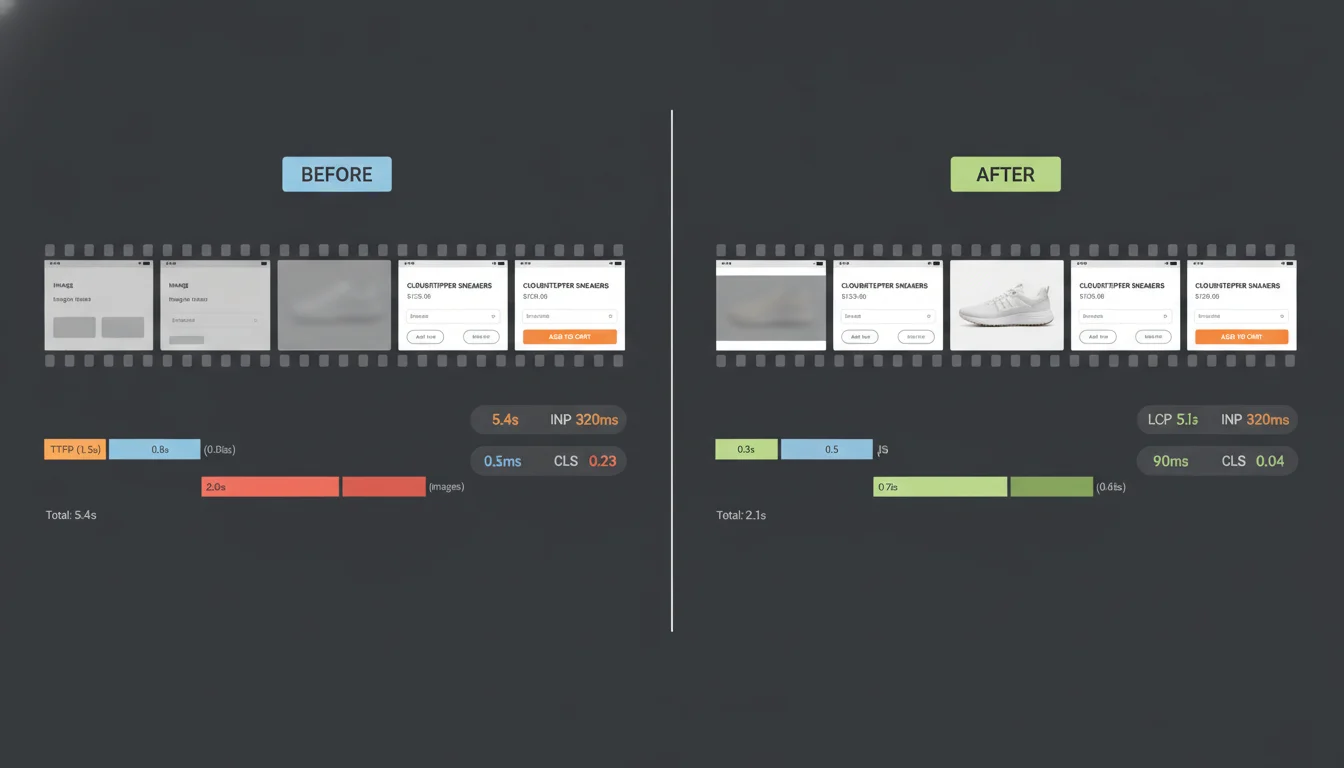
Representative wins (validated with real‑user field data)
-
WooCommerce retailer (St. Louis)
- Before: LCP 5.4s, INP 320ms, CLS 0.23 (mobile, 28‑day CrUX)
- After: LCP 2.1s, INP 90ms, CLS 0.04
- Outcome: +22% checkout completion, −31% bounce, +18% organic sessions in 60 days
- Want results like this? Ask us for a quick checkout‑flow and Core Web Vitals review.
-
B2B services firm (regional)
- Before: LCP 4.8s, INP 260ms, CLS 0.18
- After: LCP 1.8s, INP 80ms, CLS 0.02
- Outcome: +38% qualified form submissions, +47% pages/session, smoother lead routing
- Next step: we’ll benchmark your forms and route you 3–5 high‑impact fixes.
-
News/publisher nonprofit (St. Louis)
- Before: LCP 3.9s, INP 240ms, CLS 0.28
- After: LCP 1.7s, INP 70ms, CLS 0.06
- Outcome: +27% ad viewability, −22% bounce, +15% return visitors
- Let’s identify what’s slowing your ad viewability and reader journeys.
-
Multi‑location healthcare group (Midwest)
- Before: LCP 3.5s, INP 210ms, CLS 0.12
- After: LCP 1.5s, INP 75ms, CLS 0.03
- Outcome: +29% online appointment starts, faster find‑a‑doctor experience
- We’ll show you how to speed up location search and conversion paths—often without a full redesign.
Trusted by St. Louis organizations across industries, including manufacturing, healthcare, finance, higher ed, nonprofits, breweries, and the agencies that serve them. Agencies: ask about white‑label partnerships, local references, and slot availability this quarter.
What clients and partners say
- “Our mobile shoppers stopped abandoning the cart. Core Web Vitals went green, and so did our revenue.” — eCommerce Director, St. Louis retailer
- “They built a lean, custom theme and then protected the gains with a speed budget. It’s the rare dev team that thinks beyond PageSpeed scores.” — Partner, branding agency
- “Zero downtime, clear reporting, and a material lift in appointment requests within a month.” — Marketing Lead, healthcare network
All improvements are verified in field data (CrUX) over the 28‑day window and protected with ongoing monitoring and speed budgets. Want to see your baseline? Request a Core Web Vitals snapshot and a 7–10 point action plan.
View full case studies or schedule a 20‑minute performance consult. Up next: choose the starting option that fits your goals.
Plans and Starting Points
Pick a starting point that fits your site, team, and timeline. Every engagement is WordPress‑first, runs in staging, and ships with clear reporting and controls—so you get speed gains without risking your live site. Not sure? We’ll help you choose during a quick, no‑pressure call.
Audit & Sprint (2–4 weeks, custom‑quoted)
Best for: sites that need fast, low‑risk wins and a clear plan forward; new builds that missed Core Web Vitals; agencies needing a focused push.
What’s included:
- Full‑stack audit of theme, plugins, hosting and TTFB, CDN, and third‑party scripts with a prioritized backlog tied to LCP, INP, and CLS
- Staging implementation of high‑impact fixes: Critical CSS, JS scheduling and deferral, font preloading, image pipeline (WebP or AVIF), autoload and database cleanup, object caching setup, and CDN or edge configuration
- Third‑party governance to contain tag managers, analytics, and chat widgets without breaking attribution
- WooCommerce quick wins if applicable (cart fragments, AJAX hot spots, PDP and PLP templates)
- Before and after report with lab metrics and field baselines, a speed budget, and a rollback plan
Timeline: 2–4 weeks from kickoff to deployment, zero downtime
How to get started: Request a custom quote to reserve your sprint window.
Ongoing Performance Care (monthly)
Best for: teams that ship regularly and want performance safeguarded; owners who want issues found and fixed before they affect customers or rankings.
What’s included:
- Continuous Core Web Vitals monitoring using CrUX and real‑user signals, with alerts for regressions
- Monthly performance reviews and change reviews for plugins, themes, and content to prevent slowdowns
- Quarterly tuning sprints to address new opportunities, traffic shifts, or platform updates
- Incident response for sudden INP, LCP, or CLS issues, plus monthly reporting stakeholders can use
Timeline: onboarding in 1 week; improvements validated across 28‑day field‑data windows
How to get started: Book onboarding and we’ll start monitoring within days.
eCommerce Performance Program (custom, initial 4–8 weeks then monthly)
Best for: WooCommerce stores with meaningful paid traffic, seasonal peaks, or complex checkout flows.
What’s included:
- Advanced caching strategy tailored to dynamic routes, plus Redis or Memcached for object caching
- Checkout optimization, cart fragments remediation, and route‑level templating for PDP and PLP speed
- Load and stress testing to prep for campaigns or seasonal spikes, with capacity recommendations
- Real‑user deep dives by page type and device, plus synthetic transaction monitoring for cart and checkout
- Ongoing tuning to balance personalization, analytics, and speed without breaking revenue tracking
Timeline: discovery and benchmarking in 1–2 weeks; optimization sprint in 3–6 weeks; continuous monitoring monthly
How to get started: Schedule a discovery call to map revenue‑impact priorities and scope.
Guarantee
You will see measurable lab improvements within the sprint, and we keep tuning until field data stabilizes across the next CrUX cycles.
Not sure where to start? Get a Free Performance Assessment to confirm fit and scope. We will review your site and hosting, outline likely wins, and recommend the right starting point. Start your assessment, and we’ll respond with next steps.
Next, see how we protect and maintain your gains over time with budgets, monitoring, and change reviews that keep you fast as you grow. Ready to stay fast? Explore Ongoing Performance Care.
Ongoing Monitoring and Guardrails
Performance is not one‑and‑done. After we land improvements, we put controls in place so gains persist, regressions are caught early, and stakeholders know what changed and why. If you want this running on your site, ask us for a quick baseline review and we’ll show you where guardrails will pay off first.
Real‑user and synthetic monitoring with alerts
- Field‑data first: we track Core Web Vitals from CrUX and real users by device and country, watching LCP, INP, and CLS percentiles over the rolling 28‑day window, so we see what customers actually experience.
- Synthetic coverage: scheduled Lighthouse and WebPageTest runs, plus uptime and transaction monitors for login, search, cart, and checkout—your key revenue paths.
- Alerts: if Vitals trend the wrong way, TTFB rises, cache hit ratio drops, or an outage or error rate crosses thresholds, your team and ours get Slack or email alerts with context and next steps, so fixes start immediately, not after a complaint.
Speed budgets baked into CI/CD and pre‑deployment
- We set budgets for LCP, INP, CLS, total JS and CSS weight, third‑party script count, and image sizes to protect speed at the pull request—not after launch.
- Every pull request runs automated checks. If a change exceeds budget, the build fails with a clear report developers can act on.
- A pre‑deployment checklist covers cache rules, font and image policies, CDN behaviors, and page‑type spot checks on staging—reducing surprises on go‑live. Want a sample checklist? Just ask.
Update governance and change advisory
- Structured cadence for WordPress core, plugin, and theme updates with staging validation and impact profiling (queries, autoload, asset weight, admin/editor experience) to keep things secure without slowing down.
- Allowlist for auto‑updates, review for major versions, and an immediate rollback plan—so updates feel routine, not risky.
- We assess new plugins and third‑party scripts, propose lighter alternatives, and document decisions in your change log for full traceability.
Reporting, roadmap, and postmortems
- Monthly report: Core Web Vitals trends from field data, budget compliance, slow routes, third‑party costs, cache metrics, and recommended fixes—plus an exec‑friendly summary.
- Quarterly roadmap: prioritized improvements across hosting, CDN or edge, code, and plugins so you know exactly what’s next and why.
- Incident postmortems: timeline, root cause, remediation, owners, and preventive actions—closing the loop and preventing repeats. Request a sample report to see the depth we provide.
Agencies and internal teams can plug us in as a dependable development partner to enforce these controls across multiple sites, collaboratively or white‑label. Want STL CodeScape to own performance for you? Reach out for a 20‑minute consult or ask for a no‑obligation baseline audit.
Built for Partners: Agencies and In‑House Teams
Need senior WordPress performance help without adding headcount? We work with branding firms, marketing agencies, and internal product teams as a quiet, reliable WordPress performance arm. Fully white‑label or embedded with your developers, we align to your process so projects move quickly without surprises. Have a project on deck? Share the brief and we’ll return a clear plan, timeline, and estimate fast.
White‑label delivery and client‑safe comms
- Co‑branded reports and dashboards (Core Web Vitals, CrUX trends, change logs, speed budgets) ready to share with clients.
- We join calls as your development team, can use your email domain alias, and work in shared Slack or Teams channels.
- Presentation‑ready decks and one‑page summaries for executive and non‑technical audiences.
- Want a preview? Request a sample reporting pack and client‑safe deck.
Code standards, Git workflow, and clean handoffs
- WordPress Coding Standards via PHPCS, namespaced and documented code, clear dependency management (Composer, npm), reproducible builds (Vite or Webpack).
- Git best practices (protected main, PR reviews, semantic versioning and tags) with CI checks for linting and build validation, zero‑downtime deploys from staging to production.
- Complete handoff kits: README and architecture notes, environment and build steps, plugin and theme rationale, ACF and field maps, rollback plans, and a speed budget.
- Prefer to see it first? Ask for a sanitized repo and handoff kit example.
Flexible SLAs, secure access, and predictable scheduling
- SLA tiers with clear response and resolution targets, Central Time coverage, and planned maintenance windows.
- Least‑privilege access, 2FA‑only accounts, temporary vendor credentials, IP allowlists on staging, and separate secrets per environment.
- Capacity you can plan around: sprint calendars, weekly status notes, and integration with your PM tool (Asana, Jira, or ClickUp).
- Need guaranteed capacity? We’ll map a sprint calendar and SLA tier to your roadmap on a quick scoping call.
NDA/Non‑compete friendly
- We sign your NDA, non‑solicit, and non‑compete. We run conflict checks, honor agency‑client boundaries, and can invoice under your brand.
- Want us invisible? We’ll operate fully behind the scenes under your label.
Low‑risk way to start: kick off with a single‑site performance audit or a one‑sprint pilot to prove fit. Ready to explore? Schedule a 20‑minute fit call or request our Partner Kit (sample reports, SLAs, and security overview).
Tooling, Hosting, and Security Posture
The right stack and safeguards matter as much as code. Here are the tools we use, how we choose hosting, and the security practices that protect your site and data. Want a quick sanity check of your current setup? Ask us for a fast, no‑obligation audit and next‑step roadmap.
Our toolkit for measurable gains
- Field‑data first: decisions anchored in Chrome UX Report and Google Search Console, tracking LCP, INP, and CLS over the rolling 28‑day window by device and key markets.
- Lab diagnostics: PageSpeed Insights and Lighthouse to spot regressions quickly, plus WebPageTest for TTFB, waterfalls, filmstrips, and long‑task sources that affect INP.
- Delivery and caching: Cloudflare for DNS, CDN, HTTP/3, and Brotli. When appropriate, we implement edge caching and WordPress APO. In the app layer, we configure Redis or Memcached object caching and monitor hit and miss rates.
Not sure where your biggest win is? We’ll benchmark your site and return a prioritized, impact‑first fix list—before you commit to any engagement.
Hosting guidance that fits your footprint
- Server stack: Nginx or LiteSpeed with modern PHP (8.2 or 8.3 with OPcache), HTTP/3 or QUIC, Brotli compression, TLS 1.3, and a database tuned to your workload.
- Edge performance: low TTFB and stable vitals by pairing the right CDN and edge caching with your caching strategy, ensuring dynamic pages remain fresh and personalized where needed (carts, account pages).
- Right‑sized providers: after a quick workload review (traffic patterns, ecommerce, editorial tools, regional mix, compliance), we recommend a short list of managed WordPress or cloud providers that fit your goals and budget. If a change is warranted, we migrate and validate without downtime.
Suspect hosting is your bottleneck? Book a hosting review—we’ll profile TTFB, database health, and caching, then give you a clear go/no‑go on migrating (with total cost expectations) or explore our managed Website Hosting.
Security‑first by default
- Least‑privilege access: role‑based, per‑user accounts with MFA, time‑boxed key‑based server access, no shared credentials. Access is removed immediately after work completes.
- Backups and recovery: encrypted, offsite backups with defined retention, point‑in‑time restore testing, and documented recovery steps. Staging is isolated from production.
- Audit trails: Git‑based deployments, change logs, and WordPress activity logging provide a paper trail for every update.
- Vulnerability management: ongoing scanning of WordPress core, themes, and plugins, prompt patching of critical CVEs, and WAF or bot mitigation through Cloudflare where appropriate.
Need us to align with your internal IT? We’ll plug into your access controls and change process quickly—ask for our security onboarding checklist.
Compliance and documentation
- We align to your security requirements and procurement process. While we do not issue compliance certifications, we can operate within SOC 2‑audited or HIPAA‑ready hosting and complete vendor risk assessments.
- Policy documents (access control, backup and recovery, change management, incident response) are available on request.
Request our policy pack and see how we map to your vendor questionnaire in plain language.
Have questions about risk, timelines, or hosting bottlenecks? The FAQs below cover the common pre‑sales questions—or skip the queue and schedule a 15‑minute consult to talk through your stack.
FAQs: Field Data, Timelines, Risk, and More
What’s the difference between lab scores and real‑user (field) data, and when will improvements show up in CrUX?
Lab tests (Lighthouse, WebPageTest) run in a controlled environment and give instant feedback while we iterate. Field data (Chrome UX Report and Search Console) reflects how real visitors experience your site across networks, devices, and locations. We optimize for Core Web Vitals in the field using lab tests to diagnose and verify fixes before launch. You will usually see early movement in your analytics within 7–14 days. CrUX is a 28‑day rolling window, so expect partial improvement within the first couple of weeks and full stabilization after a full window from deployment. We’ll map your CrUX window and set expectations on day one—want a quick read on your current window? Ask us and we’ll take a look.
How long does a typical engagement take?
Most projects follow this cadence:
- Week 1: Staging copy and full audit (theme, plugins, queries, third‑party scripts, hosting and TTFB).
- Week 2–3: Optimization sprint (server and front end), QA, and stakeholder review.
- Week 3–4: Safe deployment, followed by 28‑day field‑data validation.
We share weekly updates and a before/after report. Quick wins land early; durable gains settle as field data accumulates. Have a deadline or launch date? Tell us—we’ll propose a realistic fast‑track or phased rollout.
How do you mitigate risk and avoid downtime?
We work in staging first, then deploy in guarded steps:
- Zero‑downtime rollout windows and canary releases for critical templates.
- Full backups and a documented rollback plan, so reversion takes minutes.
- Automated and manual QA for core flows (forms, search, login, cart and checkout).
- Version control for all code changes and a change log you can review.
For revenue‑critical sites, we schedule off‑hours cutovers and keep a live support channel open during launch. If you need stakeholder sign‑off, we’ll walk them through the plan.
What if hosting is the bottleneck?
If we find limits like high TTFB, no object caching, CPU throttling, slow disks, or network latency, we first tune what you have (PHP‑FPM and OPcache, Redis or Memcached, HTTP/2 or 3, TLS, caching rules). If constraints remain, we recommend right‑sized, vendor‑agnostic options (managed WordPress or VPS). We handle migrations end‑to‑end: cloning and staging, off‑hours cutover, DNS and TLS, content freeze coordination, and post‑launch monitoring. We don’t take commissions—expect clear costs and expected performance gains before you decide.
If you prefer a managed option, explore our Web Hosting Company services.
Any special considerations for WooCommerce?
Yes. Ecommerce has dynamic, cache‑sensitive paths:
- Logged‑in users bypass cache more often; we use persistent object caching and targeted page caching where safe.
- We replace heavy cart fragments and AJAX with event‑based updates or fragment caching.
- Checkout is optimized for INP (script containment, input responsiveness) without risking payment reliability.
- We set separate budgets for catalog vs. account and checkout so UX stays fast where it matters most.
We’ll instrument funnel metrics so you can see speed improvements where they impact revenue.
Do theme builders (Elementor, Divi, etc.) affect performance?
Builders speed up page assembly but often add bloat: larger DOMs, generic CSS and JS, and less control over render paths. We can harden builder sites (limit plugins, trim CSS and JS, defer wisely, template‑level overrides), but the best long‑term performance and maintainability come from a custom, hand‑coded theme. Not ready for a rebuild? Ask about our Builder Hardening package to capture meaningful gains without a redesign.
When a lean rebuild makes sense, our Custom WordPress Theme Development delivers speed without sacrificing design.
What if Core Web Vitals still don’t pass?
We plan for iteration. After deployment, we fine‑tune based on field data and run additional sprints if needed. Constraints that can limit outcomes include:
- Not enough traffic for CrUX to report or stabilize
- Heavy third‑party scripts (ads, tag managers, chat, heatmaps) that are required
- Design or content tradeoffs (very large hero media, custom fonts)
We propose options such as script controls, consent‑mode loading, route‑level budgets, and edge caching, and we document expected impact. While no one can guarantee a pass in every scenario, we commit to measurable improvements and to protecting gains with a speed budget and monitoring. If tradeoffs are needed, we’ll give you a clear roadmap and help you prioritize for the biggest ROI.
How do you handle access and security?
- Least‑privilege access with expiring credentials, SSH keys or SFTP, and 2FA where supported
- Secure password vault and change‑management logs
- Staging uses sanitized data when appropriate; production DB and file backups before changes
- Optional NDA and data‑processing terms on request
- Offboarding includes credential rotation, revoking tokens and keys, handing over documentation, and destroying local copies of sensitive data on schedule
Need security documentation or an NDA before we start? Just say the word.
How do you handle performance optimization and caching?
Performance optimization and caching are essential strategies in modern web development and system design. They ensure that applications run smoothly, respond quickly, and provide a seamless user experience even under heavy load. We combine server‑level tuning, intelligent cache hierarchies, and front‑end scheduling to maximize real‑user gains without risking correctness.
Want a deeper dive? Read our overview: How do you handle performance optimization and caching?
Ready to see where you stand? Request a Free Performance Assessment. Send your URL, hosting details, and top user flows, and we’ll reply with prioritized opportunities and next steps. Prefer to talk it through? Book a quick, no‑pressure call and we’ll outline your fastest path to green scores.
Get Your Free Performance Assessment
Start with our simple form—no commitment, no credit card—and we’ll take it from there. It takes about two minutes. Tell us:
- Your site URL
- CMS or theme notes (for example WordPress theme or builder, hosting provider)
- The primary pages or flows you care about most (homepage, key landing pages, product pages, checkout, lead form)
- Your contact info
What you will get within 24–48 hours:
- A concise snapshot of your current performance with real‑user Core Web Vitals (CrUX) and supporting lab data, explained in plain English
- 3–5 quick wins we can apply first for immediate impact, prioritized by effort vs. payoff
- Clear risk flags (hosting and TTFB bottlenecks, heavy plugins, render‑blocking assets, third‑party bloat)
- A proposed plan with phases, timelines, and investment options—built for zero downtime and aligned to your goals
No obligation and no surprises. If it helps, we can review safe, read‑only access such as a staging link, Search Console, or a temporary least‑privilege user. NDA available on request. We never make changes without written approval.
Ready to move? Start your free assessment now and we’ll confirm receipt with next steps. Prefer to talk it through? Grab a quick 20‑minute call—or if you’re local, swing by in St. Louis—and we’ll walk you through it. We’ll kick off your assessment today so your visitors feel the difference sooner.