Site Hosting
Managed WordPress hosting engineered for speed, security, and growth
We hand‑build your WordPress site and manage the hosting, so speed, stability, and control are baked in. Your clean, lightweight code runs on a WordPress stack we’ve tuned for real‑world traffic—not just lab tests. Your site loads faster, stays secure, and is easier to evolve, backed by a long‑term local partner in St. Louis serving SMBs and agencies. Already on WordPress? We’ll review your current setup and map a safe, low‑friction migration.
What you can expect
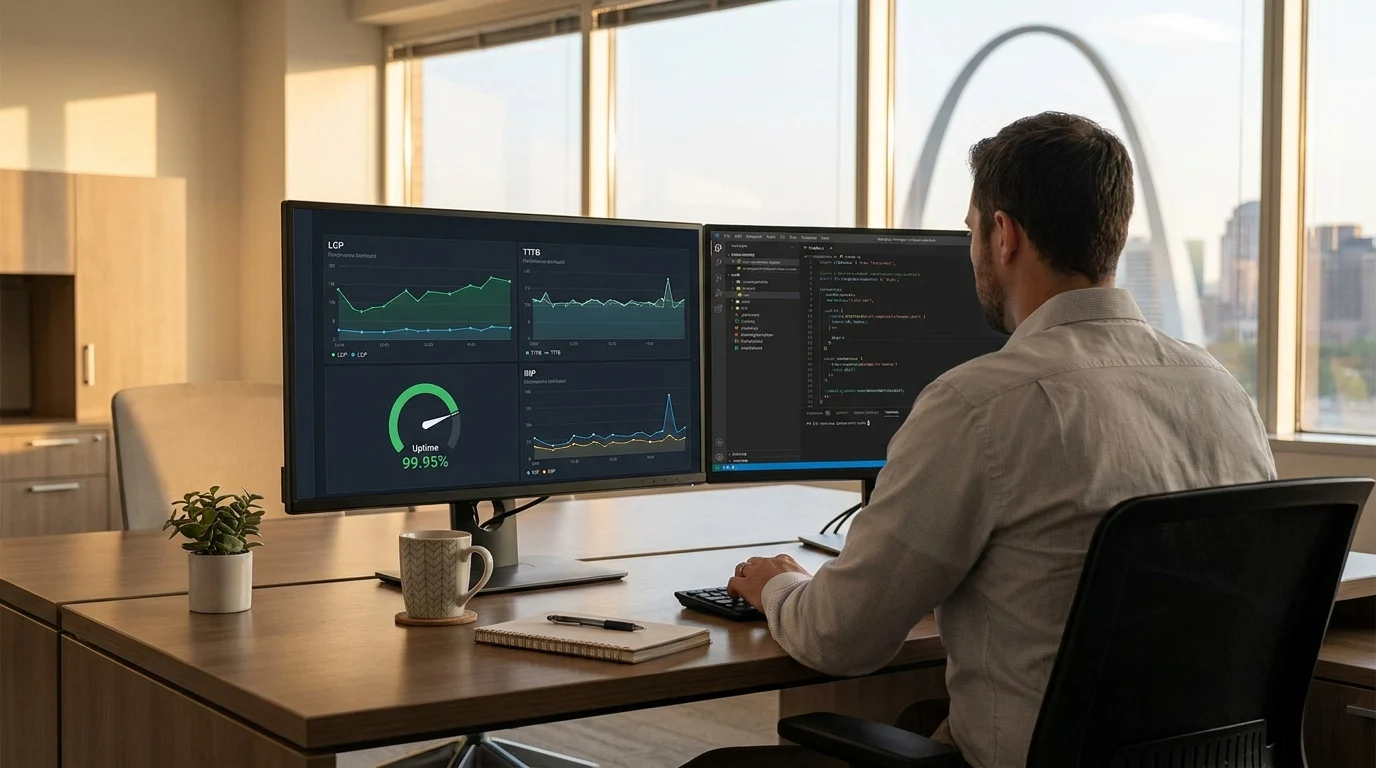
- Faster pages and stronger Core Web Vitals from day one
- Proactive security hardening, updates, and ongoing monitoring handled for you
- High uptime and headroom to scale during launches, campaigns, and traffic spikes
- Clear ownership and control—no theme bloat or mystery plugins
- One accountable team that builds, hosts, and supports your site long‑term
Let’s see what this could do for your site
- Talk to an engineer: 314-657-7421
- Request a migration plan or ask a question: jc@stlcodescape.com
Why managed hosting with STL CodeScape
Most “WordPress hosting” treats every site the same: crowded shared servers, basic caching, and a support queue that expects you to handle updates, security, and performance. You end up piling on plugins, living with uneven load times, and hoping a spike doesn’t take you down. If that sounds familiar, you’re exactly who we built this for.
Our managed hosting is built around custom WordPress code. The engineers who build our themes also provision and tune the environment your site runs on. Software and infrastructure work together. The payoff is clear and measurable:
- Faster pages and stronger Core Web Vitals that lift UX, SEO, and conversions
- Fewer incidents through proactive patching, real‑time monitoring, and hardened configs
- Predictable operations with capacity planning, staged updates, backups, and rollbacks
- Less busywork for your team so you can focus on content and growth while we run the stack
Have a site we didn’t build? No problem. We’ll review your current setup, map a capacity plan, and coordinate a smooth migration with minimal disruption.
Use our hosting on its own, or bundle it with WebCare for ongoing improvements, monthly updates, performance tuning, new features, and regular reviews.
Curious what this looks like for your site? Get a quick, no‑pressure performance review and hosting plan: jc@stlcodescape.com or 314-657-7421.
Performance stack and expected results
High performance comes from the right infrastructure plus code that uses it well. Our lean custom themes pair with a modern stack so pages render quickly on any device—and we validate the gains with real-user data, not just lab tests. If you want us to benchmark your current setup and outline quick wins, we can do that before you commit.
What we run under the hood
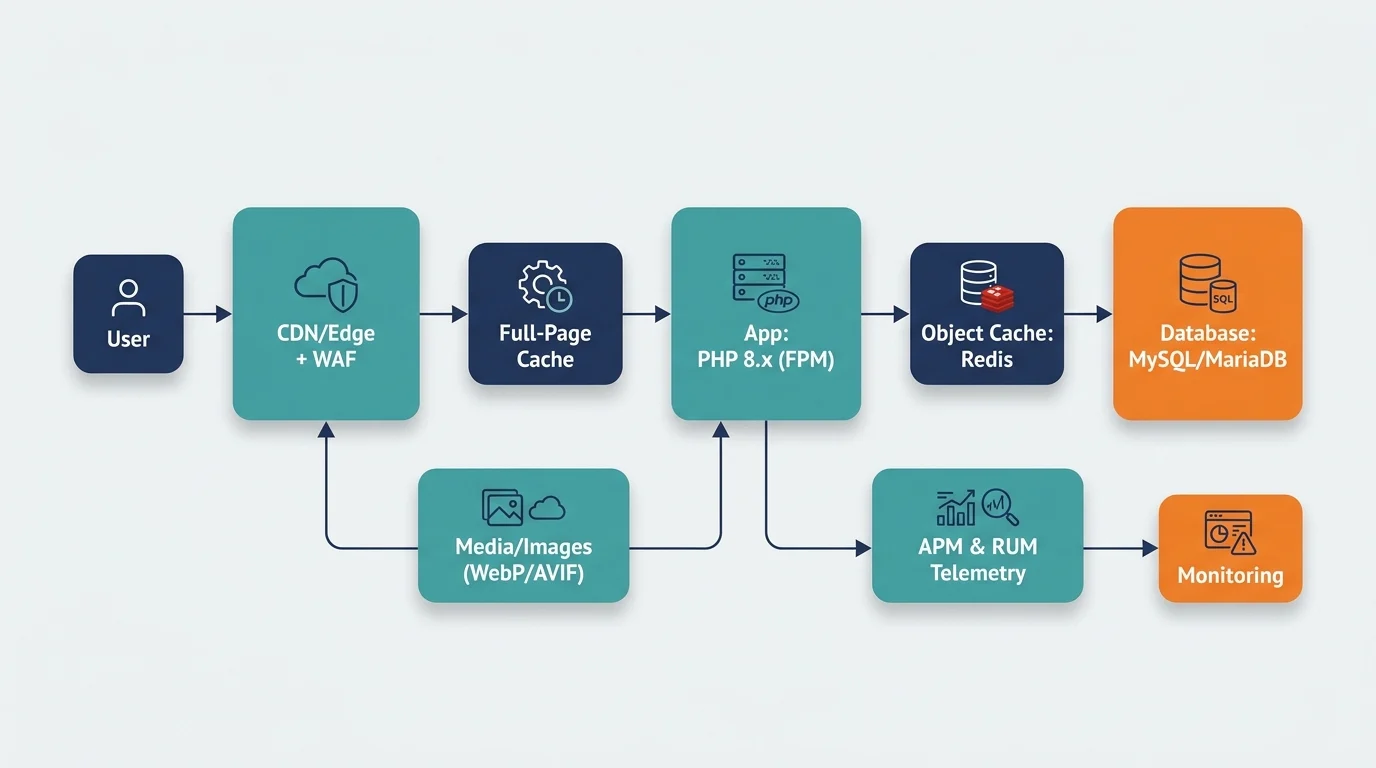
- Edge/CDN: Global edge delivery with full‑page caching at the CDN, smart cache keys, Brotli compression, TLS 1.3, and HTTP/2 and HTTP/3. Geo and device rules serve the right assets to the right users.
- Smart caching tiers:
- Server‑level page cache for anonymous traffic with stale‑while‑revalidate to avoid misses during bursts.
- Object caching (Redis) to speed database lookups and reduce PHP overhead.
- PHP 8.x with OPcache and tuned FPM workers for consistent response times under load.
- Media and assets: Automatic image optimization and next‑gen formats (WebP/AVIF), responsive srcset, critical CSS inlining, font subsetting, and minified, deferred JS where it helps.
- Database tuning: Query analysis and indexing, pruning autoloaded options, transient and cron hygiene, plus WooCommerce‑specific optimizations to keep checkout quick.
Caching that respects dynamic content
- No one‑size‑fits‑all cache. Logged‑in sessions (admins, members, LMS users) bypass full‑page cache while still using Redis/object caching.
- WooCommerce carts, checkout, and account pages are excluded or fragment‑cached so personalization stays accurate without losing speed.
- Cache purges are surgical. When you update a product, post, or menu, we purge only what changed using surrogate keys.
- Staging to production deploys trigger automated cache warmups so top pages are hot before users arrive.
Typical results after migration and tuning
- Time to First Byte (TTFB): typically 150–400 ms from U.S. locations for cached pages, 300–700 ms for uncached dynamic views, depending on complexity.
- Largest Contentful Paint (LCP): often 1.2–2.0 s on mid‑range mobile over 4G for marketing and content pages, 1.8–2.5 s on complex ecommerce templates after image, CSS, and JS optimization.
- Healthier Core Web Vitals: CLS commonly under 0.05 with proper media sizing and font strategy; INP improves as we reduce JS weight and long tasks.
- Ongoing APM: We baseline with real user monitoring and APM (query traces, slow transactions), set regression alerts, and review monthly so performance stays steady as content and plugins change.
Want to see what this stack could do for your site? Ask us for a quick performance review or a low‑risk staging pilot. Call 314-657-7421 or email jc@stlcodescape.com and we’ll map out the before/after and an easy migration plan.
Security and reliability you can trust
Security is built into every layer of our managed WordPress hosting so your site stays fast, available, and protected—without you having to babysit it. We monitor around the clock and act before users or revenue feel a thing. Want a quick sanity check on your current setup? Let’s walk you through where you’re strong and where we’d tighten things up.
What’s included in our security and reliability stack
- Edge protection and threat prevention: Managed WAF tuned for WordPress that blocks OWASP Top 10 exploits and abusive bots, with integrated DDoS mitigation and rate limiting—stopping attacks at the edge before they reach your site.
- Continuous malware defense: Automated file and database scanning, integrity checks, and alerting. If something slips through, we handle cleanup and hardening quickly to minimize impact.
- Encrypted by default: Free SSL/TLS with automatic renewals, strong ciphers, and HSTS to enforce secure connections. HTTP/2 and HTTP/3 support where available for speed and trust.
- Hardened configurations: Least‑privilege on servers, databases, and WordPress; key‑based SSH/SFTP; restricted XML‑RPC; login rate limiting; optional two‑factor authentication for WordPress admins—practical controls that reduce risk without adding friction.
- Identity and access: 2FA and SSO options (SAML/OIDC) for team access to admin tools and dashboards. Role‑based permissions so each user has only what they need, satisfying common IT requirements.
- Secrets management: API keys and credentials stored outside the codebase as environment secrets, rotated on a schedule, and access‑logged—protecting sensitive integrations and reducing blast radius.
- Audited change control: Git‑based, peer‑reviewed deployments from staging to production with approvals and full audit trails of configuration and admin changes—so you always know who changed what and when.
Uptime and incident response
- 24/7 uptime and transaction monitoring with on‑call incident response. Health checks cover page availability, key user actions, and background jobs so we can fix issues before they affect customers.
- Typical uptime target is 99.95% to 99.99%, depending on architecture (single region vs multi‑zone, caching strategy, and CDN configuration). We’ll recommend a setup based on risk tolerance and traffic patterns and tailor alerting/playbooks to your business.
This layered approach prevents most issues and shortens recovery when something does happen. Want this level of certainty behind your site? Call 314-657-7421 or email jc@stlcodescape.com to schedule a quick security and uptime review.
Backups, safe updates, and disaster recovery
Reliable backups. Predictable updates. Fast recovery. With STL CodeScape‑managed hosting, you get peace of mind baked in, so your site stays online and your team stays confident:
Automated backups you can trust
- Daily full‑site backups (files and database) stored offsite in encrypted, geo‑redundant storage.
- On‑demand snapshots before risky changes or big campaigns, so you always have a rollback point.
- One‑click restores to production or staging, with an option to restore to staging first to verify. Want proof? Ask us for a 5‑minute restore demo.
- Retention windows matched to your risk profile. Standard is 30–90 days; longer retention available for compliance needs.
- Regular, documented restore tests to confirm backups are actually usable.
Safe updates without surprises
- WordPress core, plugins, and theme updates are tested in staging first against your site and workflows—no cowboy commits.
- Visual and functional smoke tests, log reviews, and conflict resolution before release. We handle the boring checks so you don’t have to.
- For changes that could affect checkout, forms, or integrations, we schedule a maintenance window and communicate timing in advance—no “who broke the site?” moments.
- Rollback plans for every release. If something misbehaves, we revert to the last known‑good snapshot, usually within minutes.
Clear recovery objectives (RPO/RTO)
- Recovery Point Objective (RPO): measured in hours. With daily backups, expected RPO is 24 hours or less. Optional hourly database snapshots (recommended for WooCommerce or news sites) bring RPO near 1 hour.
- Recovery Time Objective (RTO): for most incidents (plugin conflict, bad deploy, minor corruption), typical RTO is 1–4 hours, depending on site size, complexity, and third‑party dependencies. We’ll quote your expected RTO during onboarding.
- Security incidents follow contain, clean, restore, harden—with a post‑incident report of what happened, what changed, and recommended next steps.
The result: updates don’t derail your day. If something goes wrong, there’s a fast, practiced path back to normal. Want this level of safety? Request a quick hosting assessment or ask for a live restore demo at jc@stlcodescape.com or 314-657-7421.
Staging environments and developer workflow
We ship changes through a repeatable, low‑risk pipeline so your site keeps earning while it keeps improving. Small change or big feature, the path is the same and safe—no surprises on launch day. If you have an internal dev team, we plug right in. If you don’t, we handle everything for you.
How we build and deploy
- Isolated staging for every site: A password‑protected environment that mirrors production (same PHP version, database engine, caching and CDN settings, and environment variables). It is blocked from search engines and can be refreshed from production with sanitized data for safe testing. See it in action—ask us to spin up a demo staging space for your project.
- Git‑based deployments: All work runs through pull requests and code review. Merges deploy to staging for stakeholder UAT. Production releases are triggered by a signed tag (for example, v1.8.3) so every build is traceable and reproducible. Your marketing and leadership teams always know what’s shipping and when.
- Developer access when you need it: SSH and WP‑CLI for power users. We also support Git over SSH and secure SFTP for asset handoffs. Keep your preferred tools and workflows; we’ll meet you there.
- Optional CI/CD: We can wire your repo to GitHub Actions or GitLab CI for automated linting (PHPCS/ESLint), dependency audits, asset builds (Vite/Webpack), basic unit and E2E tests, and Lighthouse CI performance budgets before anything ships. Want guardrails without slowing down releases? Let’s set up a right‑sized pipeline.
Pre‑launch QA checklist (every release)
- Performance: Mobile‑first tests on throttled 4G; Core Web Vitals (LCP, CLS, INP) and TTFB; caching headers and CDN behavior; image and video optimization and lazy‑loading; script deferral and splitting.
- Accessibility: WCAG 2.1 AA checklist with automated scans (axe) and manual keyboard testing; color contrast and focus states; semantic landmarks, form labels and errors, alt text and ARIA where appropriate.
- Functional/regression: Visual diff across key templates and breakpoints; critical user flows (forms, search, checkout, account) including transactional emails; plugin and theme conflict scan; 404s and redirects, canonical and robots, XML sitemap, schema markup.
- Security/config: Least‑privilege roles, disallowed file edits, secure headers and SSL, nonces and CSRF checks on custom features, staging noindex verified.
Ask us for a sample QA report from a recent launch to see the depth we cover.
Rollback plan on every release
- Pre‑deploy snapshots: Code and database snapshots immediately before production deploys for one‑click restore. Typical code rollback RTO is under 15 minutes.
- Safe database changes: Migrations are backward‑compatible and reversible. For schema changes, we plan brief, off‑peak windows and preserve live data. For WooCommerce, orders placed during deploy are protected.
- Blue/green mindset: New code is promoted only after health checks pass. If error thresholds trip, we auto‑revert while we investigate.
- Full traceability: Every release has a changelog, tag, and deployment log. You’ll know what changed and when.
This discipline is built into onboarding. When you migrate to STL CodeScape Hosting, we set up your staging environment, connect your repo, and outline a zero‑downtime cutover plan on day one. Ready to de‑risk your next release? Book a quick walkthrough at jc@stlcodescape.com or 314‑657‑7421, and we’ll map your deployment plan together.
Zero-downtime migration and onboarding
Move your WordPress site to a faster, safer home without disruption. We handle everything end to end, give you a single point of contact, and schedule timing with you so customers keep browsing while we do the work.
Our zero‑downtime process
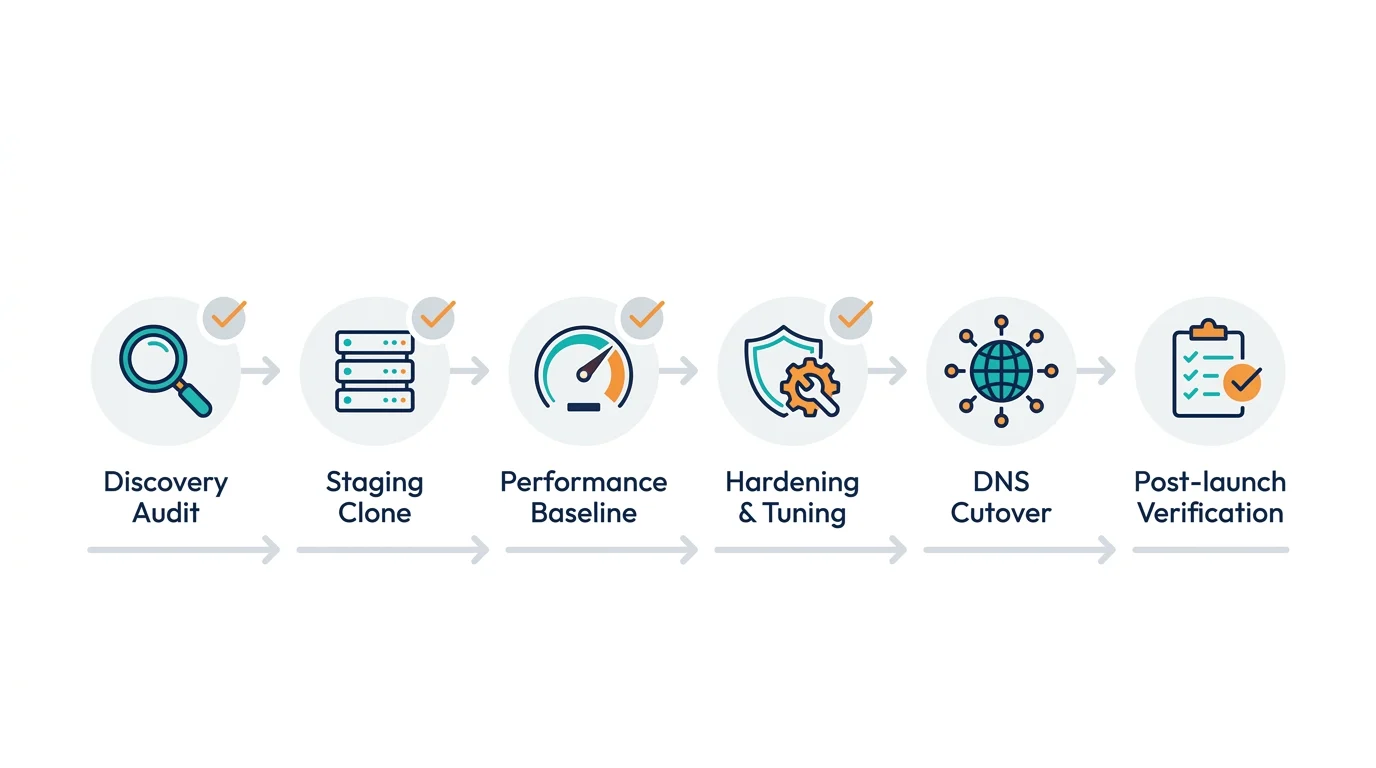
- Discovery audit: We review your current stack, plugins and themes, DNS and registrar, traffic patterns, and any custom code or integrations to plan a safe migration window—no surprises, just a clear timeline.
- Staging clone: We create a secure staging copy on our platform and mirror environment variables, PHP version, and database so you can preview and approve before anything goes live.
- Performance baseline: We record current TTFB and LCP, queries, and asset weights to benchmark improvements after launch and show measurable wins.
- Hardening and tuning: We audit plugins and themes, remove abandonware, patch vulnerabilities, configure caching and CDN, optimize images and assets, and tune the database so you land on a faster, tighter setup day one.
- Scheduled DNS cutover: We lower DNS TTL in advance, schedule cutover for off‑peak hours, and switch with real‑time monitoring—your team knows exactly when it’s happening.
- Post‑launch verification: We verify SSL, redirects, forms, checkout, search, logins, and third‑party integrations, compare performance to baseline, and fix anything on the spot. You get a simple launch report and sign‑off checklist.
What we handle
- Full migration and database sync, including serialized data‑safe search and replace—no broken links or weird characters
- Plugin and theme audit, updates, and remediation recommendations to reduce risk and bloat
- 301 redirects, URL normalization, and www, non‑www, and HTTPS enforcement to protect SEO
- SSL certificate provisioning and HSTS configuration for locked‑down transport
- CDN, edge caching, page and object caching, and image optimization setup for speed
- Cron scheduling, email deliverability (SMTP) configuration, and uptime monitoring for reliability
- Accessibility and Core Web Vitals checks, plus security hardening for long‑term health
What you provide
- Access to your current host, domain registrar and DNS, and any third‑party services (for example, payment gateways)
- Stakeholder contacts for approvals and scheduling
- Optional: brand or design contacts if you want us to tidy content or templates during the move
Don’t have all the logins handy? We’ll help you track them down and keep credentials secure.
Downtime expectations
- Visitor impact is typically near zero during DNS cutover. Some users may briefly see the old site while DNS propagates.
- For high‑transaction sites (for example, WooCommerce), we can enable a short content freeze or maintenance mode and sync final orders to ensure data integrity.
- We keep an instant rollback plan and leave your previous environment intact until you approve the launch. You’re never locked into a go‑live you’re not ready for.
Timeline
- Standard marketing sites: 3–7 business days from kickoff
- Complex, ecommerce, or multisite: 1–2 weeks with coordinated testing
Need it expedited? Ask about our next available migration window.
Ready to move? Request a migration date and we’ll map your plan in plain English. Prefer to talk first? Call 314-657-7421 or email jc@stlcodescape.com.
What’s included: your managed hosting checklist
Everything you need to run WordPress fast, safe, and stress‑free. One list, clear scope. Skim the checklist—if you want a quick read on how your current setup stacks up, email jc@stlcodescape.com or call 314-657-7421.
Performance
- Global CDN and edge delivery that replicates assets near your visitors for consistently low TTFB worldwide (fewer bounces, happier users)
- Multi‑layer caching: server, object, and page caching tuned for WordPress, with smart bypass for logged‑in users and WooCommerce carts and checkout (speed without breaking sessions)
- PHP 8.x with OPcache and HTTP/2 and HTTP/3 for higher throughput and lower latency
- Image optimization: automatic WebP/AVIF, responsive sizing, and lazy‑loading with controls in WordPress
- Database tuning: query optimization, index reviews, scheduled cleanup, and optional object caching (Redis) when appropriate
- APM visibility to pinpoint slow plugins, queries, and external calls
Want a before/after speed snapshot? Ask us to benchmark your TTFB and Core Web Vitals.
Security
- Web Application Firewall (WAF) with WordPress‑aware rules to block exploits before they reach your site
- Malware scans and cleanup with proactive detection and remediation included
- DDoS mitigation at network and application layers to absorb and filter attacks
- SSL/TLS everywhere with HSTS available on request and automatic renewals
- Least‑privilege access: per‑user roles, SFTP/SSH keys, 2FA support, and time‑boxed vendor access
- Audit logs that track logins, changes, and deployments, with export on request
Have compliance or policy requirements? We’ll map controls with your IT team.
Management
- Safe updates: core, plugin, and theme updates tested in staging first, with change notes and a rollback plan (no surprise outages)
- Backups: automatic daily backups with typical 30‑day retention plus on‑demand pre‑change snapshots, one‑click restore
- Monitoring and alerting: 24/7 uptime, performance, resource, and SSL/domain‑expiry monitoring with on‑call escalation
- Change calendar: scheduled deployments and maintenance windows with advance notice and post‑deploy verification
Prefer to stay in the loop? We provide clear change notes and scheduling so you always know what’s shipping and when.
Support
- 24/7 uptime monitoring with incident response
- Clear SLAs: standard targets include first response within 1 hour during business hours (CT), immediate triage on critical incidents, and status updates every 30 minutes until resolved
- Talk to an engineer. Work directly with the developers who know your stack (no ticket ping‑pong)
- Optional Enhanced Response: priority queueing, 24/7 change windows, faster SLAs, and quarterly disaster‑recovery testing
Have a critical launch or high‑traffic season coming up? Tell us—we’ll align SLAs and change windows to your calendar.
How we deliver
Choose hosting as a standalone service, or bundle it with WebCare for ongoing enhancements, content support, analytics reviews, and continuous performance tuning, all under one team and one invoice. Want the simple path? Ask about bundling. For measurement clarity, we can also help with analytics setup and tracking tools.
Not sure if this fits your situation? See who gets the most value below, or reach out now at jc@stlcodescape.com or 314-657-7421 for a quick, no‑pressure fit check.
Who it’s for
STL CodeScape’s managed WordPress hosting is for teams that want the people building and improving their site to also run the infrastructure, so performance, security, and updates stay aligned with your goals. One accountable crew. Want to confirm fit? Book a quick 15‑minute hosting call at 314-657-7421 or jc@stlcodescape.com.
SMBs and multi‑location businesses
Franchises, clinics, retail, and service networks that need fast location pages, consistent uptime across regions, and easy content updates from a central team with role‑based access. Ask about multi‑site management and region‑aware caching.
Nonprofits
Built to handle giving‑day traffic and campaign spikes without glitches, with predictable costs, strong security practices, and support that understands board and staff transitions and volunteer workflows. Planning a big campaign? We’ll map a load plan with you.
Professional services
A fit for law, financial, healthcare‑adjacent, and architecture/engineering firms that rely on form submissions, appointment tools, and reputation content, and cannot risk slow pages during business hours. We align with compliance requirements and coordinate with your IT.
Content‑driven publishers
Editorial teams running announcements and launches where traffic can surge quickly. We optimize caching, CDN strategy, and image delivery so posts load fast globally and Core Web Vitals stay green. Need launch support? We’ll be on call.
WooCommerce and membership sites needing reliability under load
We tune checkout, logged‑in caching, and database queries to protect revenue during promos and renewals, and we coordinate with payment, shipping, and CRM integrations to avoid bottlenecks. Let’s de‑risk your next sale or renewal window.
Branding and marketing agencies
White‑label friendly partner for agencies that want dependable development and hosting with staging workflows, Git, SSH, and WP‑CLI access, and responsive support, so you can focus on creative and strategy while we own uptime, deployments, and incidents. Need a partner deck? We’ve got one.
Not sure if you’re a fit? If your site runs on WordPress, matters to your bottom line, and you’d rather not gamble on generic hosting, we built this for you. Send us your domain for a quick, no‑pressure fit check: jc@stlcodescape.com.
Our operations promise
You shouldn’t have to wonder how your site is cared for. We run hosting like an operations team: measurable, proactive, and documented—no surprises. Want proof before you commit? Ask us for sample dashboards, runbooks, and incident reports.
Uptime target
- 99.95% monthly target on our standard managed stack
- 99.99% monthly target available with high‑availability or multi‑zone configurations
- Planned maintenance is scheduled outside peak hours and announced in advance. We share incident reviews after any unplanned outage.
Prefer to verify first? Request our last 90‑day uptime report and SLO policy.
24/7 monitoring and escalation

- Synthetic uptime and key transaction checks every 1–5 minutes from multiple regions, with SSL and domain expiry monitoring included
- Alerts route to our on‑call engineer with automated escalation to a senior lead if not acknowledged within 10 minutes
- Runbooks guide fast triage, and you receive status updates during critical events until resolved
See how it works in practice—ask for our monitoring checklist and escalation flow.
Backups and retention
- Automated daily backups plus on‑demand snapshots before significant changes
- Encrypted offsite copies stored separately from production
- Retention documented per site (standard: 30‑day rolling retention, extended retention available). Periodic test restores confirm recoverability.
Want extra confidence? We’ll perform a test restore during onboarding.
Change management you can trust
- All changes flow staging to client or QA review to scheduled deploy with a tested rollback plan
- Version‑controlled releases, pre‑deployment checks (performance, errors, accessibility where applicable), and post‑deploy monitoring
- Maintenance windows are communicated ahead of time (typically 48 hours for non‑urgent work). Emergency security patches may be applied sooner with notice.
Have blackout dates or strict windows? We’ll align to your calendar.
Support SLAs
- Critical (P1: site down, checkout failing, or security incident): 24/7 alerting, acknowledgment within 15 minutes, continuous updates until stable
- High (P2: major feature degraded, no workaround): first response within 2 business hours
- Standard (P3: routine requests and updates): first response within 1 business day
- Business hours: Monday to Friday, 9am‑5pm CT; after‑hours reserved for P1 incidents
We put this in writing. Ask for our SLA and response‑time commitments.
Results and proof
We track outcomes, not adjectives. Here are recent results clients saw within 30–45 days of moving to our managed WordPress stack. Actual gains vary by site size, plugins, and traffic, but the patterns are consistent and measurable. If your site is slow or unstable today, these are the kinds of improvements you can expect—fast.
Before/after performance snapshots
- Regional nonprofit (news/blog, no redesign): LCP improved from 3.2 s to 1.6 s on mobile; TTFB dropped from about 800 ms to 120–180 ms for U.S. visitors; INP improved from 310 ms to 130 ms; CLS stabilized below 0.05.
- WooCommerce retailer (2k SKUs): Product page LCP from 3.8 s to 1.9 s; checkout load from 2.9 s to 1.4 s; timeouts during peaks reduced to 0 across the first 90 days after migration.
- Professional services firm: Homepage LCP from 2.7 s to 1.5 s; sitewide TTFB now 100–170 ms in the U.S.; interaction latency under 200 ms for 90% of sessions.
Want a quick read on your site? Send your URL and we’ll run a baseline with practical, low‑risk recommendations you can act on right away.
Reliability and recovery improvements
- Fewer incidents: Tickets related to slowness or timeouts fell 60–80% after migration for most clients.
- Faster recovery: Mean time to recover from a plugin or deployment issue is typically 15–30 minutes using staging‑first changes and point‑in‑time restores.
- Uptime: Clients routinely see 99.95–99.99% monthly uptime with continuous monitoring and proactive remediation.
Have an IT team or agency you already trust? We’ll coordinate hand‑in‑hand—our goal is fewer alerts, faster fixes, and less firefighting for everyone.
Aggregate impact across the last 12 months
- Median LCP improvement: 30–55% on mobile
- Typical U.S. TTFB after optimization: 100–250 ms
- INP: under 200 ms for the 75th to 90th percentile of interactions on optimized builds
- Incident volume: about 70% fewer outage or slowdown events after moving to our managed stack and change‑management process
These aren’t lab‑only numbers. We validate with real‑user monitoring and share clear before/after reports so you can see exactly what changed.
Local and accountable
We’re based in St. Louis and you can reach us directly, no call center. Want to speak with clients who’ve made the switch? We’re happy to provide references on request.
- 314-657-7421
- jc@stlcodescape.com
- 2940 Melton Dr, Arnold, MO 63010
Schedule a 15‑minute performance review and get a tailored migration plan for your site. Prefer email? Send your URL and top concerns, and we’ll reply with next‑step options and timing.
FAQs
What’s the difference between managed hosting and standard hosting?
- With managed hosting, STL CodeScape runs the stack for you: server provisioning and tuning, security hardening, updates and patches, uptime and performance monitoring, backups, CDN and WAF configuration, and incident response. We also coordinate changes through staging so deployments are low risk.
- You still control your business: content, products, and publishing; approval of major updates; plugin and theme choices (we’ll advise); marketing tags; and admin access. You’ll always have a clear view of what’s running and why.
Want to stop playing sysadmin and focus on growth? Book a quick consult and we’ll show you what we’d manage vs. what you keep.
Will there be downtime during migration? How long does it take?
- For most sites, cutover is near zero downtime.
- Typical timeline: discovery and access (same day to 1 business day), full copy to staging (1–2 days), QA and performance tuning (1–3 days), schedule cutover in an off‑peak window, then DNS switch. Many sites complete in 3–7 business days.
- Expected interruption: a short cache warm‑up and propagation window. We target under 5 minutes of read‑only or maintenance mode during final sync. For ecommerce or membership sites, we coordinate a short checkout or account freeze to ensure data is not lost.
Ask for a no‑pressure migration review and we’ll map your cutover plan, risks, and timeline before you commit.
Can I choose where my site is hosted? What about CDN and compliance needs?
- Yes. We deploy in regions closest to your primary audience (for example, US‑East or West, Canada, EU, UK, APAC) to reduce latency.
- A global CDN caches static assets at edge locations worldwide. We can enable regional routing and cache rules to meet data‑residency preferences where required.
- If you have compliance constraints (for example, U.S.‑only data paths), tell us during onboarding and we’ll propose an appropriate region and CDN configuration.
Not sure what you need? We’ll document data flow and make a clear, compliant recommendation—ask during your consult.
Do you host email?
- We recommend Microsoft 365 or Google Workspace for inboxes. We set up DNS (SPF, DKIM, DMARC), help with migration, and integrate your site’s forms with a reliable transactional email service so messages land in inboxes.
- We do not run mailbox services on the web server. Separating email from web hosting improves deliverability and resilience.
If you’d like, we’ll coordinate with your IT team and handle DNS so there’s no email downtime.
What are the contract terms, billing, cancellation, and data export?
- Plans are available with monthly or annual billing. We’ll outline specifics in your proposal. No long‑term lock‑in is required.
- You can request full exports at any time: code repository, database, uploads, and environment notes. If you cancel, we keep the site online through the end of your current term and provide an orderly offboarding. If you need hands‑on migration help, we can assist at our standard support rates.
Want predictable budgeting? Ask about annual savings and bundled management options.
How do you handle traffic spikes and seasonal campaigns?
- We plan and test ahead of your campaign: capacity assessment, cache strategy, CDN rules, and load testing when appropriate.
- During the event, we monitor in real time and can scale vertically (CPU and RAM) and adjust caching and CDN policies. Post‑event, we right‑size resources so you’re not overpaying.
- If your traffic pattern is unpredictable, we’ll design for burst tolerance and set automated alerts.
Planning a launch or media hit? Request a quick capacity check and “game day” plan.
How do you optimize WooCommerce and other dynamic sites?
- Smart caching: full‑page caching for catalog and content pages, automatic cache bypass for cart, checkout, account, and personalized views.
- Session handling that respects logged‑in users and carts, with careful cookie rules so the right pages are never cached.
- Database and object‑level optimizations, plus queueing for resource‑heavy tasks (for example, order emails and exports) to keep checkout fast.
- We stage and test payment gateways, shipping and tax plugins, and inventory syncs before going live.
Want to see how your store would perform? Ask for a checkout speed and stability audit. Also see our in‑depth approach to performance optimization and caching.
Who owns the site and how is access managed?
- You do. You keep admin access to WordPress and, for custom builds, access to the code repository.
- We enforce least‑privilege policies, MFA where available, and auditable roles. You’ll have a designated owner account plus scoped access for your team and vendors. If we manage DNS or CDN, you remain the owner with us as a delegated administrator.
We provide an access map during onboarding so you always know who has what.
Have another question or ready to move?
Book a no‑pressure 15‑minute hosting consult, call 314-657-7421, email jc@stlcodescape.com, or request a migration review to get your timeline and quote.
Talk to an engineer or start your migration
Ready to move quickly? Talk directly with an STL CodeScape engineer—no sales scripts—and choose the path that fits your timeline:
- Schedule a free performance and security review
- Request a managed migration plan
- Call 314-657-7421 for immediate help
Prefer email? Reach us at jc@stlcodescape.com. Local to St. Louis? We’re at 2940 Melton Dr, Arnold, MO 63010. We’ll get back to you within one business day.
What you get with the free performance and security review
- A baseline snapshot of Core Web Vitals, TTFB, and real‑user speed data
- A security and update posture check (plugins and themes, PHP, SSL/TLS, WAF coverage)
- Quick‑win recommendations and a right‑sized hosting plan suggestion aligned to your goals
- A clear, no‑pressure migration game plan with timeline and next steps, so you know exactly what happens when
Short form (no obligation)
Use the short form below to request your free review. Include:
- Name and company
- Website URL
- Current host and traffic estimate
- Your top concern (speed, uptime, security, or all of the above)
- Best way and time to reach you
No pressure—just practical next steps you can act on. Not ready to migrate? Keep the report and use it internally. Need help sooner or dealing with something urgent? Call 314‑657‑7421 and we’ll jump on it. We can also coordinate directly with your current host or IT team.